Limits and Scope
Out-of-scope replies
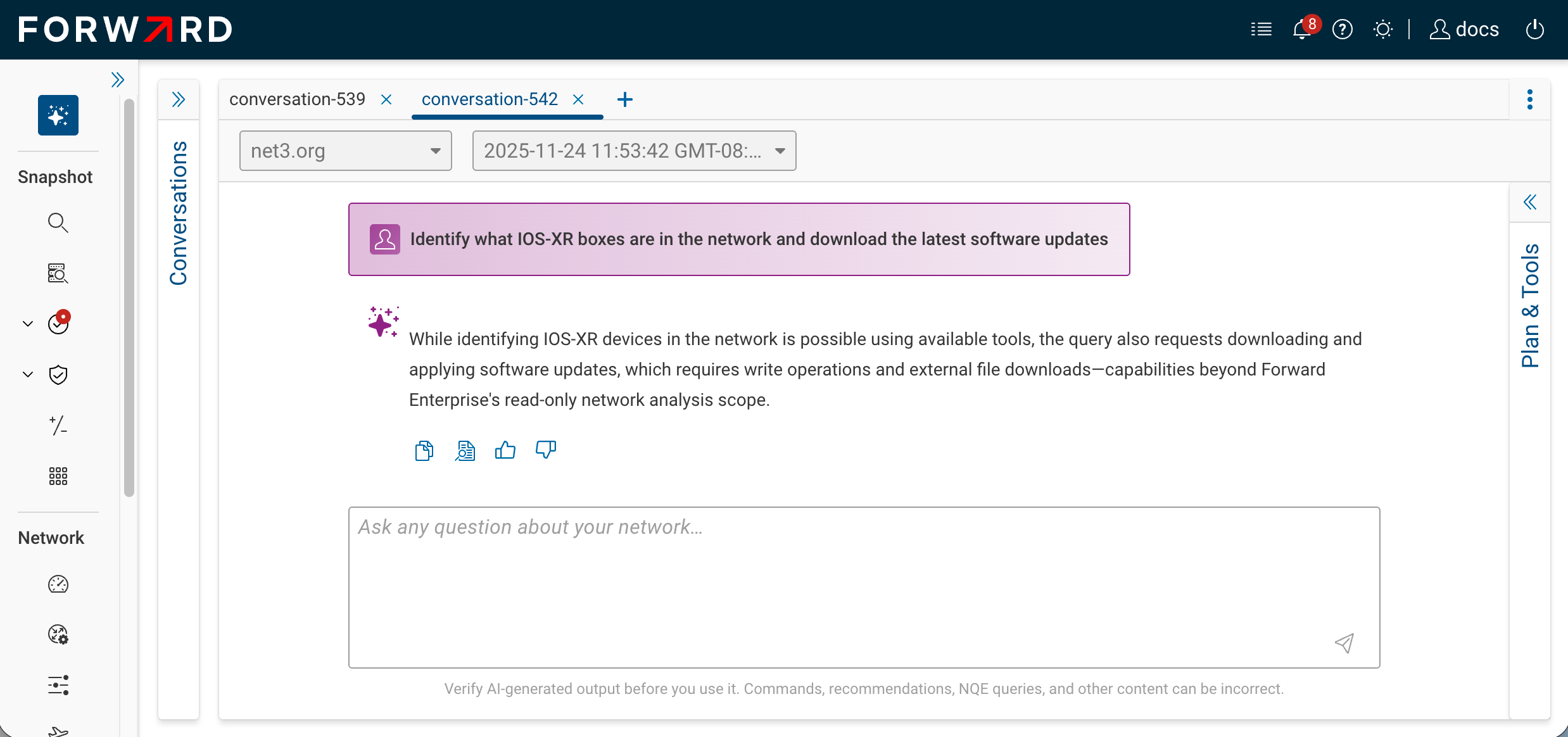
Before running any tools, the agent classifies whether the prompt is answerable with the tools available to you. If not, it skips planning and returns an out of scope reply with a short reason.
A prompt is treated as out of scope when:
- It asks for general IT or networking knowledge unrelated to your network ("how does OSPF work?", "what is BGP?").
- It asks the agent to take an action it has no tool for (push a configuration, change a policy, create a snapshot).
- It requires a tool the user does not have access to. For example, the agent does not see the NQE tool for Limited Read-Only users, so a prompt that requires NQE returns out-of-scope for them but works for a Read-Only user.
- It is unrelated to the snapshot's data ("what's the weather?", coding questions, etc.).
Out-of-scope replies render in place of an answer with a sparkle icon and the reason text. No tool calls are recorded on the message.
Hard limits
| Limit | Value | What it means |
|---|---|---|
| Concurrent Processing conversations per user | 1 | While one of your conversations is mid-flight, attempting to start another or post to a different one returns "one active conversation at a time." Wait for the active conversation to reach Done. |
| Tool calls per assistant message | 7 | The agent runs at most seven tools to answer one prompt. If a prompt would need more, it narrows the scope. Planning steps don't count toward this budget. |
| NQE rows fetched per query | 100 | The NQE tool fetches at most 100 rows per query — that's what the agent summarizes and what you see in the result table. For larger result sets, refine the prompt or open the underlying query in NQE. |
| Feedback comment length | 1000 characters | The thumbs-up / thumbs-down dialog accepts up to 1000 characters of free-text comment. |
Snapshot scoping
When a conversation is created, Forward AI pins it to the network you have selected and to that network's latest snapshot. Both stay fixed for the life of the conversation.
- A conversation keeps using its original snapshot even after newer snapshots arrive. To analyze a newer snapshot, start a new conversation.
- Switching the network in the network picker does not move open conversations; each stays on the network it was created in.
- The selected snapshot must be processed at least through Stage 1 (the point at which Inventory and NQE become available). Earlier stages cannot back a conversation.
Privacy and isolation
- Conversations are private. No other user — including org admins — can view your conversations through the UI.
- Tool results respect your permissions. If a tool would return data your role isn't allowed to see, the tool silently omits that data; it does not leak through the assistant's reply.
- Cross-network access is enforced. If you don't have permission to a network, you can't open or post to a conversation in it; the API returns 403.
Tool failures
If a tool times out or errors:
- The tool step is marked Failed with a short reason.
- The agent continues the loop, posts whatever it can, and the conversation reaches Done so you can send the next message.
For NQE specifically, the agent retries on validation errors before declaring the query unrunnable.
What Forward AI cannot do
- Modify network state (push configs, change policies, create snapshots, trigger collection).
- Answer questions outside the digital twin (general networking theory, vendor documentation, the public internet).
- Span multiple networks in a single conversation.
- Use tools your role does not have permission for.
- Compute blast radius for a hypothetical change — for example, "if I shut down
core-rtr-1, which flows or tenants break?" Use the blast-radius tools in the Security application directly. - Surface or analyze intent check failures — for example, "which Verify checks are failing on this snapshot, and why?" Open the Verify application instead.
- Diff snapshots or configurations across time — for example, "what changed on
core-rtr-1between yesterday's and today's snapshot?" Use the snapshot diff and config diff tools. - Reference or interpret Forward product documentation — for example, "what does the docs site say about NQE joins?" The agent reasons over your network, not the docs corpus.