Checkpoint
General Information
The Forward Collector automatically collects VSX virtual instances as long as the login credentials have administrative access to the firewall. No additional configuration is required.
Some Check Point devices require three separate credentials to reach expert mode:
- Login Credential – Establishes the initial SSH session.
- Privileged Mode Credential – Escalates to the required privilege level before entering expert mode. Escalation is supported only via TACACS.
- Expert Mode Credential – Enters expert mode and allows the execution of the necessary commands.
All of the above credential types are required for Check Point devices that enforce multi-step authentication.
Starting with release 25.11, Forward Enterprise supports a dedicated Expert Mode credential for Check Point devices. This enhancement addresses deployments where Check Point gateways require multiple authentication steps before expert-level commands can be executed.
Previously, Forward Enterprise treated the Expert Mode credential as a Privileged Mode credential, which caused issues in environments with custom privilege-level configurations.
Collect Using Expert Mode
A dedicated Expert Mode credential type is now available under Add CLI Credential.
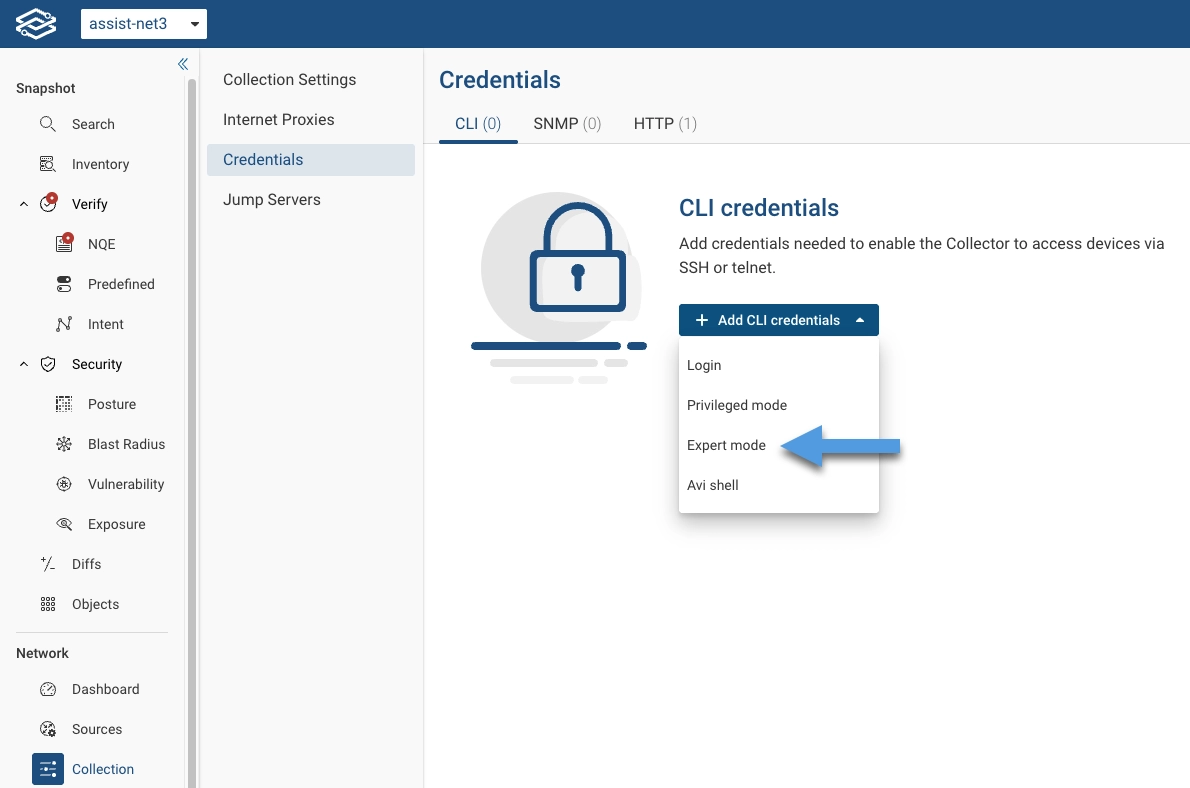
Forward Enterprise provides a seamless migration path for credentials created prior to the 25.11 release:
- Existing Privileged Mode credentials tied to Check Point SSH devices are automatically copied and converted into Expert Mode credentials.
- If a Privilege Mode password was previously used only for Check Point expert mode, that credential will no longer be used by any devices. Forward does not delete these credentials automatically, but customers may remove them if they wish.
During connectivity testing, error messages may still reference Privileged Mode credential checks when validating expert access. This terminology may be updated in a future release to clearly distinguish Expert Mode failures.
Collect Using not-Expert Mode
Collect User Identity in non-expert mode
The expert/privileged mode command pdp monitor all is used to get the user/IP association.
To get this result from Gaia shell (non-expert mode), you can create an additional shell command alias for the expert mode command.
- Step 1: SSH into the Checkpoint device and run
expertto enable expert mode - Step 2: Check the full path of the command
[Expert@checkpoint:0]# which pdp
/opt/CPsuite-R81.10/fw1/bin/pdp
- Step 3: Add a command alias named
pdpfor this path and save the config
checkpoint> add command pdp path /opt/CPsuite-R81.10/fw1/bin/pdp description "PDP monitor"
Command (pdp) was added.

checkpoint> save config
Collect Bridge Domain in non-expert mode
If a Checkpoint device has a bridge interface (for example for a VSX device with the virtual switches), Forward needs to
collect the command brctl showmacs $iface.
To get this result from Gaia shell (non-expert mode), you can create an additional shell command alias for the expert mode command.
- Step 1: SSH into the Checkpoint device and run
expertto enable expert mode - Step 2: Check the full path of the command
[Expert@checkpoint:0]# which brctl
alias brctl='/bin/brctl_start'
/bin/brctl_start
- Step 3: Add a command alias named
brctlfor this path and save the config
checkpoint> add command brctl path /bin/brctl_start description "Bridge control"
Command (brctl) was added.

checkpoint> save config
Collect using non-expert mode
Forward provides the ability to collect without expert mode access by expanding the set of available commands in the non-expert CLI using the Checkpoint non-expert mode connection type. This requires adding the following command aliases on each Checkpoint device that will be collected using this connection type.
Create pdp command alias
- Step 1: SSH into the Checkpoint device and run
expertto enable expert mode - Step 2: Check the full path of the command
[Expert@checkpoint:0]# which pdp
/opt/CPsuite-R81.10/fw1/bin/pdp
- Step 3: Add a command alias named
pdpfor this path and save the config
checkpoint> add command pdp path /opt/CPsuite-R81.10/fw1/bin/pdp description "PDP monitor"
Command (pdp) was added.

checkpoint> save config
Create brctl command alias
- Step 1: SSH into the Checkpoint device and run
expertto enable expert mode - Step 2: Check the full path of the command
[Expert@checkpoint:0]# which brctl
alias brctl='/bin/brctl_start'
/bin/brctl_start
- Step 3: Add a command alias named
brctlfor this path and save the config
checkpoint> add command brctl path /bin/brctl_start description "Bridge control"
Command (brctl) was added.

checkpoint> save config
Create env command alias
- Step 1: SSH into the Checkpoint device and run
expertto enable expert mode - Step 2: Check the full path of the command
[Expert@checkpoint:0]# which env
/bin/env
- Step 3: Add a command alias named
envfor this path and save the config
checkpoint> add command env path /bin/env description "Environment"
Command (env) was added.

checkpoint> save config
Create cat command alias
- Step 1: SSH into the Checkpoint device and run
expertto enable expert mode - Step 2: Check the full path of the command
[Expert@checkpoint:0]# which cat
/bin/cat
- Step 3: Add a command alias named
catfor this path and save the config
checkpoint> add command cat path /bin/cat description "Cat"
Command (cat) was added.

checkpoint> save config