Missing Peer
A Missing Peer appears when Forward detects traffic leaving a device toward a synthetic node on a VLAN or subinterface that the synthetic node is not configured to accept. It represents unmodeled uplinks and highlights gaps in synthetic device configuration.
A Missing Peer ensures such traffic does not silently disappear from path search. Instead, Forward exposes it as a placeholder so you can decide how the unmodeled VLAN or subinterface should be handled.
Key Points
-
Missing Peers are created automatically. You cannot manually add them. Forward adds a Missing Peer only when the collected snapshot clearly indicates a real interface/VLAN/subinterface sending traffic to a synthetic-device uplink that has no matching synthetic-device connection.
-
They are not errors. A Missing Peer indicates that the potential for traffic is present, but the model has no destination for it.
-
They help identify incomplete synthetic-device configurations. You decide whether to:
– Add another synthetic-device connection
– Create a new synthetic device for that service
– Ignore it if the traffic is intentionally out of scope
Why Missing Peers Occur
Layer-3 synthetic devices (such as Intranet, Internet, or L3VPN nodes) can accept traffic via:
- An L2 parent interface (access port or trunk), or
- An L3 interface (subinterface or SVI)
A single physical uplink may carry multiple VLAN tags or multiple subinterfaces.
A Missing Peer appears when:
- A device sends traffic out specific VLANs/subinterfaces
- The physical interface is connected to a synthetic device
- But the synthetic device is configured to accept only some of those VLANs
- Forward sees traffic on an unconfigured VLAN and creates a Missing Peer placeholder to receive that flow
Example Scenario (Lab Topology)
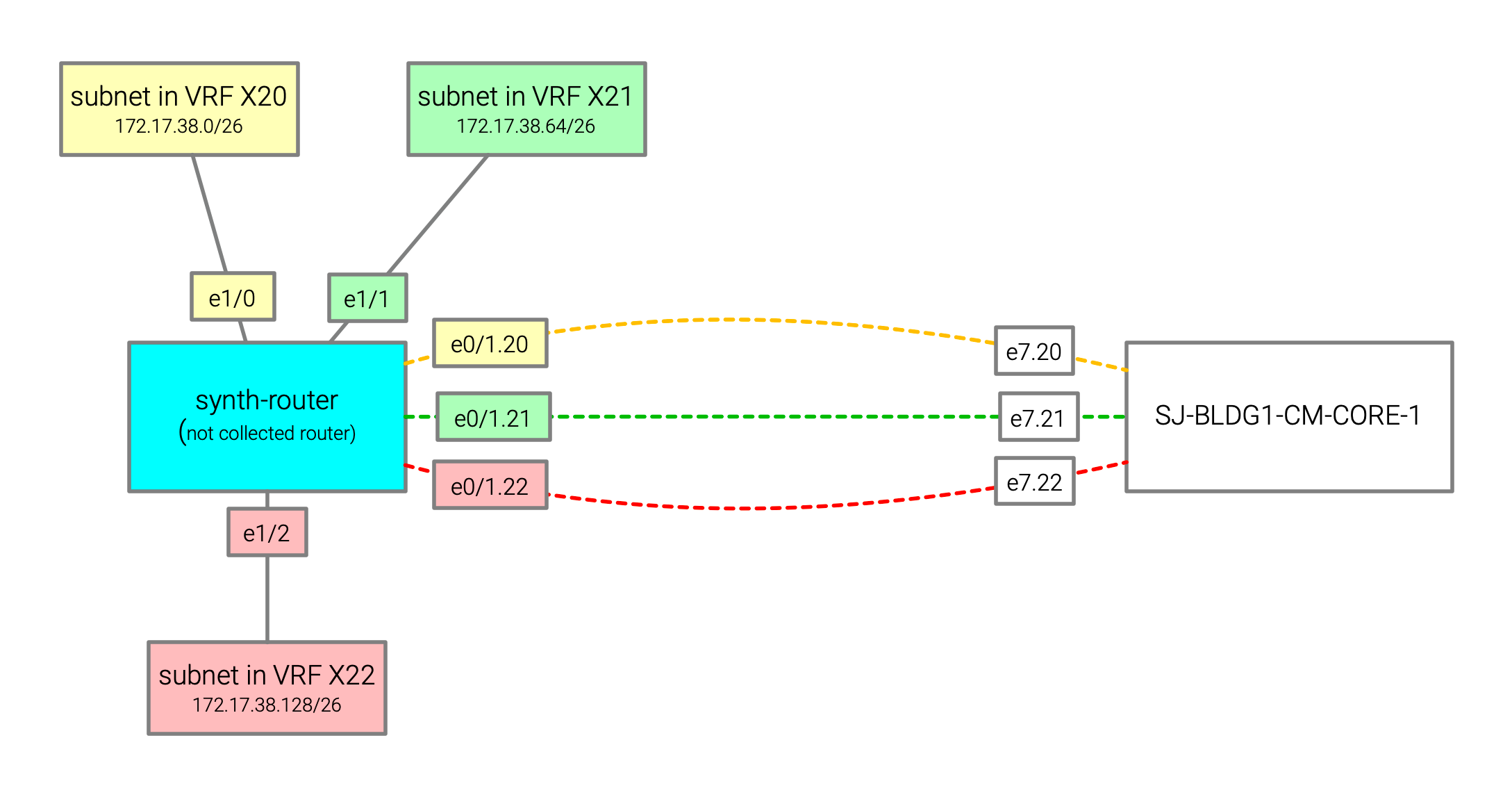
This example lab illustrates precisely when and why Missing Peers appear.
Physical Device: SJ-BLDG1-CM-CORE-1
Interface e7 has three routed subinterfaces (e7.20, e7.21, e7.22), each used by route sending traffic toward the
synthetic node:
- 172.17.38.0/26 → e7.20
- 172.17.38.64/26 → e7.21
- 172.17.38.128/26 → e7.22
synth-router peers with SJ-BLDG1-CM-CORE-1 using three VLAN-tagged subinterfaces:
e0/1.20— VLAN 20e0/1.21— VLAN 21e0/1.22— VLAN 22
Behind synth-router, the following downstream subnets are reachable:
- 172.17.38.0/26
- 172.17.38.64/26
- 172.17.38.128/26
How It Was Modeled in Forward
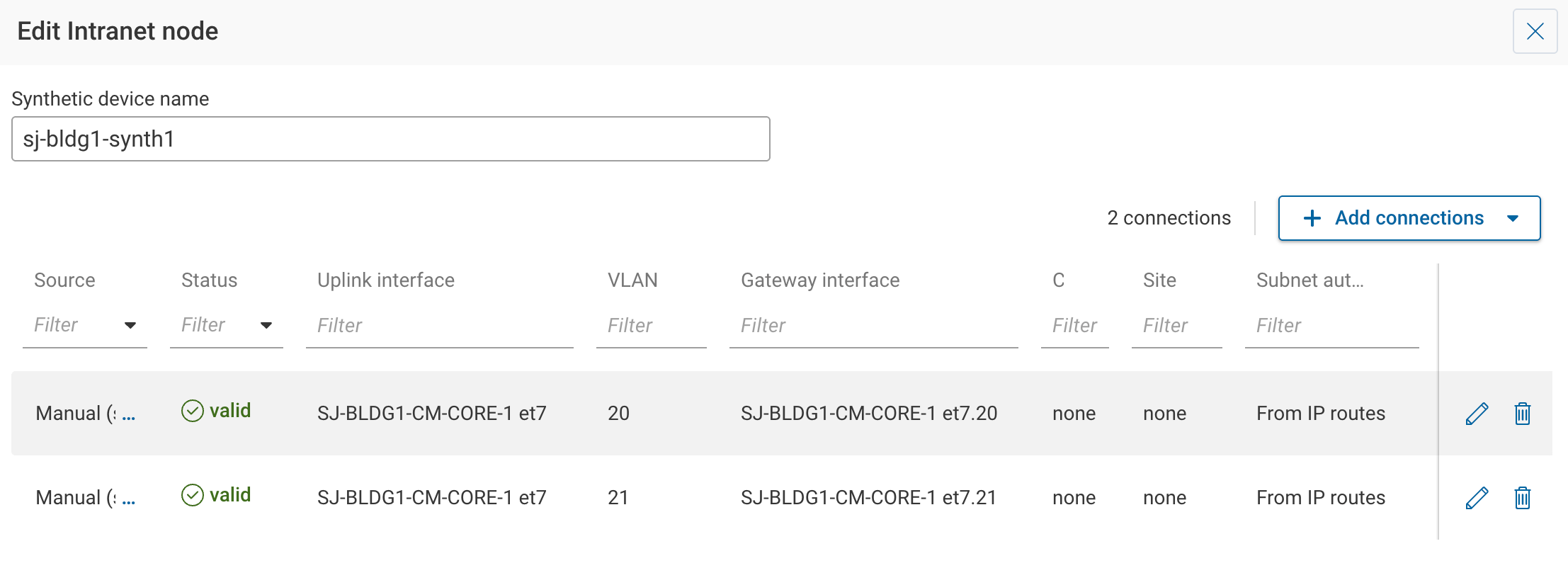
In the Sources → Synthetic, a sj-bldg1-synth1 synthetic node was added to model the behavior of synth-router
from the lab. Only VLAN 20 and VLAN 21 were added as uplink connections. VLAN 22 was not configured.
Resulting Behavior
-
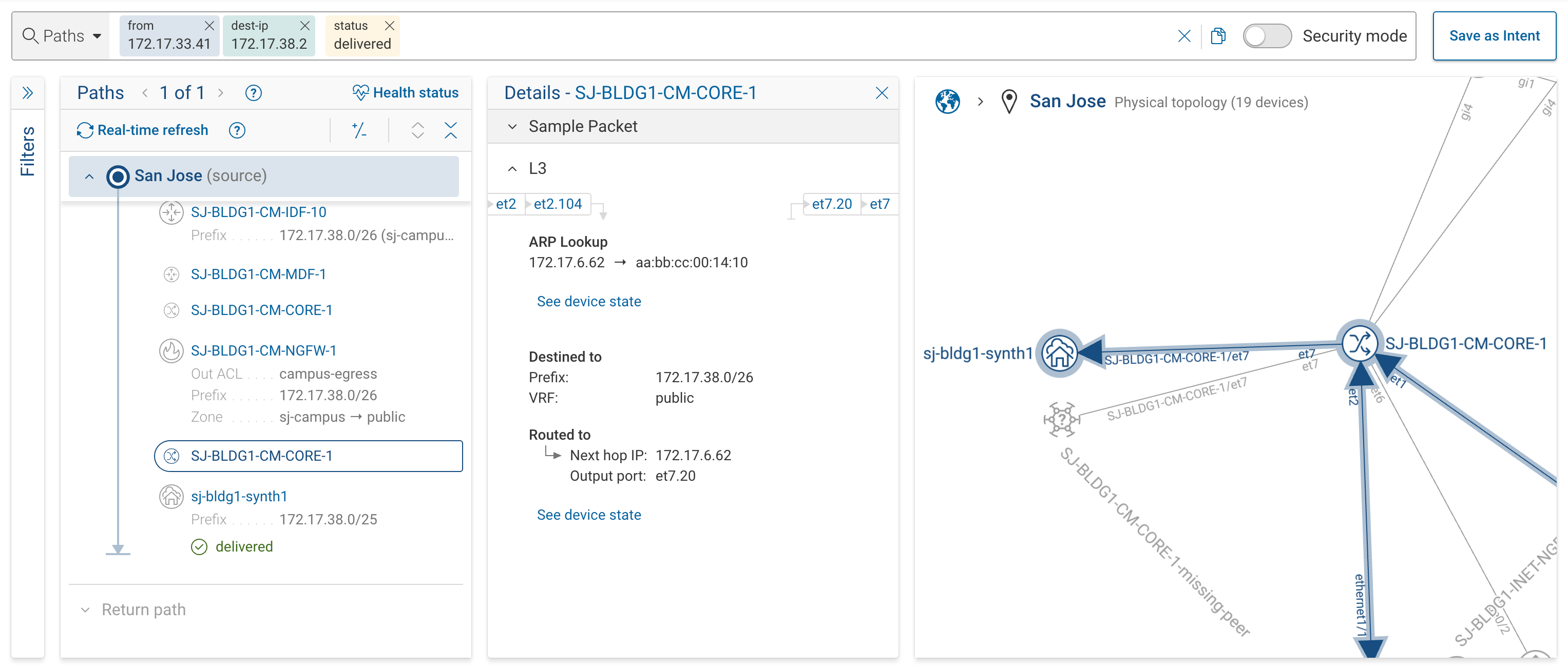
Traffic to 172.17.38.2/26 → VLAN 20 → reaches the sj-bldg1-synth1 synthetic node
-
Traffic to 172.17.38.66/26 → VLAN 21 → reaches the sj-bldg1-synth1 synthetic node (not shown on screenshot)
-
Traffic to 172.17.38.130/26 → VLAN 22 → SJ-BLDG1-CM-CORE-1-missing-peer
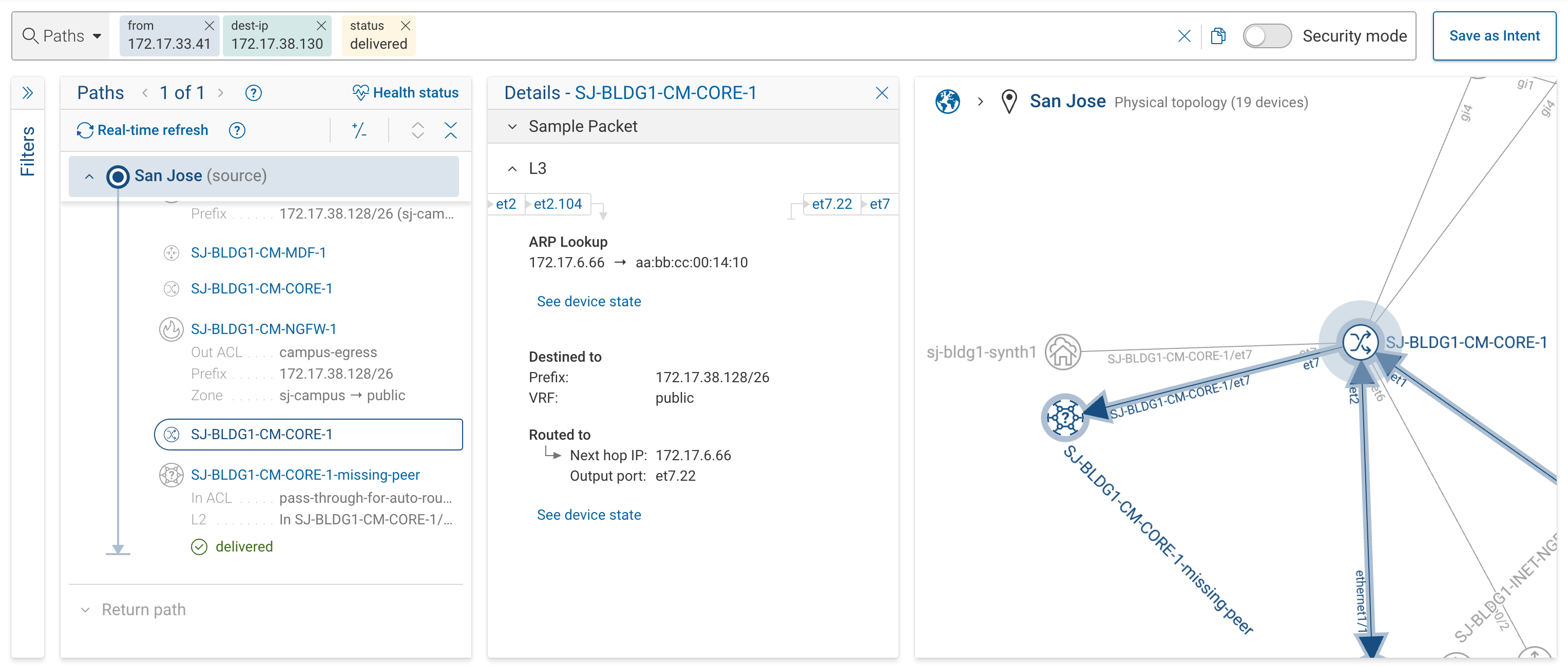
The SJ-BLDG1-CM-CORE-1-missing-peer node captures all egress traffic on VLAN 22, making the unmodeled path explicit.
What To Do When You See a Missing Peer?
-
If the traffic should go to the Intranet synthetic device:
Add an appropriate VLAN as an additional uplink. -
If the traffic represents a different external service:
Create a separate synthetic device and connect that VLAN/subinterface to it. -
If the traffic is out of scope:
You may ignore the Missing Peer. It will remain visible only as an indicator of unmodeled traffic.
-
You cannot manually create a Missing Peer. It appears only when Forward detects real egress traffic lacking a valid synthetic destination.
-
Removing a Missing Peer requires adjusting the synthetic-device configuration, not editing the Missing Peer itself.
-
Missing Peers help maintain modeling accuracy, ensuring unmodeled traffic is visible rather than silently dropped from analysis.