Performance
This document describes how NQE optimizes your query and what you can do to improve query execution performance.
Introduction
NQE provides a declarative, high-level language for querying your network data. With NQE, you primarily specify what data you want, not how to compute it.
NQE, in turn, translates your high-level query into a more detailed plan and executes it efficiently. NQE automatically applies a number of optimizations in this process. These optimizations often make queries orders of magnitude more efficient, for example running in a few seconds rather than hours.
In some cases, NQE may not be able to recognize that a specific optimization applies to your query. In such cases, you may be able to adjust your query so that NQE is able to recognize that these optimizations apply. This guide explains the available optimizations, when they are applicable, and how to see whether they apply to your query.
Query Debug Panel
The Query Debug Panel enables you to see how NQE has analyzed your query and how NQE will execute the query. In particular, the panel provides two pieces of information: the detailed execution plan for the query and the runtime of your query (after it has been executed).
You can open the Query Debug Panel by option-clicking (Mac) or alt-clicking (Windows) on the Execute button in NQE Library. The following screenshot shows the Query Debug Panel for the "Devices" query provided in the NQE Forward Library:
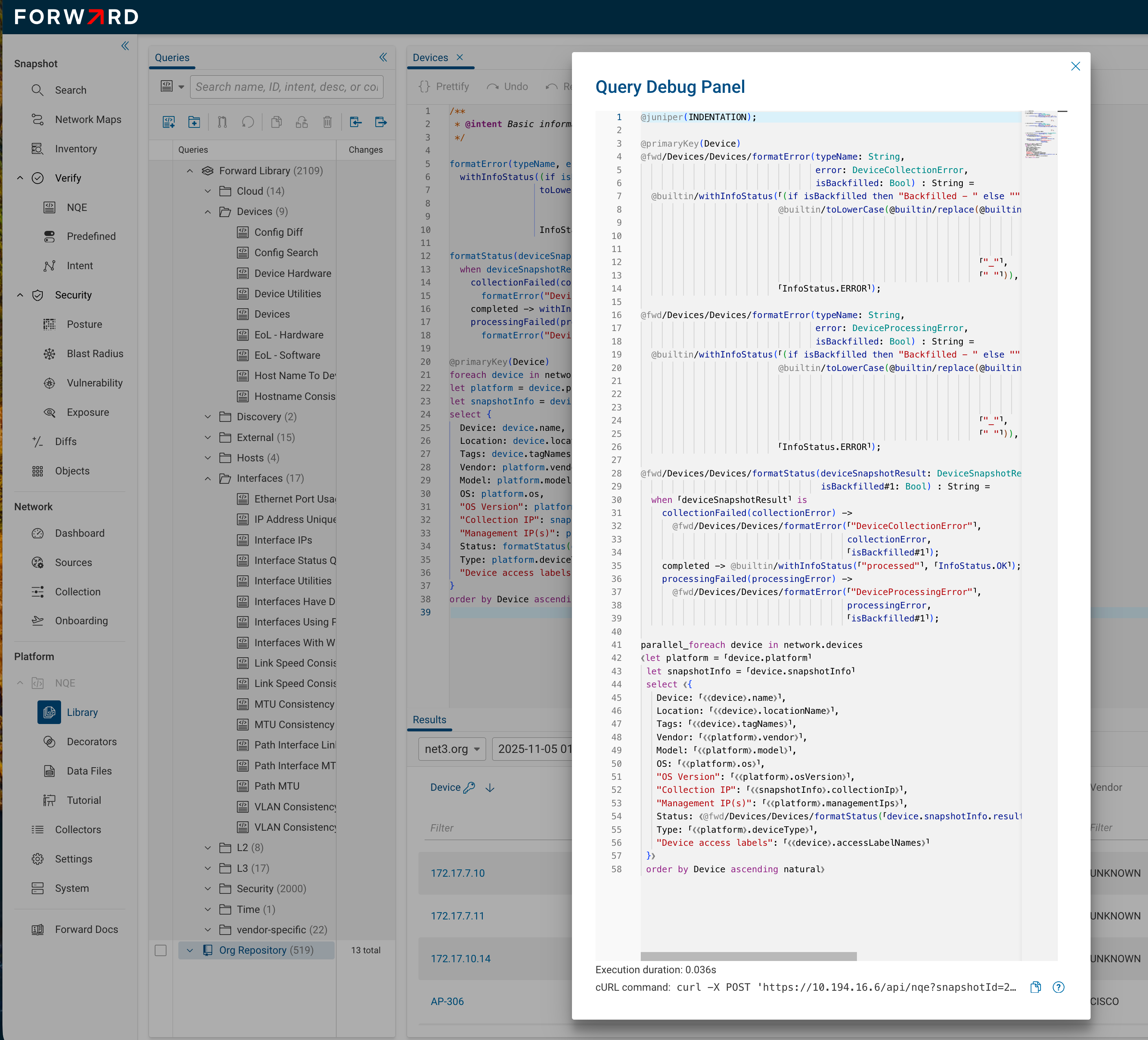
The main section of the Query Debug Panel displays the detailed execution plan for the query. This shows how NQE
analyzed the query and what optimizations apply. For example, in the query shown in the above screenshot, the initial
foreach of the "Devices" query is replaced by parallel_foreach indicating that the query will be executed in
parallel over devices. The following sections go into more detail on this optimization (and several others).
The runtime of the current query is displayed at the bottom of the panel, if the query has been run before. Note that the runtime is the time spent running the query and does not include the time spent while the query execution job was queued for execution. The queue time depends only on what other work is being processed in the system, and so it is not relevant to query optimization. Note that once a query has been run, subsequent requests for the same query will return immediately based on already-computed results. The runtime shown in the panel, however, will remain the original time taken to run the query.
Device-Parallel Query Execution
One of the most important optimizations in NQE is called the Device-Parallel Optimization. This optimization applies to many NQE queries and often results in 1 to 2 orders of magnitude speed up. It is typically useful to see if this optimization can apply to your queries.
Queries that have the following form, and which satisfy a few more criteria (explained below), are called Device-Parallel:
foreach device in network.devices
<rest of the query>
For example, the following query, which shows the status of all interfaces, is device-parallel:
foreach device in network.devices
foreach interface in device.interfaces
select {
  deviceName: device.name,
  interfaceName: interface.name,
  adminStatus: interface.adminStatus,
  operStatus: interface.operStatus,
  violation: interface.adminStatus == AdminStatus.UP &&
             interface.operStatus != OperStatus.UP
}
To see that this query is device-parallel, open the Query Debug Panel for the query. The first line of the main query
starts with parallel_foreach (similar to the Debug Panel for the "Devices" query shown above).
NQE executes device-parallel queries by running one task per device, in parallel for all devices. A device's compute task computes the rows for that device. When all device tasks are completed, the rows are assembled into a single result set. On typical systems, with 32 or 64 cores, 128 to 256 devices will be computed in parallel, typically resulting in a 10-100x speedup.
For the device-parallel optimization to apply, the query needs to adhere to the form above, and also satisfy a few other restrictions:
- The network variable is only used to select its fields. In particular, it cannot be passed to a function.
- The query cannot reference
network.devicesmultiple times. - The main comprehension of the query cannot use a
groupqualifier.
Where and Let Floating
NQE attempts to apply where filter conditions as early as possible in a query. For example, consider this query:
foreach device in network.devices
foreach interface in device.interfaces
where "core" in device.tagNames
select {
  deviceName: device.name,
  interfaceName: interface.name,
  adminStatus: interface.adminStatus,
  operStatus: interface.operStatus
}
Since the where condition does not access the interface variable, NQE will effectively execute it with the where
qualifier moved up one level just after the search over network.devices:
foreach device in network.devices
where "core" in device.tagNames
foreach interface in device.interfaces
select {
  deviceName: device.name,
  interfaceName: interface.name,
  adminStatus: interface.adminStatus,
  operStatus: interface.operStatus
}
This where-floating reduces execution time because the query execution prunes the search before computing the set of
interfaces on each device.
Similarly, NQE attempts to move let statements as early as possible in a query. For example, in the following query,
the highCves variable is defined after the search over device.interfaces:
foreach device in network.devices
foreach interface in device.interfaces
let highCves = (foreach finding in device.cveFindings
                where finding.isVulnerable
                select finding.cveId)
select {
  deviceName: device.name,
  interfaceName: interface.name,
  adminStatus: interface.adminStatus,
  operStatus: interface.operStatus,
  highCves
}
Since the definition of highCves does not depend on the interface variable, NQE will effectively execute this as if
highCves was defined right after the search over network.devices, as if the query had been written in this way:
foreach device in network.devices
let highCves = (foreach finding in device.cveFindings
                where finding.isVulnerable
                select finding.cveId)
foreach interface in device.interfaces
select {
  deviceName: device.name,
  interfaceName: interface.name,
  adminStatus: interface.adminStatus,
  operStatus: interface.operStatus,
  highCves
}
Floating let bindings in this way typically improves performance because it avoids redundantly recomputing a
variable's value for each item in an inner search.
Limitations
In some cases, NQE is currently unable to move a where qualifier to an earlier position in the query, even if its
variable dependencies indicate that it should be possible to move the qualifier. In particular, NQE will not move any
where qualifier whose condition might cause the query to terminate with an error. For example in the following query,
the where condition divides by a number, which could be 0:
foreach x in fromTo(0, 3)
foreach y in fromTo(1, 0)
where 10 / x == 5
select { x, y }
In fact, since the second foreach generates no rows, the where condition is never executed and the whole query
returns no rows.
However, if NQE were to move the where qualifier forward, it would obtain this query:
foreach x in fromTo(0, 3)
where 10 / x == 5
foreach y in fromTo(1, 0)
select { x, y }
This query would terminate with a division-by-zero error, thereby changing the query's behavior. Since automatically-applied optimizations should never change the query behavior, NQE does not move this qualifier.
Besides division-by-zero, there are other sorts of errors that are possible, such as indexing into a list with an
out-of-bounds index. We call an expression total if it cannot raise an error. Using this terminology, we can say that
NQE will only move a where qualifier forward in the query if it is determined to be total.
To see if the conditions in your where qualifiers are determined to be total, open the Query Debug Panel. The query
rendering surrounds an expression with ⸢ and ⸣ when the expression is determined to be total. For example, consider
the following query:
foreach x in fromTo(0, 3)
foreach y in fromTo(1, 0)
where 10 + x == 12
where 10 / x == y
select { x, y }
Viewed in the Debug Panel, NQE shows:
⟪foreach x in ⸢⟪@builtin/fromTo(0, 3)⟫⸣
 where ⸢10 + x == 12⸣
 foreach y in ⸢⟪@builtin/fromTo(1, 0)⟫⸣
 where ⸢10⸣ / ⸢x⸣ == ⸢y⸣
 select ⟪{ x, y }⟫⟫
From this output, we can observe that the where condition 10 + x == 12 is determined to be total, whereas the
condition 10 / x == y is determined to not be total. We do see that each component of that second where condition is
total, since each argument is surrounded by totality brackets (⸢10⸣ / ⸢x⸣ == ⸢y⸣). However, the totality brackets do
not surround the division expression, since the divisor x might be 0.
The Debug Panel additionally surrounds an expression with ⸤ and ⸥ when the expression is determined to evaluate to a
possibly-null value. Like totality brackets, these nullability brackets help you see what the optimizer knows about your
query. The two kinds of brackets are independent and can appear together: ⸢⸤…⸥⸣ means the expression is total (cannot
raise an error) but its result may be null.
In cases where NQE does not automatically place a where qualifier optimally, you can manually move the where
qualifier. Typically, the earlier it is placed in the query, the better.
Dictionary Lookups
NQE provides declarative constructs like foreach, where, let, select for querying network data. In order to
execute queries quickly, some combinations of foreach and where are translated into dictionary lookups, which are
typically much faster than iterating and then filtering.
For example, consider this query, which shows all devices and the HIGH severity CVEs to which they are vulnerable:
foreach device in network.devices
let highCves = (foreach finding in device.cveFindings
                where finding.isVulnerable
                foreach cve in network.cveDatabase.cves
                where cve.cveId == finding.cveId
                foreach vendorInfo in cve.vendorInfos
                where vendorInfo.vendor == device.platform.vendor &&
                      vendorInfo.severity == Severity.HIGH
                select finding.cveId)
select { deviceName: device.name, highCves }
The definition of highCves searches over the device's cveFindings and then does a subsequent search and filter over
the network.cveDatabase.cves collection to get the severity of the CVE for the appropriate vendor. Naively, this looks
like a triply-nested loop, which could be very slow.
However, NQE optimizes away the additional loops (as can be seen in the Query Debug Panel for the above query):
parallel_foreach device in network.devices
⟪let highCves = ⸢(foreach finding in device.cveFindings
                  where finding.isVulnerable
                  foreach cve
                    in _lookup(network.cveDatabase.cves, "cveId", finding.cveId)
                  foreach vendorInfo
                    in _lookup(cve.vendorInfos, "vendor", device.platform.vendor)
                  where vendorInfo.severity == Severity.HIGH
                  select finding.cveId)⸣
 select ⟪{ deviceName: ⸢⟪⟪device⟫.name⟫⸣, highCves }⟫⟫
In this output, we see that the iterations and filterings on network.cveDatabase.cves and cve.vendorInfos have each
been replaced by a _lookup(collection, attribute, keyExpression) operation, which performs a dictionary lookup on the
attribute specified in the second argument with a key determined by the expression in the third argument.
NQE does not apply a lookup rewrite in all cases. In particular, NQE does not apply the rewrite on collections that are not taken from the data model and which are not "reused" multiple times. For example, consider the following query:
favs = [{name:"a", value:1}, {name:"b", value:2}, {name:"c", value:3}];

foreach fav in favs
where fav.name == "a"
select fav
In this case, the favs collection is used exactly once, and so there is no advantage in building an index on it. If
NQE converted this to a lookup operation it would be:
favs = [{name:"a", value:1}, {name:"b", value:2}, {name:"c", value:3}];

foreach fav in _lookup(favs, "name", "a")
select fav
To execute this, NQE would need to build a dictionary on favs and then perform a single dictionary access into it.
Since this would be worse than iterating and filtering, NQE avoids the dictionary construction in such cases.
NQE performs a cardinality analysis on queries to determine whether each expression is used ONCE or MANY times.
The dictionary lookup operation is skipped if the collection is determined to have ONCE cardinality. To see the
cardinality of expressions within your query, view the query in the Query Debug Panel. For example, the above query is
shown as:
favs : List<{name: String, value: Integer}> =
  ⸢[{ name: "a", value: 1 }, { name: "b", value: 2 }, { name: "c", value: 3 }]⸣;

⸢⟪foreach fav in ⟪favs⟫
  where fav.name == "a"
  select ⟪fav⟫⟫⸣
This output surrounds an expression with ⟪ and ⟫ if that expression has ONCE cardinality. In the above output, we
can observe that favs in the main query has ONCE cardinality. This explains why NQE does not use the lookup
operation for this query.
In contrast, the following query first searches over an additional things collection, which would lead to repeated
searches through favs:
favs = [{name:"a", value:1}, {name:"b", value:2}, {name:"c", value:3}];

things = ["a", "b", "c", "d", "e"];

foreach thing in things
foreach fav in favs
where fav.name == thing
select fav
In this case, a dictionary lookup on favs would be useful. The Debug Panel shows the following for this query:
favs = ⸢[{ name: "a", value: 1 }, { name: "b", value: 2 }, { name: "c", value: 3 }]⸣;

things = ⸢["a", "b", "c", "d", "e"]⸣;

⸢⟪foreach thing in ⟪things⟫
 foreach fav in _lookup(favs, "name", thing)
 select ⟪fav⟫⟫⸣
In this query, we see that favs in the second foreach is analyzed to have MANY cardinality (indicated by the lack
of cardinality brackets around favs). Therefore, the lookup operation is used.
Unused Let Bindings
NQE automatically removes variable bindings that are not used within your queries. For example, consider this query,
where the highCves variable is defined but never used:
foreach device in network.devices
foreach interface in device.interfaces
let highCves = (foreach finding in device.cveFindings
                where finding.isVulnerable
                select finding.cveId)
select {
  deviceName: device.name,
  interfaceName: interface.name,
  adminStatus: interface.adminStatus,
  operStatus: interface.operStatus
}
When executing this query, NQE will omit the highCves variable definition, as can be seen from viewing the query in
the Query Debug Panel:
parallel_foreach device in network.devices
⟪foreach interface in ⸢⟪device.interfaces⟫⸣
 select ⟪{
   deviceName: ⸢⟪⟪device⟫.name⟫⸣,
   interfaceName: ⸢⟪⟪interface⟫.name⟫⸣,
   adminStatus: ⸢⟪⟪interface⟫.adminStatus⟫⸣,
   operStatus: ⸢⟪⟪interface⟫.operStatus⟫⸣
 }⟫⟫
Constant Folding for Builtins
Builtin calls with literal arguments are converted to typed literals when they can be successfully evaluated during optimization.
Supported BuiltIns:
Typed literals are shown as follows in debug panel:
IP_ADDRESS("192.168.1.1")
MAC_ADDRESS("00:11:22:33:44:55")
IP_SUBNET("10.0.0.0/8")
re`ab`
These typed literals are constants evaluated at compile time, so they are treated as total expressions.