How Predict Works
A prediction re-derives network behavior from a configuration change. Forward Predict computes the config the change would produce, re-parses the changed devices, and propagates the resulting state changes across the topology. This page covers running a prediction, the methods for describing a change, and how the engine resolves the result.
Running a Prediction
Forward Predict is a guided wizard: a single workflow that advances through the steps below. A saved analysis reopens at the step you left.
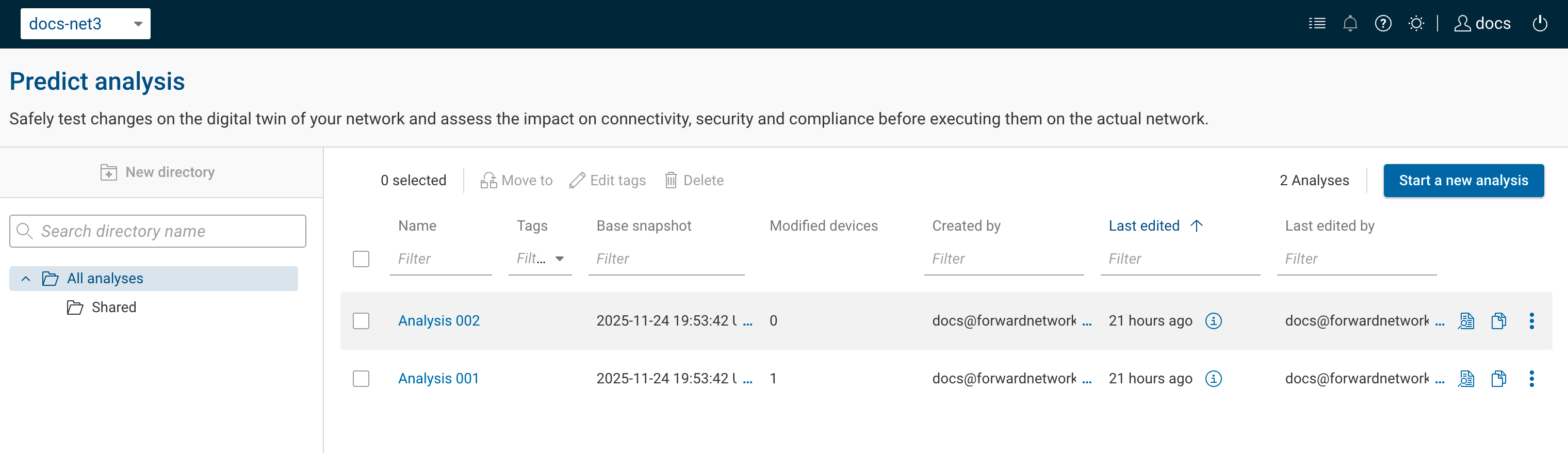
Open the Predict home page and click Start a new analysis, then name it. The analysis list is sorted by last edited, with a Modified devices column that shows each analysis's scope. Analyses can be organized into directories. Two actions apply to an existing analysis:
- Duplicate and apply to... clones the change set onto another base snapshot or network.
- Move to relocates the analysis into a different directory.

A prediction can also start from a Path Analysis result. On a device in the path, click Modify device in Predict to open that device in a new analysis, with the change set anchored to that flow.
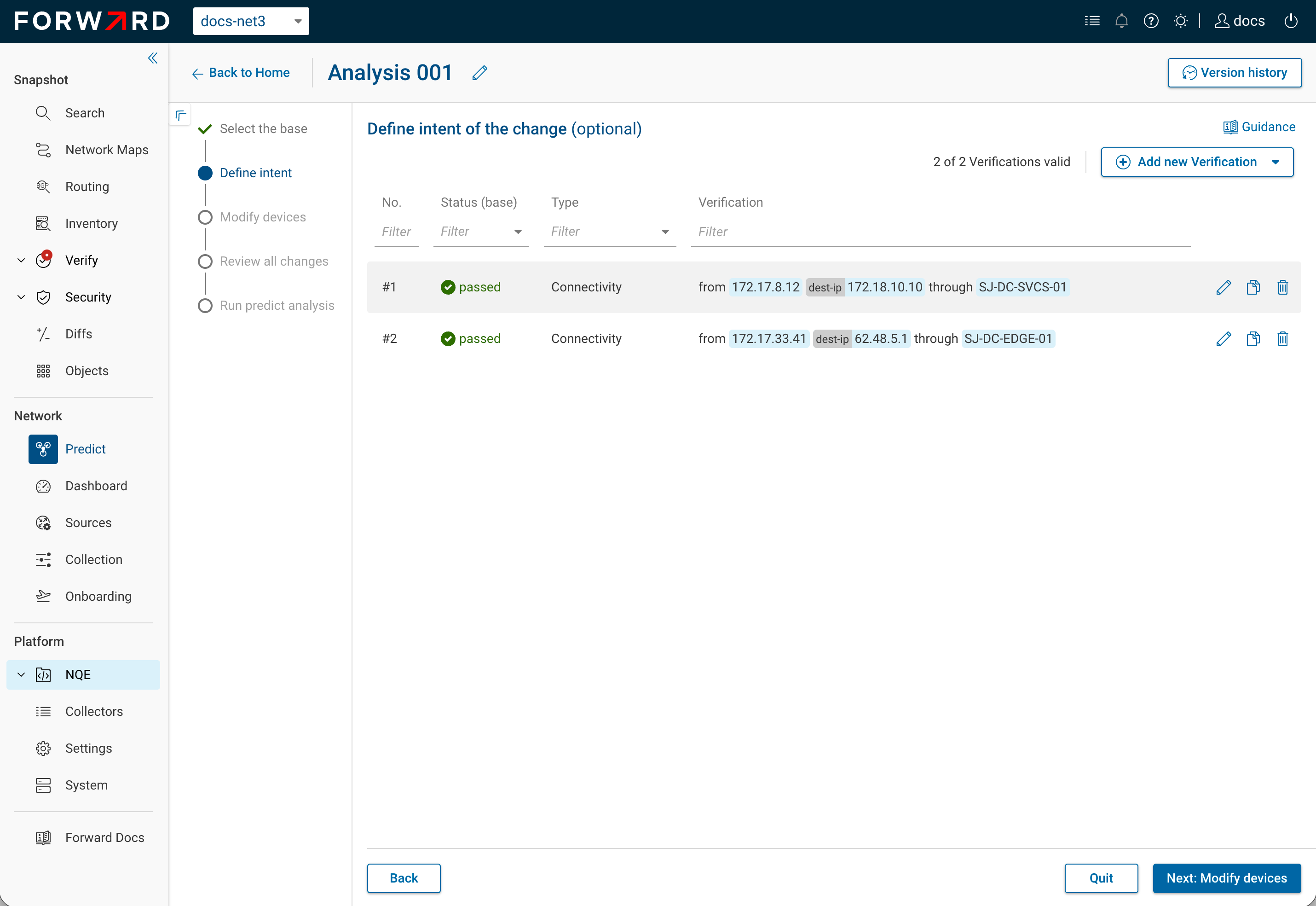
The steps panel on the left lists:
| Step | Action |
|---|---|
| Select the base | Pick the snapshot the change is modeled against. It defaults to the network's most recent collected snapshot. |
| Define intent | Optionally state the goal the change should meet, as a reachability or isolation check or an NQE check, so the analysis re-runs it against the result. |
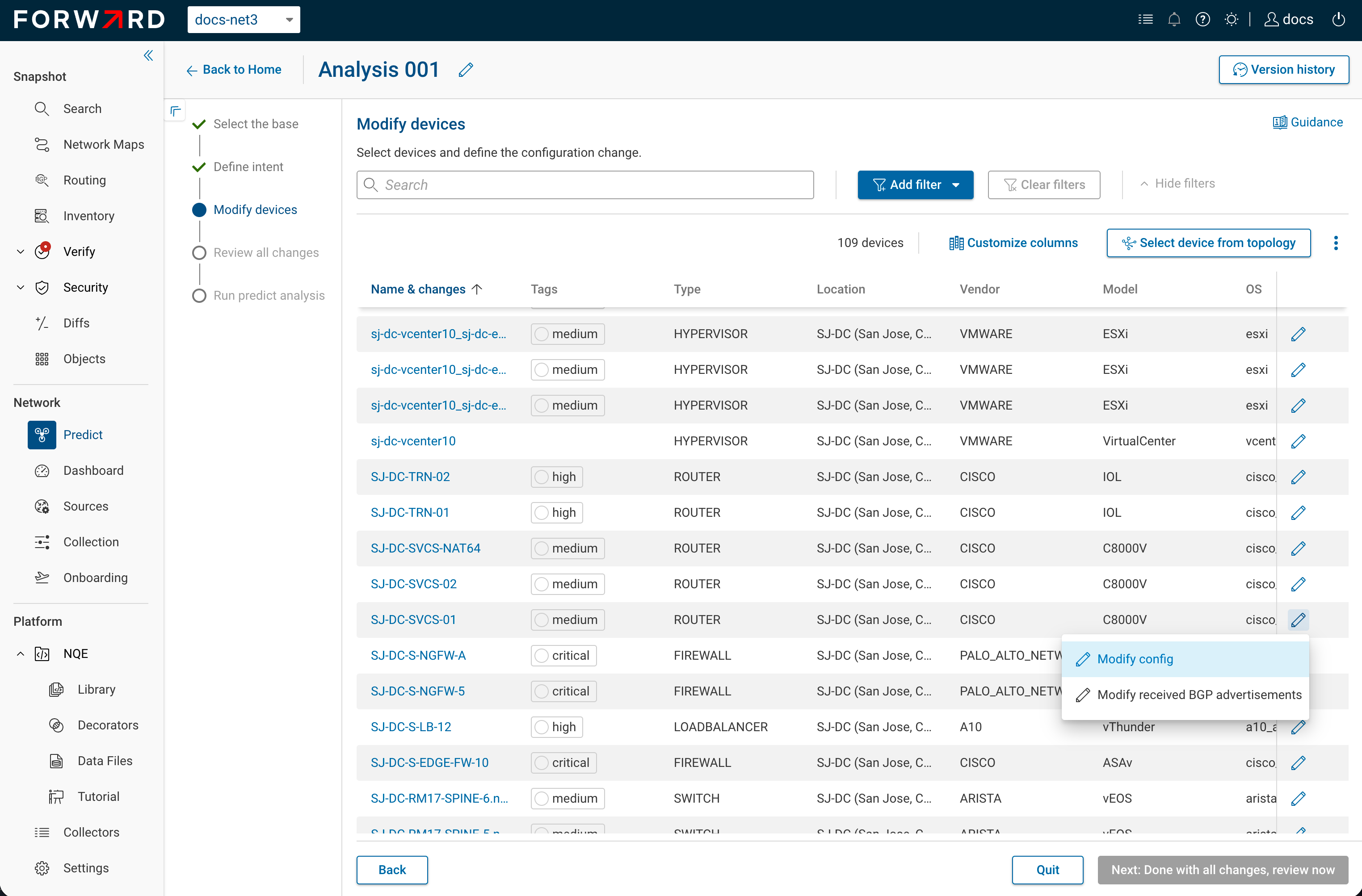
| Modify devices | Describe each device's change, using one of the prediction methods below. |
| Review all changes | Read every config diff in the set, grouped by device, and edit or add devices before running the analysis. |
| Run predict analysis | Produce the predicted snapshot and read the results. See Reviewing Results. |
Prediction Methods
A change enters the model in one of three ways:
- a config change (CLI commands or a full file): produces a predicted running config that Forward Predict re-parses;
- a firewall rule change: also produces a predicted running config that Forward Predict re-parses;
- a BGP advertisement: enters the routing computation directly.
Every method then uses the same re-modeling and propagation, described below.
Config Change: CLI Commands or a Full File
On the Modify devices step, open a device's editor. The Modify using: radio selects how to specify the change:
- CLI commands: type vendor-native config lines, the same ones entered on the device. Forward Predict merges them
into the device's current config the way that vendor applies them: command order,
no-form overrides, and structuredsetanddeletesemantics on Juniper. Command merge covers eight OS families, listed in Prediction Scope. - Config file: supply a complete running config that replaces the device's baseline. Use it for a large rewrite, or when command merge is not supported for the platform.
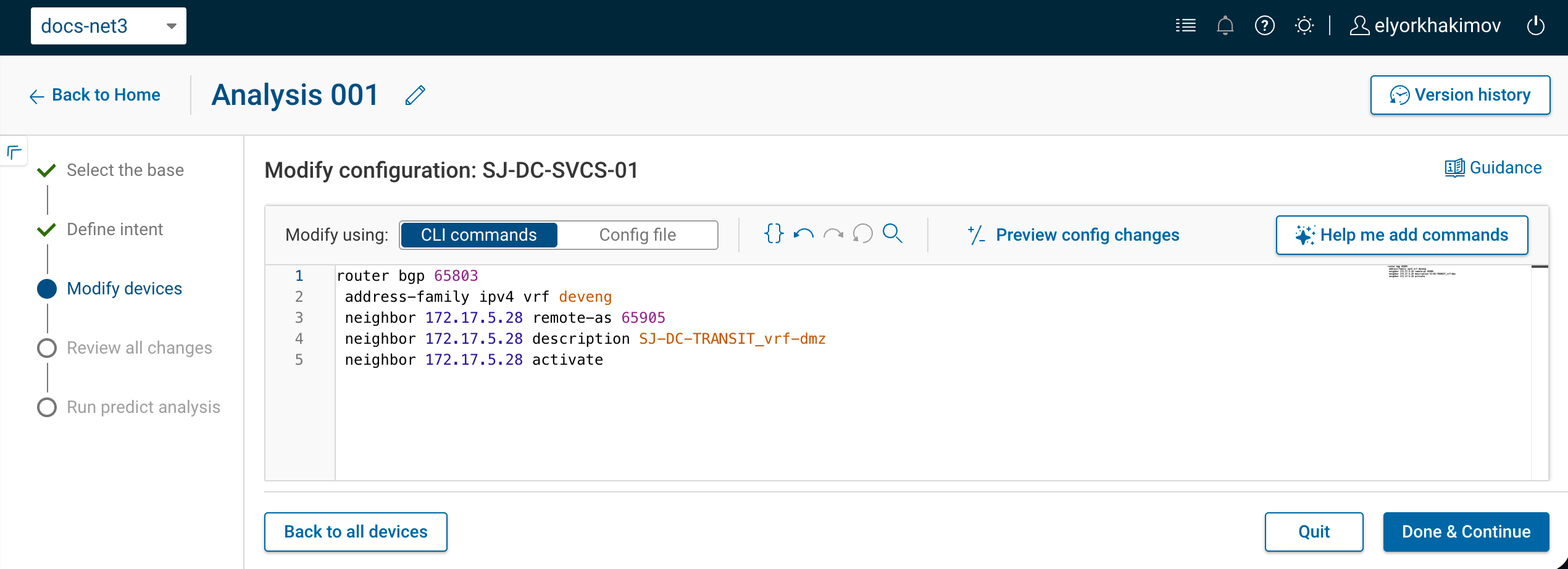
The CLI editor accepts any configuration the platform's CLI supports, not only routing. The following BGP change adds a neighbor under a VRF address family:
router bgp 65803
 address-family ipv4 vrf deveng
  neighbor 172.17.5.28 remote-as 65905
  neighbor 172.17.5.28 description SJ-DC-TRANSIT_vrf-dmz
  neighbor 172.17.5.28 activate
Click Preview config changes to see the predicted running-config diff before saving. The diff shows the lines the device would add, remove, or override, not a literal echo of the typed commands. Confirm the diff, then click Save changes & continue.
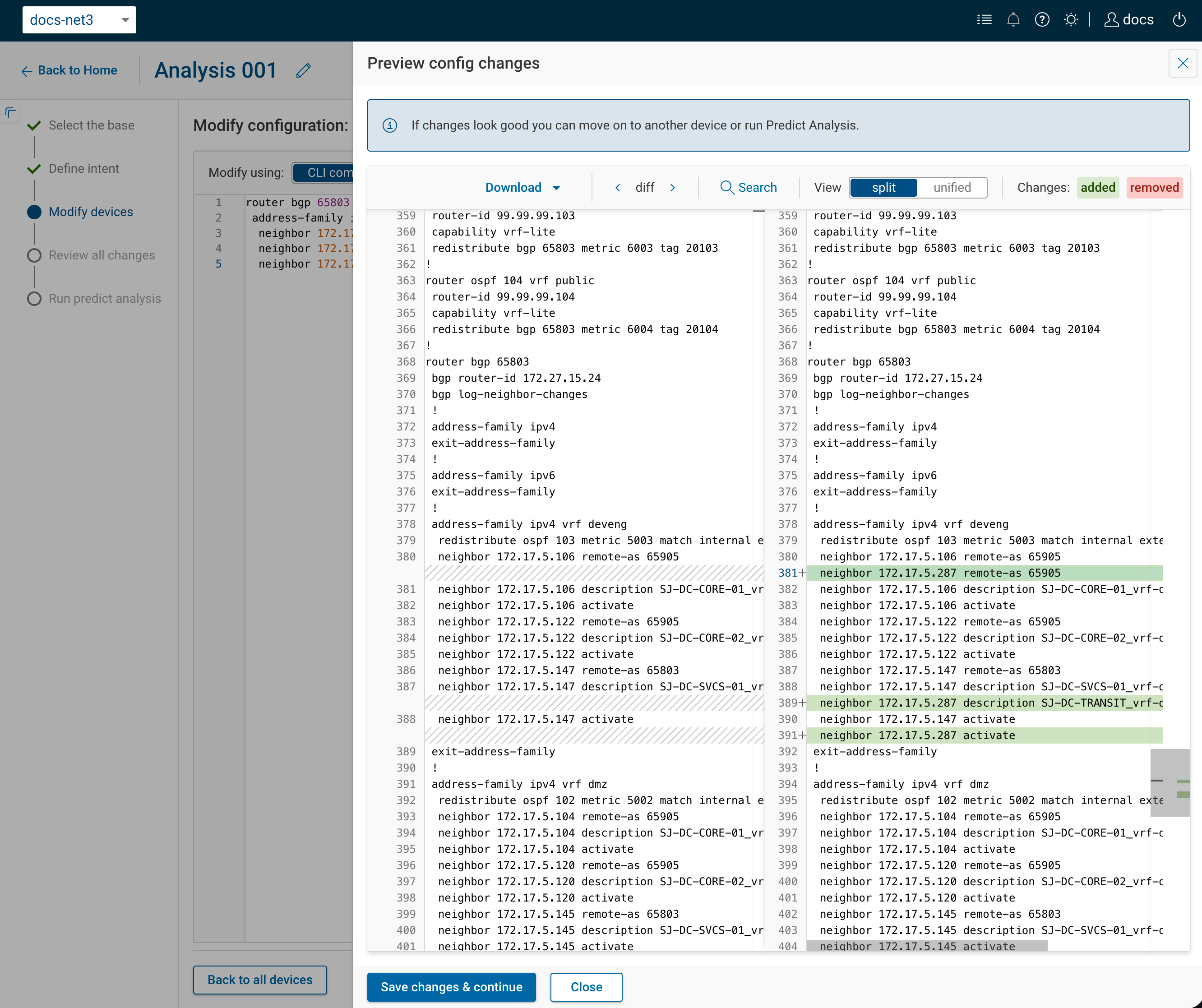
If the previewed diff does not match the entered commands, the command-merge logic may not handle that vendor or command form. Switch Modify using: to Config file and paste the exact config instead. See Troubleshooting.
BGP Advertisement: Inject, Modify, or Withdraw
On the Modify devices step, a device's Modify received BGP advertisements menu opens an editor for the routes it receives from its external BGP peers. Use it to simulate a change in the external environment through three actions:
- Inject a new advertisement: model a peer sending a prefix it does not send today. Set the external peer, VRF, prefix, next hop, origin, local-pref, AS path, MED, and communities.
- Modify a received advertisement: change the path attributes of a prefix the device already receives.
- Withdraw a received advertisement: model a peer no longer sending a prefix it sends today.
Injecting does not require received-BGP-advertisement collection: enter the advertisement's attributes directly in the editor. Use it to model a route learned from a peer outside the snapshot that Forward did not collect (see Accuracy Boundaries).
Modifying and withdrawing act on advertisements the base snapshot already holds, so received-BGP-advertisement collection must be enabled on the device (see BGP Collection).

Firewall Rule Change (PAN-OS)
Add, delete, edit, and reorder security rules through a graphical editor on Palo Alto (PAN-OS) firewalls. Forward Predict applies the edit to the device's config and re-models it, so the change affects end-to-end reachability. Other firewall platforms use a config-based change instead. See Firewall Predict for the rule editor, lifecycle badges, and the objects a rule can reference.
Re-Modeling the Changed Devices
Each changed device is re-parsed from its predicted config, rebuilding its device model: routing configuration and protocol state, ACLs, NAT rules, and security policies. Because the model comes from re-parsing, the predicted device behaves under analysis the same way a collected device on that config would. Only the devices in the change set are re-parsed; every other device updates through routing propagation.
Re-Propagating the Control Plane
Forward Predict re-computes routing across the modeled topology, so a change propagates to every downstream device in the snapshot. Propagation covers only the devices the snapshot models; a device the snapshot omits is not predicted. This step covers only the routing protocols it re-propagates; see Supported Routing Protocols for the ones in scope.
Which routes are modeled. Locally originated prefixes (network statements, aggregates), redistributed routes, routes the base snapshot collected from external peers, and any injected advertisements. Forward Predict models how each route propagates from its origin. Routes learned from a peer outside the snapshot are modeled only when the base device collected the advertisements it received from its BGP peers, which is off by default (see Accuracy Boundaries).
How routes propagate. Forward Predict traverses the topology hop by hop, applying each device's own policy at each step.
| Step | What Forward Predict applies |
|---|---|
| Import and export policies | Route-maps and policy-statements, including permit and deny actions and attribute edits (communities, local-pref, MED, AS-path, next-hop). |
| Peering rules | eBGP versus iBGP advertisement behavior and route reflection. |
| Redistribution | Routes crossing protocol boundaries, with the redistribution policy applied at the boundary. |
| Loop prevention | AS-path and route-reflector loop checks. |
When a device's policy denies a route, the route stops propagating at that device, as it would on the real network. Use the route trace to see why a prefix does or does not reach a given router.
Forward Predict re-propagates BGP in 26.9, including routes redistributed into BGP from another protocol. OSPF, static and connected routes, and the SD-WAN overlay (OMP) are not re-propagated in this release; support is planned for later releases. See Supported Routing Protocols.
Best-Path Selection
When several routes to the same prefix compete, Forward Predict resolves them with standard best-path logic: BGP by weight, local-preference, AS-path length, and the rest of the tiebreak order; OSPF by route type first, then cost. See BGP Best-Path Order and OSPF Route Preference for the full order.
Forward Predict installs all equal-cost routes that survive the comparison, up to the device's configured maximum paths. Self-dependent policies (aggregate and summary-only routes, conditional advertisement, conditional default-origination) are resolved to a single stable result.
Accuracy Boundaries
The prediction reflects protocol logic and many device-specific behaviors, but not timing-dependent behavior or every implementation-specific detail of a particular device. That protocol logic is vendor-aware: cross-protocol route selection uses each platform's own administrative distance defaults and overrides (see Cross-Protocol Route Selection). Two boundaries affect what a result can show.
- Externally learned routes need their advertisements. Forward Predict needs a route's ingress advertisement to predict a route learned from a peer outside the snapshot (an eBGP prefix from an upstream provider). It has that advertisement only when the base device collected the advertisements it received from its BGP peers. That collection is off by default and enabled per device (see BGP Collection). Without it, the route is left unchanged in the predicted snapshot and no warning is shown; to predict against it, inject the advertisement as part of the change (see BGP Advertisement).
- Equal-cost paths and ties. Forward Predict installs all equal-cost paths, up to the device's maximum-paths limit. Where a real device would break a remaining tie by a criterion it does not model, such as which route it received first, Forward Predict reports one valid path and the device may have chosen another. See A predicted best path differs from the real device.
See Accuracy and Limitations for other limits on what a prediction can promise.
Next
- Prediction Scope: the change types, routing protocols, and platforms in scope.
- Reviewing Results: the diffs, traces, and checks a prediction produces.
- Prefix Search & Trace: inspect BGP propagation prefix by prefix.