Prefix Search & Trace
Prefix Search & Trace inspects BGP propagation one prefix at a time. Search for a prefix, see which devices carry it, then trace its path from origin to any router with the import and export policy applied at each hop. It runs on a collected snapshot and on a predicted one. Compare how a prefix propagates before and after a change.
Open it from the Routing section of the sidebar, on the Prefix search page. It is a routing-analysis feature, available whenever Predict is enabled for the organization, and works on any snapshot independent of a change set. The trace panel is titled Route Propagation.
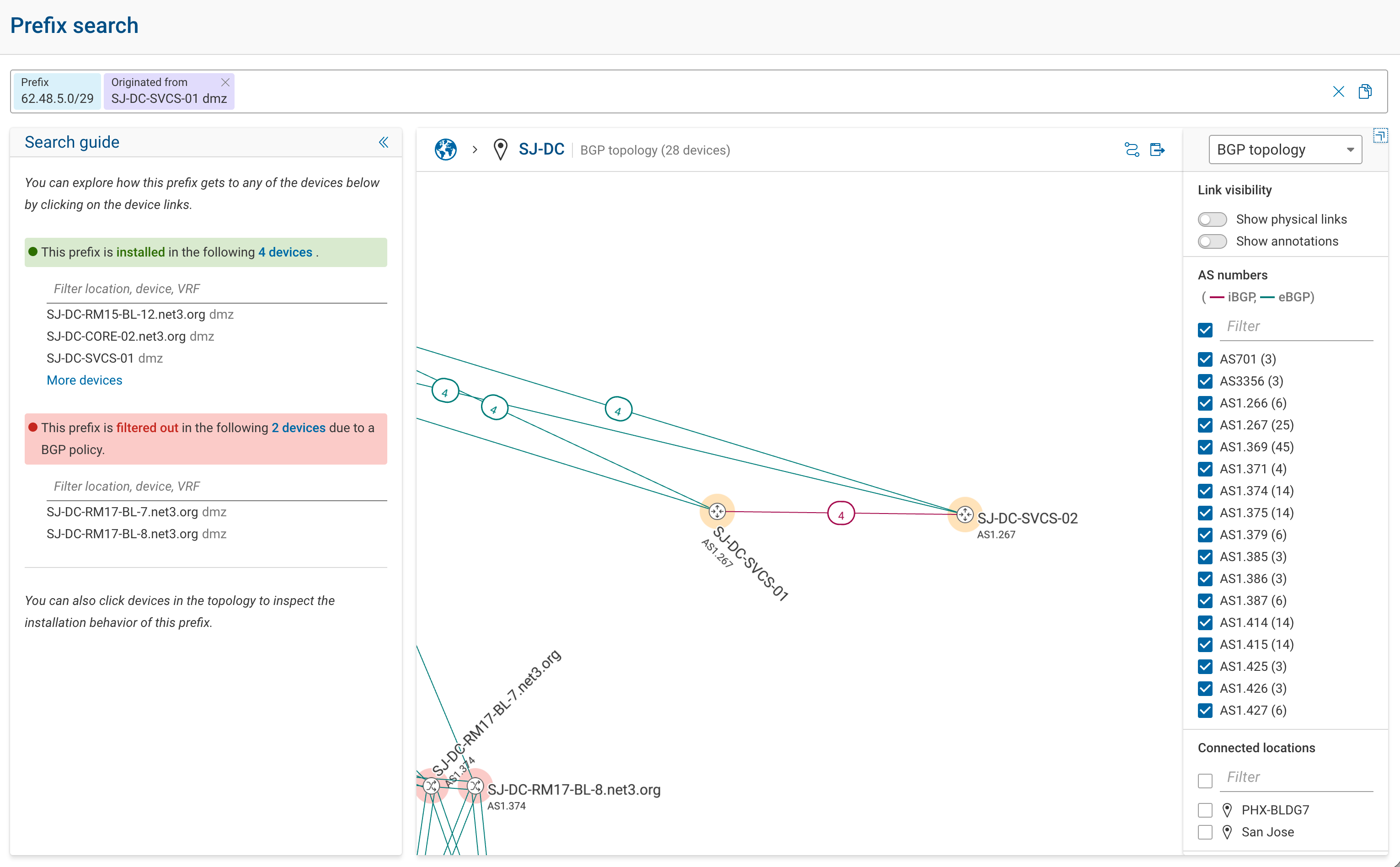
Prefix Search covers the modeled BGP control plane. A prefix redistributed from another protocol into BGP appears, but the results are restricted to the BGP domain: the search shows where the prefix propagates within BGP, not its path inside the source protocol. A prefix that never enters BGP is not shown.
Prefix Search shows a prefix when it is in the modeled BGP control plane, which Forward Predict builds from the collected snapshot (configuration and state). It shows a prefix learned from an external peer only if that prefix's ingress advertisement is in the base snapshot: either collected (received-BGP-advertisement collection, off by default) or injected as a change. See How Predict Works for the accuracy boundaries.
Searching for a Prefix

The search bar is token-based, with type-ahead suggestions. A query combines these tokens:
| Token | Purpose |
|---|---|
| A prefix | The BGP prefix to inspect, such as 203.0.113.0/24. |
@device … with outcome … | Constrain the search to a device and the outcome the prefix has on it. |
Originated from … | Constrain the search to prefixes originated from a given device and VRF. |
Device suggestions are limited to BGP nodes. Copy a query to share it or re-run it later.
Outcomes
The outcome describes how a route resolved on a device. It is set by the device picked in the query, not derived automatically from the prefix:
| Outcome | Meaning |
|---|---|
Installed | The route is installed in the device's routing table. |
Filtered out | An import or export policy dropped the route. |
Not preferred | The device received the route but selected a different best path. |
Tracing Propagation
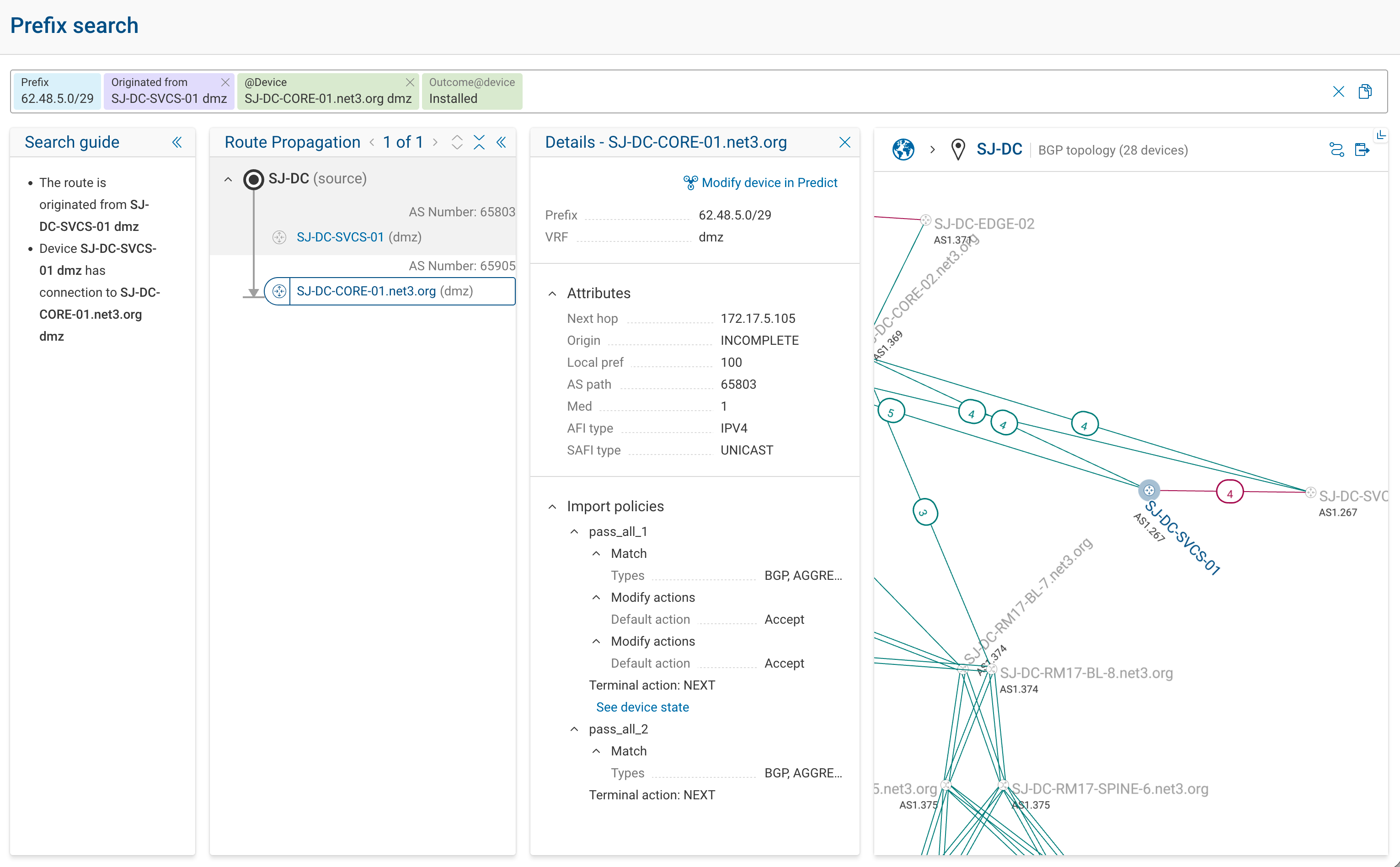
The Route Propagation trace follows a prefix from its origin across the network. It returns every path the prefix takes to a given router, not just one, along with the devices where it resolved, per VRF.
Each hop shows:
- the import and export policy applied;
- the resulting route attributes: next hop, origin, local preference, AS path, and MED (attributes that do not apply are hidden);
- the outcome at that hop: whether the prefix propagated onward, was dropped by an import or export policy, or was received but not selected as the best path. Marking the outcome at every hop pinpoints the exact device where a prefix stops and the policy that dropped it.
The topology diagram highlights the prefix's path, and the device state view shows the routing state behind each hop. Use the trace to find why a prefix does or does not reach a given router, on a collected snapshot or on a predicted one after a change.
Editing From the Trace
Add a device to a change set from its details panel, then run the prediction and re-trace the prefix to confirm it propagates as intended.
Next
- How Predict Works → Best-Path Selection: how competing routes are resolved.
- Reviewing Results: the config diff, route trace, and intent checks.