Filters
Filters directly refine the path search query itself, shaping which paths are evaluated and returned by the search engine. Adding or removing a filter changes what the engine computes, not just what is displayed.
This page covers:
- How filters translate into query constraints
- Packet header filters, including SGT and Layer-7 attributes
- Outcome filters and their definitions
- Forwarding type filters
- Traffic defaults and modeling guardrails
Why Specify Filters?
A path search without filters answers a broad question: "What paths exist that match this structure?"
Filters refine that question by expressing what kind of traffic you care about, how it behaves, and where it transits:
- Traffic characteristics (protocols, ports, application identity, security group tags)
- Outcomes (delivered, dropped, unreachable)
- Forwarding behavior (MPLS, VXLAN, direct IP)
- Transit requirements (paths through, entering, or exiting specific devices)
Anchors and constraints describe the structure of the path. Filters refine what traffic is flowing and how it behaves.
How Filters Work
When you select a filter in the UI, Forward augments the underlying path search query. The engine evaluates only paths that satisfy the augmented query.
Every filter available in the UI corresponds to a query clause that can also be typed directly into the query bar. In
practice, users typically begin with an anchor such as from(172.17.20.16), then add constraints by selecting filters
or by typing into the query field. The UI provides real-time suggestions, so you do not need to memorize query tokens.
For example, pasting this query:
f(172.17.20.16)(ipv4_dst.62.48.5.1)(tp_dst.443)(ip_proto.TCP)(app_id.https)
is automatically parsed and rendered as structured, color-coded elements:

Query Token Reference
Every query clause uses a shorthand prefix. The full mapping:
| Token | Full Name | Purpose |
|---|---|---|
f | from | Source location (anchor) |
t | to | Destination location (anchor) |
u | through | Require transit through a device |
i | ingress | Require ingress at a device or interface |
e | egress | Require egress at a device or interface |
b | bypass | Exclude a device from the path |
w | forwarding | Forwarding type (MPLS, VXLAN, etc.) |
z | status | Outcome filter (delivered, dropped, etc.) |
m | mode | Query mode (e.g., permit-all) |
A Fully Refined Query Example
Most troubleshooting starts with just a source and destination — you rarely need a query this detailed. This example illustrates the full syntax for reference.
Below is a complex path search as copied from the UI:

f(172.17.32.5)(ipv4_dst.62.48.5.1)(tp_dst.443)(ip_proto.TCP)(app_id.https)
i(SJ-DC-CORE-02.net3.org)u(SJ-DC-S-NGFW-5)(tp_dst.443)e(SJ-DC-S-LB-12)
w(mpls)z(delivered)
This encodes:
- Traffic originates from
172.17.32.5with destination IP62.48.5.1 - HTTPS over TCP
- Ingresses
SJ-DC-CORE-02, traversesSJ-DC-S-NGFW-5, egressesSJ-DC-S-LB-12 - Uses MPLS forwarding
- Is successfully delivered
Most users arrive at queries like this incrementally, starting with a simple anchor and adding filters only as needed. Many common questions can be answered without any of the advanced tokens shown here.
Packet Header Filters
Packet header filters constrain what the traffic looks like.
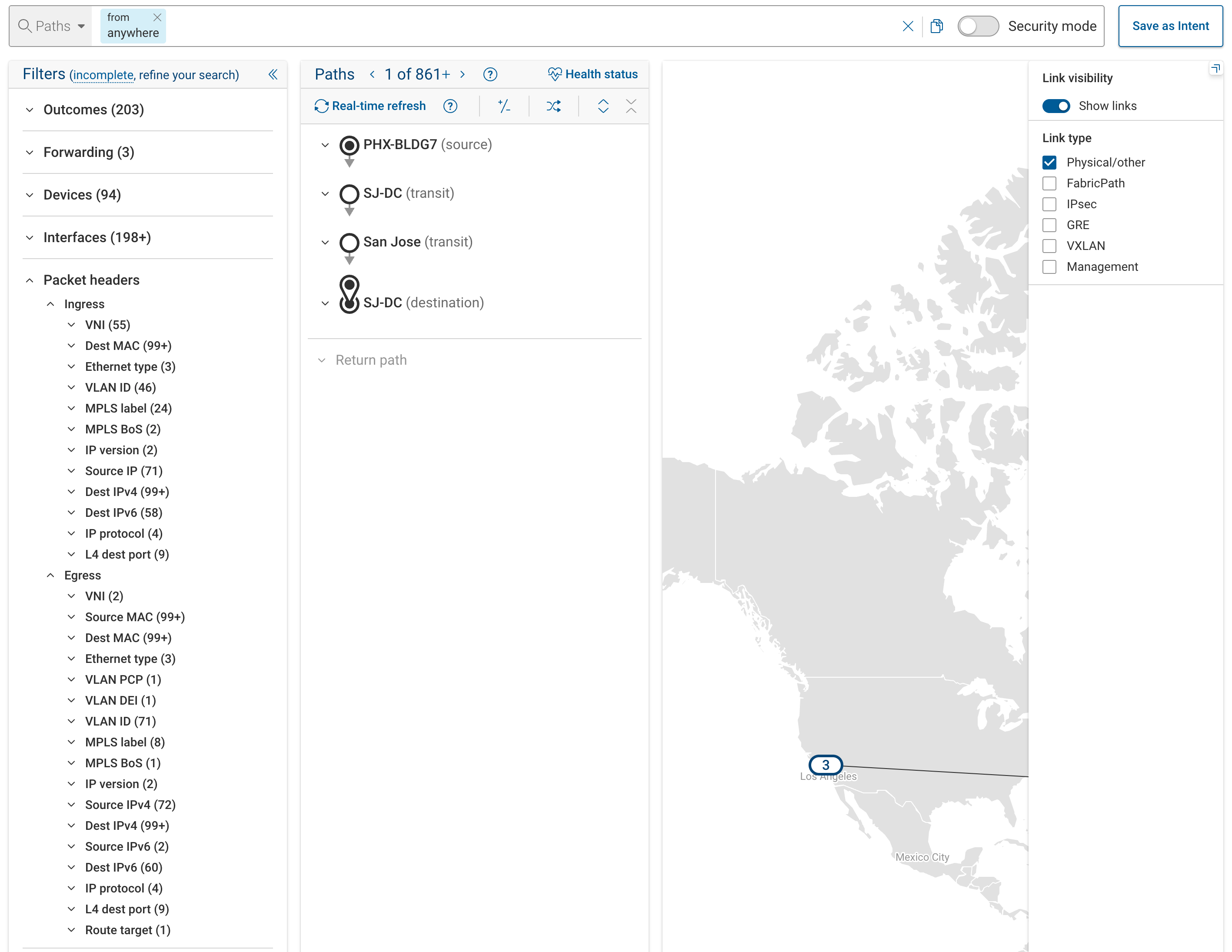
Available header fields span multiple layers:
| Layer | Examples |
|---|---|
| Layer 2 | MAC addresses (mac_src, mac_dst), VLAN (vlan_vid), Ethernet type, Security Group Tags (sgt_src, sgt_dst) |
| Layer 2.5 | MPLS labels (mpls_label), MPLS CoS, bottom-of-stack |
| Layer 3 | IPv4/IPv6 source and destination, IP protocol, ToS/DSCP, TTL, fragment offset, ARP fields |
| Layer 4 | Source and destination ports (tp_src, tp_dst), TCP flags, ICMP type and code |
| Layer 7 | Application ID, user group, user ID, URL, URL category |
For example, to find paths carrying ICMP traffic of a specific type:
from(10.1.0.5)(ip_proto.ICMP)(icmp_type.8)
Or to filter on a specific VLAN:
from(10.1.0.5)(vlan_vid.100) to(10.2.0.10)
A destination IP header filter (ipv4_dst) sets the initial packet header but does not anchor delivery. Use to()
when you need traffic to arrive at a specific location. See
Basic Reachability for the full
distinction.
Security Group Tags (SGT)
SGT filters constrain traffic based on Cisco TrustSec security group assignments. They are Layer-2 header fields used in role-based access control (RBACL/SGACL) policies.
sgt_src— source security group tagsgt_dst— destination security group tag
Example: find paths where traffic from security group 10 is evaluated against policies matching destination group 200:
from(10.1.0.5)(sgt_src.10)(sgt_dst.200) to(10.2.0.10)
When SGT values are specified, path results reflect how RBACL and SGACL policies on traversed devices evaluate the traffic. This is useful for validating TrustSec segmentation intent — confirming that traffic between security groups is permitted, denied, or handled as expected.
Forward models SGT-based policies on Cisco ASA, FTD, NX-OS, and Versa platforms. FTD environments require FMC collection for SGT zone-to-interface mapping.
Layer-7 / Application Filters
Layer-7 filters constrain traffic based on application-level attributes recognized by firewalls and policy devices:
app_id— application identity (e.g.,https,ssh)user_group_id— user group membershipuser_id— individual user identityurl— URL with optional wildcardingurl_category— URL category classification
Restriction: Layer-7 filters can only appear after from(). They cannot be placed after to(), because these
attributes represent how traffic enters the network, not how it is delivered.
For detailed semantics, query examples, and limitations, see:
Outcome Filters
Outcome filters constrain how a path terminates in the model. They are expressed using the z() or status()
token:
z(dropped) or equivalently status(dropped)
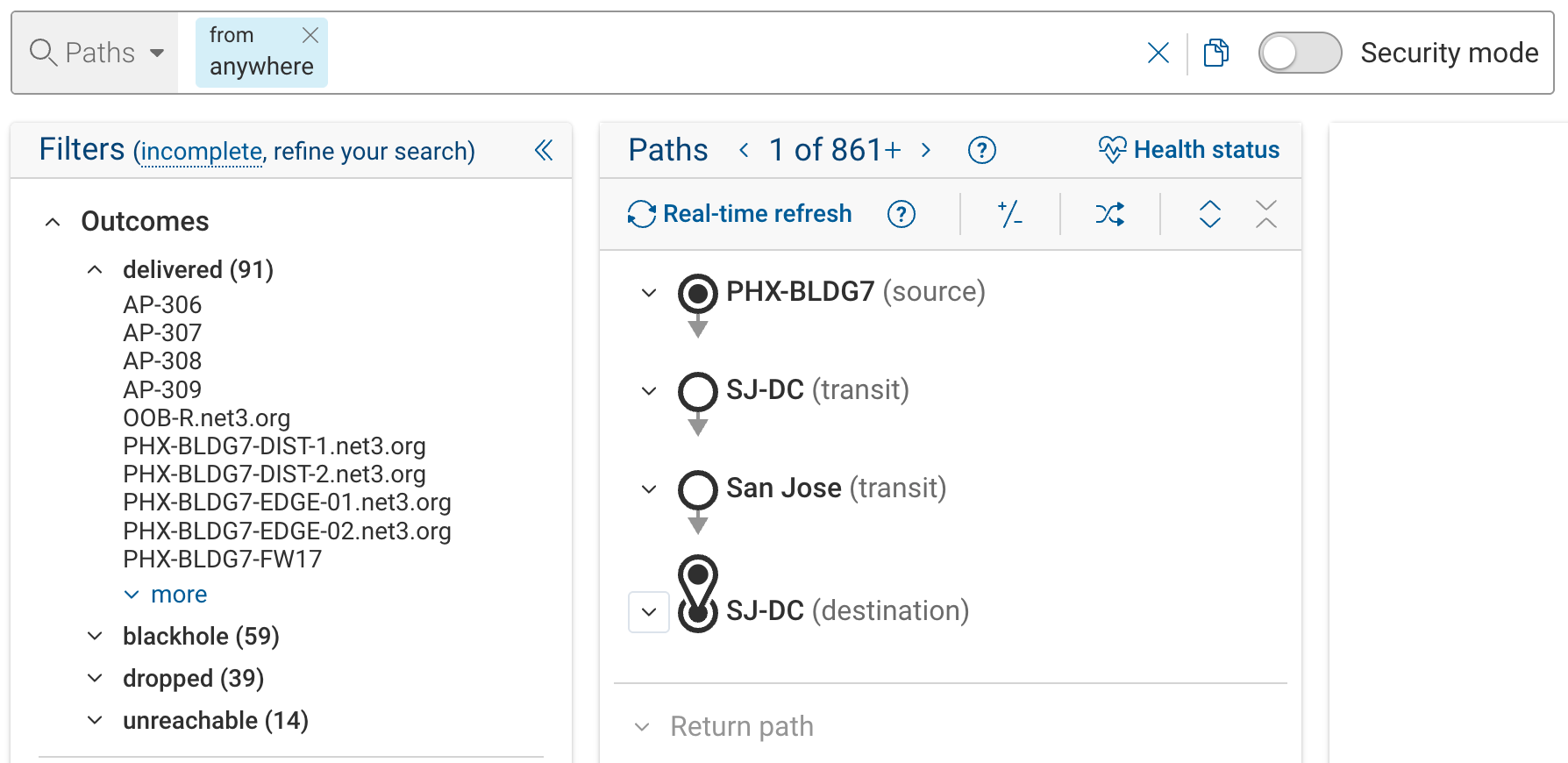
Outcome Definitions
| Outcome | Meaning |
|---|---|
| delivered | Traffic successfully egresses the modeled network edge toward the destination |
| dropped | Traffic is explicitly denied by an ACL or firewall rule |
| blackhole | Traffic is implicitly dropped — no matching forwarding entry (silent failure) |
| inadmissible | Traffic is not admitted at the very first hop (blackholed at the first forwarding table) |
| unreachable | Traffic cannot complete delivery due to a failed ARP/ND resolution mid-path |
| loop | Traffic enters a forwarding loop and never exits |
| undelivered | Meta-outcome: matches all non-delivered paths (dropped, blackhole, inadmissible, unreachable, and loop combined) |
Key distinctions:
- Dropped vs blackhole: dropped means an explicit deny rule matched. Blackhole means no rule matched at all — the traffic had nowhere to go.
- Inadmissible vs blackhole: inadmissible is a blackhole specifically at the first device's first table. It often indicates that traffic should never have entered the network at that point.
What "Delivered" Means
Delivered does not necessarily mean traffic reached the final application or service. It means traffic successfully egressed the modeled edge of the network toward the next hop or destination determined by routing and forwarding state. Final delivery may occur outside the modeled boundary. This is for example the case where traffic is sent to an adjacent network that has not yet been added to the Forward model.
Using Outcome Filters Effectively
When you apply an outcome filter, results are limited to paths whose modeled outcome matches that condition. This does not mean these are the only possible outcomes — Path Analysis searches are bounded by configurable limits, so results are not guaranteed to be exhaustive.
A common effective approach:
- Start with a broader query (source and destination only)
- Observe the distribution of outcomes in the results
- Refine incrementally based on what you discover
For query construction examples using outcome filters, see Basic Reachability in the Running Path Analysis page.
Filtering on an outcome too early can hide useful context. For example, constraining to z(unreachable) may return only
a few obscure paths while excluding other informative results.
Distinguishing Policy Drops from Connectivity Issues
- Dropped typically indicates an explicit deny (ACLs, firewall policy)
- Unreachable and blackhole typically indicate forwarding issues (missing routes, adjacencies, state)
For a step-by-step walkthrough of isolating policy drops from connectivity failures, see "Why is this specific traffic being dropped?" in the Running Path Analysis page.
Permit-All Mode
Permit-all mode ignores ACLs and firewall policies on all devices along the path. It is expressed as a query token:
m(PERMIT_ALL)
This is useful for:
- Determining whether a failure is caused by security policy or by underlying routing and forwarding issues
- Revealing the full chain of enforcement points (firewalls, ACL devices) that would need policy changes to allow the traffic
A common pattern:
- Observe dropped or limited paths under normal evaluation
- Add
m(PERMIT_ALL)to the query - Compare how far traffic propagates without policy enforcement
If traffic is delivered in permit-all mode but dropped normally, the issue is policy. If traffic still fails, the issue is connectivity.
Permit-all mode cannot be scoped to a single device — it applies globally to the entire path.
Forwarding Type Filters
Forwarding type filters constrain how traffic is transported between devices. They are expressed with the w()
token:
w(mpls)
Available Forwarding Types
| Group | Type | Query Value |
|---|---|---|
| L2 | Direct Layer 2 | direct_l2 |
| L2 | FabricPath | fabric_path |
| L2 | VXLAN | vxlan |
| L3 | Direct IP | direct_ip |
| L3 | MPLS | mpls |
| PBR | Policy-Based Routing (L2) | l2_pbr |
| PBR | Policy-Based Routing (L3) | l3_pbr |
Forwarding type filters apply per segment — each segment of a path is evaluated independently against the filter.
These filters are useful when:
- Debugging label-switched paths — use
w(mpls)to isolate MPLS forwarding behavior - Troubleshooting overlay networks — use
w(vxlan)to focus on VXLAN-encapsulated traffic - Verifying encapsulation — confirm traffic uses the expected transport mechanism
- Separating overlay from underlay — distinguish logical forwarding from physical transport
Traffic Defaults
Traffic defaults define implicit packet header values assumed when the query does not explicitly set them. They are not filters — they influence how the packet is modeled, particularly for security policy evaluation.
Default Values
| Field | Default Value | Effect | Typical Use |
|---|---|---|---|
tcp_flags | 0x2 (SYN) | Models new connection establishment | Rarely changed |
ip_frag_offset | 0 | Models non-fragmented or first-fragment traffic | Rarely changed |
ip_tos | 0x0 | Models default QoS/DSCP | Rarely changed |
tp_src | 65000 | Models an ephemeral source port | Rarely changed |
app_id | unidentified | Bypasses application-ID-based firewall rules | Set when testing app policies |
url | none | Bypasses URL-based firewall rules | Set when testing URL policies |
user_id | unidentified | Bypasses user-identity-based firewall rules | Set when testing ID policies |
Org-Level vs Query-Level
Traffic defaults can be configured at two levels:
- Organization level (Settings > Organization Preferences): establishes defaults for all searches across the org
- Per-query: toggled in the Traffic Defaults section of the filter panel, overriding org defaults for that search
When a default is enabled, the corresponding header field is set to the default value unless the query explicitly specifies a different value. When disabled, the field is left unconstrained (wildcarded), which may cause the engine to discover a broader set of matching paths.
Traffic to Exclude: Modeling Guardrails
These controls exclude classes of traffic that are typically invalid or operationally irrelevant. They are modeling guardrails, not post-processing filters — excluded traffic is never evaluated.
These exclusions are tuned for typical network analysis. Disabling them increases noise and may return operationally irrelevant paths. Override only when specifically investigating edge-case or abnormal traffic.
Exclusion Categories
Misconfigured gateway traffic — Traffic sent using an incorrect or inconsistent default gateway MAC address. Typically indicates a host-level misconfiguration rather than a network forwarding problem.
Traffic to network or broadcast addresses — Traffic destined to network addresses, broadcast addresses, or invalid
unicast ranges such as 0.0.0.0/8 or 127.0.0.0/8. Does not represent routable end-to-end communication.
L2 traffic consumed by the network — Layer-2 control or management traffic terminated locally by devices (e.g., control-plane protocols, discovery frames). Never participates in multi-hop forwarding.
Malformed or unhandled traffic — Traffic that does not conform to expected protocol formats or cannot be processed by the modeled forwarding logic.
Glean traffic — Layer-3 traffic that reaches a directly connected subnet but is dropped because the destination host cannot be resolved (e.g., no ARP/ND entry). The subnet has other reachable hosts, but the specific destination is unknown.
Configuration and Overrides
All exclusions are:
- Configurable at the organization level (Settings > Organization Preferences)
- Overridable per-query in the filter panel
Overriding exclusions is useful for investigating misconfigurations, auditing edge-case behavior, or performing security analysis that intentionally explores abnormal traffic patterns.
Filters and the Sample Packet
Filters and traffic defaults influence which header values appear in the sample packet displayed for each matching path. The sample packet is illustrative — it represents one concrete packet that exercises the selected path, reflecting any header transformations (NAT, encapsulation) that occur along the way.
Practical Guidance
- Start with anchors and basic constraints
- Run the query and inspect results
- Apply filters to refine intent
- Remove filters to broaden again
- Add manual query syntax only when needed
Filters support iteration, not precision on the first attempt.
Where to Go Next
- Understanding Results — interpreting hops, decisions, and covered topology
- Layer-7 User-Group Filtering — user-group and user-ID query semantics
- Layer-7 URL Filtering — URL-based policy queries