Running Path Analysis
This page covers how to build a path query: anchors, constraints, filters, and the two query modes. Concepts like the modeled network, the sample packet, and path groups are documented in Overview. How to read a result is documented in Understanding Results.
How to Think About a Query
A path query has three parts:
- Anchors: where traffic enters the model and, optionally, where it terminates. Tokens:
from()andto(). - Filters: what the traffic looks like and how it behaves. Packet headers, outcomes, forwarding types, and traffic-modeling controls.
- Constraints: which paths to include or exclude. Tokens:
through(),bypass(),ingress(),egress().
Start with anchors. When the result is too broad, narrow it with filters first — a tighter traffic class often clears the noise on its own — and add constraints only when you need to require or forbid a specific transit point. Queries are usually built incrementally: run a simple one, see what comes back, then narrow.
Three common mistakes account for most confusion:
- Anchors too vague to resolve cleanly.
- Constraints added before reachability is confirmed, which excludes the path you meant to find.
- An implicit assumption about VRF, zone, or traffic type that does not match the model.
Anchors
| Anchor | Purpose |
|---|---|
from(X) | Anchor the start of the path. When used, it must appear at the start of the query. |
to(X) | Anchor the end of the path. When used, it must appear at the end of the query. |
Anchors accept an IP address, prefix, hostname, device name, device alias, or interface alias. Forward resolves the argument to a location in the model through IP localization.
Both anchors are optional at the query level, but Forward needs at least one of them. A query with only to(X)
implicitly runs from(anywhere). The source is not shown in the query bar, but the engine evaluates traffic from every
ingress that could reach X. The reverse holds for from(X) without to(Y): Forward explores every destination
reachable from X.
A from() anchor set to a device or edge interface fixes where the path starts, not which source addresses may
start there. An edge port carries transit traffic from any source, so the search admits the full source-address space at
that ingress — the sample packet can then show a source IP that lives elsewhere in the network. See
Troubleshooting → What if the sampled source address is discovered somewhere else in the network?.
Broad Queries
Queries with unspecific anchors are exploratory. Any of these shapes qualify:
from()alone with no destination: returns every reachable destination from the source.to()alone with no source: returns every ingress that could reach the destination. Forward implicitly runs this asfrom(anywhere) to(X).from(anywhere): evaluates traffic from every device in the snapshot, so the search competes across every possible origin at once.- A large prefix like
from(10.0.0.0/8): localization spreads across a wide slice of the model. from()andto()both set to prefixes that overlap most of the network.
These queries ask the engine to enumerate rather than verify. They are the most expensive to run, and they usually hit the result cap before finishing, returning paths too broad to act on.
Broad anchors have a second problem: IP localization rarely resolves to one place. Forward prompts the operator to pick from a list of candidates, and when the prefix spans much of the network, the operator often has no basis to choose. The result then reflects whichever termination was picked, which is why broad queries can return results that look incoherent rather than informative.
Broad queries are for one-off exploration, not a regular habit. When you find yourself running one repeatedly, narrow it with a specific source, a specific destination, or at minimum a prefix that maps to a single subnet or a single device — narrow enough that localization resolves to one place instead of spreading across the network. If the actual question is "what can this host reach?" or "what can reach this service?", use Blast Radius or Security Posture instead. Both are built to enumerate reachability across many endpoints at once; Path Analysis is built to show the detail of individual paths.
A query with no from clause — including to(X) alone, which runs as from(anywhere) to(X) — is ungrounded.
Answering it requires
advanced reachability analysis for the
selected Snapshot, which by default is computed on demand.
When you build an ungrounded query against a Snapshot that has not had advanced reachability computed, Path Analysis recommends adding a specific from source (or, if the source is anywhere, narrowing it) for a faster result. You can decline and run advanced reachability instead; that computation can take 30 minutes or longer.
A grounded query—one with a specific from source—does not need advanced reachability and runs immediately,
including while advanced reachability for the Snapshot is still being computed. What makes a query grounded is the
from source; the at() and in() constraints are largely orthogonal and do not, on their own, determine whether
advanced reachability is required.
IP Localization
Both anchors run IP localization. from() resolves its argument to an ingress location in the model, and to()
resolves to a termination location. The resolution logic is the same either way; what differs is the argument passed in.
- A directly-connected IP. Forward anchors at the device and interface where that IP terminates (interface address, ARP/ND entry, or MAC-table mapping).
- An off-subnet IP. If the IP doesn't terminate on any collected subnet, Forward falls back to routing lookup and anchors at the device that would deliver the IP per its routing table.
- A prefix. Every device with a directly-connected subnet or a routing-table entry that overlaps the prefix becomes a candidate location, and Forward anchors at each one.
- A hostname. Forward resolves against DNS (if DNS zone transfer is configured), device hostnames, and custom aliases, in that order. Without DNS, the hostname has to match an object in the snapshot.
When more than one location matches, the GUI shows a candidate list below the query bar. Picking a candidate from that
list adds an at(device) chip after the anchor, restricting localization to the device you chose:
from(172.17.8.12) at(SJ-DC-RM10-ACC-13.net3.org) to(172.18.10.10-vip)
You can further narrow an anchor by typing an in() clause yourself. In path search, in() scopes to a
Logical Network — a user-defined collection of devices and edge nodes. The
in() autosuggest lists the logical networks defined for the network, so if none are defined it offers nothing. Unlike
at(), in() clauses are not proposed by the candidate picker; you add them by hand:
from(172.17.8.12) to(172.18.10.10-vip) in(logical-network_RM15-LEAF)

The query bar above shows both refinements on one query: from(172.17.8.12) and to(172.18.10.10-vip) are typed
anchors, at(SJ-DC-RM10-ACC-13.net3.org) is the refinement the GUI added when a candidate was picked from the list, and
in(logical-network_RM15-LEAF) is a hand-typed logical-network narrowing.
at() and in() are GUI-only chips. For most cases the Paths API has no equivalent
disambiguation: it runs the query against every candidate and returns the paths for all of them. The one exception is a
device-level source pin — the API takes a from device parameter alongside srcIp; see
Troubleshooting → Can I set an at location through the API?.
See Reference → Anchor resolution for the full resolution rules and precedence.
Filters
Anchors set where a path starts and ends. Filters describe the traffic itself: what's in the packet (headers, L7 attributes), how the path terminates (outcome, forwarding type), and the modeling controls that change what the engine considers at all (traffic defaults and exclusions). Apply filters before you add constraints: narrowing the traffic class often removes an over-broad result's excess paths without requiring you to pin specific transit points.
How Filters Work
The filter panel on the results page is a visual query builder. Selecting a filter augments the underlying query; the engine re-runs and returns paths that satisfy the new filter. Anything you can select in the panel you can also type directly into the search bar as a query clause.
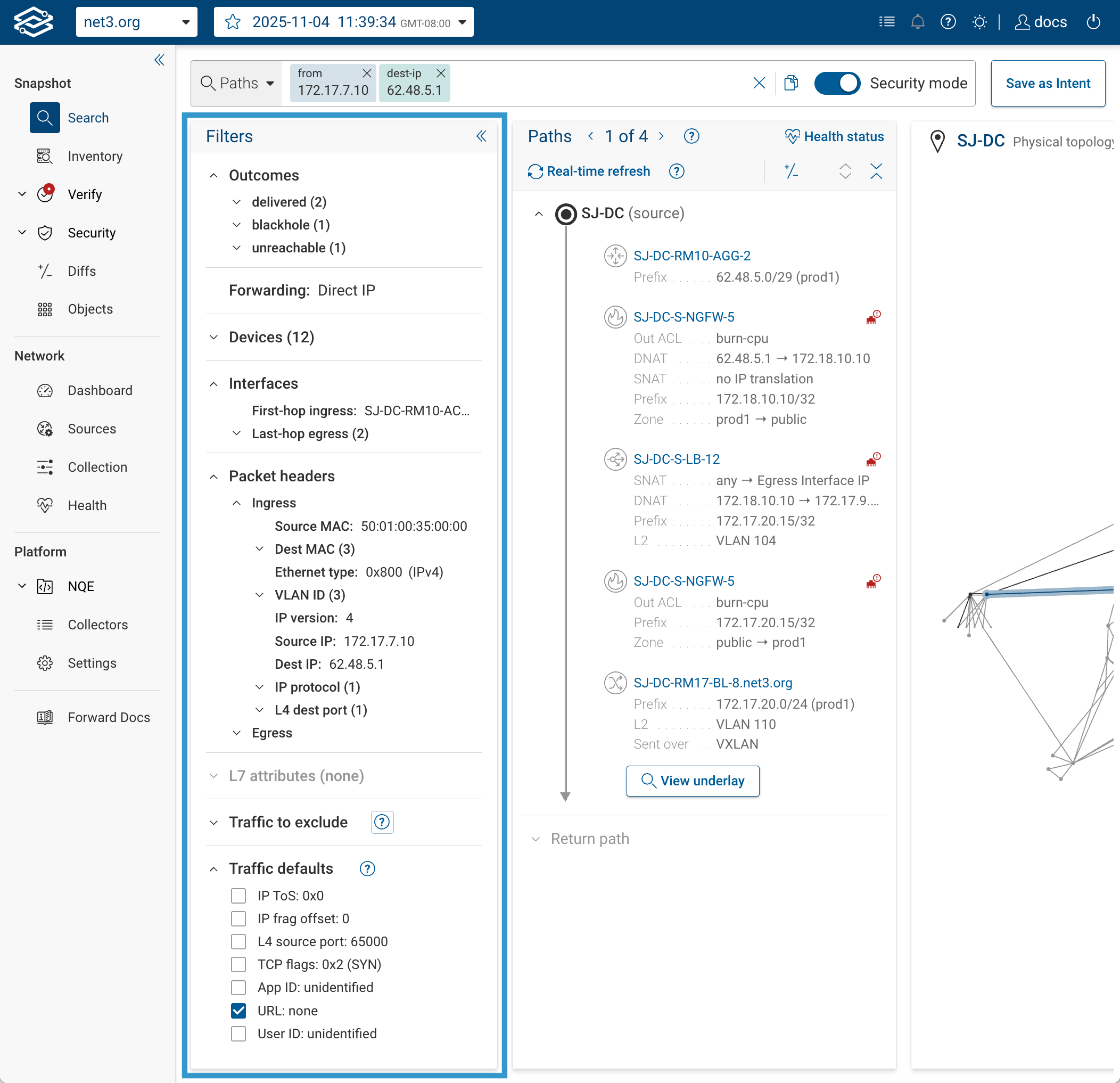
As you build a query, the search bar parses each clause and renders it as a structured chip. When you copy a query back
out as text, the clauses appear in a single-letter shorthand (f for from, u for through, z for status, and
so on). You don't need to write queries in that form — build them in the search bar with the full field names — but if
you're reading a copied query, Reference → Query Tokens
decodes the shorthands. For example, a fully specified query copied from the search bar looks like:
f(172.17.32.5) ipv4_dst(62.48.5.1) tp_dst(443) ip_proto(TCP) i(SJ-DC-CORE-02)
u(SJ-DC-S-NGFW-5) tp_dst(443) e(SJ-DC-S-LB-12) w(mpls) z(delivered)
Most troubleshooting starts with just a source and a destination. A query this detailed is rarely needed; the example exists to show the full syntax, not to imply it is common.
Packet Header Filters
Packet header filters constrain what the traffic looks like. They span Layer 2 through Layer 7:
| Layer | Fields you can specify |
|---|---|
| Layer 2 | MAC (mac_src, mac_dst), VLAN (vlan_vid), Ethernet type (eth_type), SGT (sgt_src, sgt_dst) |
| Layer 3 | IP source/destination (ipv4_src, ipv4_dst, ipv6_src, ipv6_dst), protocol (ip_proto), ToS (ip_tos) |
| Layer 4 | Source/destination ports (tp_src, tp_dst), TCP flags (tcp_flags), ICMP type and code (icmp_type, icmp_code) |
| Layer 7 | app_id, user_group_id, user_id, url, url_category |
Examples for less-common fields:
from(10.1.0.5) ip_proto(ICMP) icmp_type(8)
from(10.1.0.5) vlan_vid(100) to(10.2.0.10)
See Reference → Packet Header Fields for the full catalog.
Placement Matters
Header filters can appear after from(), after to(), or both. Where they appear changes what they constrain:
- After
from(): the value is set on the initial packet as it enters the network. The network is free to translate, redirect, or load-balance the packet as it transits. - After
to(): the value is a delivery condition, applied to the packet as it exits toward the destination anchor. - In both places: both ingress and delivery are constrained.
from(A) ipv4_dst(B) tp_dst(443)        # ingress: packet enters with dst B, port 443
from(A) to(B) tp_dst(443)              # delivery: whatever ingresses, must exit with port 443
from(A) tp_dst(8080) to(B) tp_dst(443) # both ends: enters on 8080, must exit on 443 (e.g. across a port-translating hop)
The last example uses different ports at each end deliberately: it matches only paths where the ingress port 8080 is
translated to 443 by the time the packet is delivered — for instance, across a NAT or load-balancer hop that rewrites
the destination port. Use the same port at both ends when you don't expect a translation.
Layer-7 fields (app_id, user_group_id, user_id, url, url_category) can only appear after from(). They
describe how traffic enters the network, not how it's delivered.
Because Forward displays a single sample packet per path, placement directly affects which header values are fixed at the start, which are evaluated at delivery, and how translations along the way are rendered. If a value in the sample packet isn't what you expected, check where the filter sits in the query.
SGT (Security Group Tags)
sgt_src and sgt_dst are Layer-2 header filters for Cisco TrustSec security group tags. Values are raw integers from
0 to 2³²−1 (the tag number itself, not a named group).
from(10.1.0.5) sgt_src(10) sgt_dst(200) to(10.2.0.10)
When SGT values are set in the query, path results reflect how SGT-aware ACLs on traversed devices evaluate the tagged traffic. Use this to validate TrustSec segmentation intent: confirm that a tag pair produces the permit or deny you expect on a given firewall.
Forward parses SGT-aware access-control policy on Cisco ASA and Cisco FTD (FTD requires FMC collection for
zone-to-interface mapping). On Cisco IOS and IOS-XE, Forward reads per-interface SGT assignments and the dynamic ACL
from 802.1X/MAB-authenticated sessions, applying that downloadable ACL with the session's SGT as its source. It does not
model SGT-to-SGT SGACL (cts role-based) policy enforcement.
Forwarding-Type Filters
Forwarding-type filters constrain how traffic is transported between devices. w() takes a single value — one of
direct_l2, fabric_path, vxlan, direct_ip, mpls, l2_pbr, or l3_pbr. For the UI labels and the transport
each value matches, see Reference → Forwarding Types.
from(A) to(B) w(vxlan)
A forwarding-type filter matches a path if any hop along it uses that transport. Forwarding is evaluated hop by hop,
and a single path can switch transports along the way — MPLS in the core, plain IP at the edges — so w(mpls) returns
every path that uses MPLS somewhere, even if the rest of the path doesn't.
The most common use is separating overlay from underlay: w(vxlan) to see only the encapsulated traffic, w(direct_ip)
to see only the underlay.
Outcome Filters
Outcome filters limit results to paths that terminate a specific way. Use z() or status():
from(A) to(B) z(dropped)
The values are delivered, dropped, blackhole, inadmissible, unreachable, loop, and the meta-outcome
undelivered (everything except delivered). For what each one means, see
Reference → Outcome Values.
Delivered does not mean the receiving application got the traffic. It means the packet exited the modeled network toward its destination. Final delivery may happen outside the model. Two cases where this matters:
- Traffic bound for an adjacent network that hasn't been collected.
- Paths that cross an uncollected device mid-model. In this case the result terminates at the edge of the gap rather than at the intended destination, because the model cannot reconstruct what happens once traffic leaves a modeled device toward an unknown one. See Understanding Results → Missing Devices.
Applying an outcome filter narrows results to paths the engine found. It does not reveal every possible outcome, because searches are bounded and some paths may not have been explored.
A common workflow:
- Run the query without an outcome filter.
- Look at the distribution across
delivered,dropped,blackhole, and the other outcomes. The Outcomes section of the filter panel shows a count next to each. - Filter to the outcome you want to investigate, then narrow further with header filters or constraints.
Filtering too early can hide context. Applying z(unreachable) at the start of an investigation may return a few
obscure paths and leave the interesting behavior in the delivered bucket that has been filtered out.
Layer-7 Filters
Layer-7 filters constrain traffic based on application-level attributes recognized by firewalls and policy devices:
app_id: application identity (for example,web-browsing,ssl). An app-id constrains only the application field — it does not pinip_protoortp_dst. See Does setting a port or app-id pin the other header fields?.user_group_id: user group membership.user_id: individual user.url: URL with optional wildcards.url_category: URL category classification.
Layer-7 fields can only appear after from(). They describe how traffic enters the network, not how it is delivered.
See Layer-7 User-Group Filtering and Layer-7 URL Filtering for query semantics, platform support, and wildcard rules.
Traffic Defaults
Traffic defaults are implicit packet-header values Forward assumes when the query does not set them. They are not filters; they influence how the sample packet is modeled, which in turn affects policy evaluation.
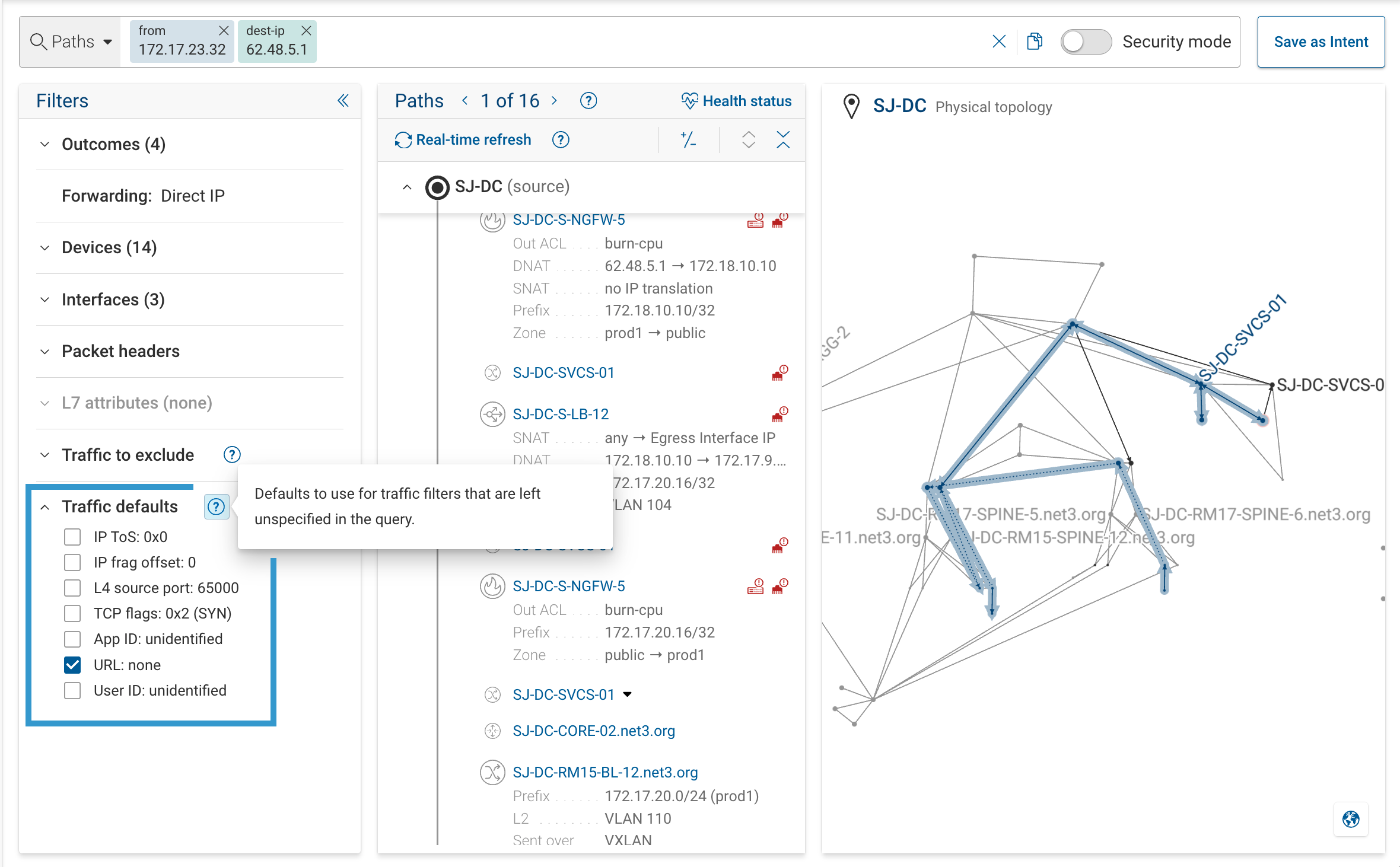
Each default can be configured at the organization level (Settings → Organization Preferences) and overridden per query in the Traffic Defaults section of the filter panel. When a default is enabled, the field is set to the default value unless the query pins it explicitly. When disabled, the field is wildcarded.
Defaults matter most for security policy evaluation. An ACL that inspects TCP flags evaluates differently against a
SYN-only packet (the default) than an ACK-only one. A firewall that matches on app_id sees unidentified by default,
and may treat the traffic differently than if app_id(https) is set explicitly.
See Reference → Traffic defaults for the full list of defaults and their values.
Traffic Exclusions
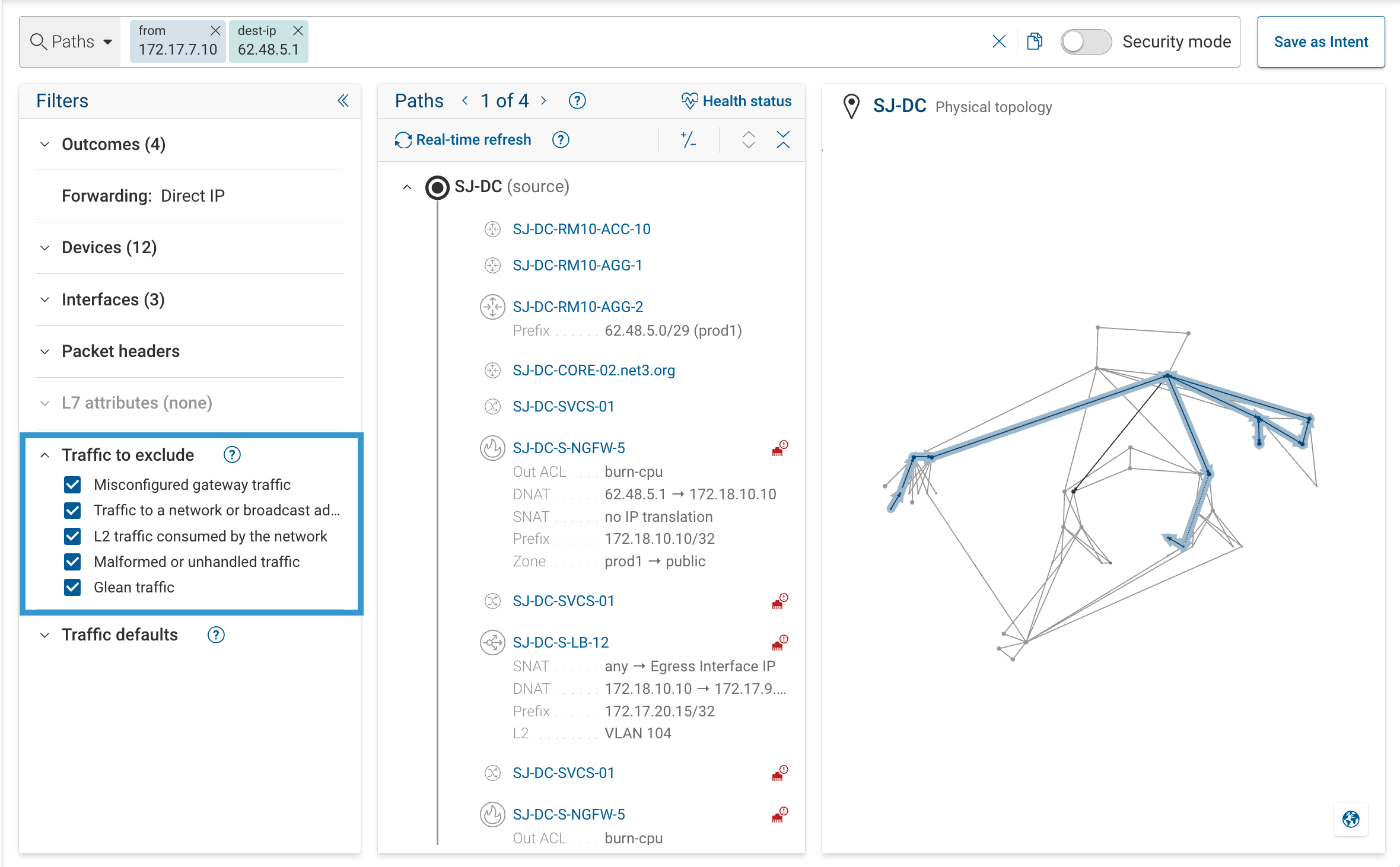
Traffic exclusions remove whole classes of traffic from the search itself, so an excluded class never comes back as a path. This is different from a display filter: the exclusion happens inside the search, not by hiding results the query already produced.
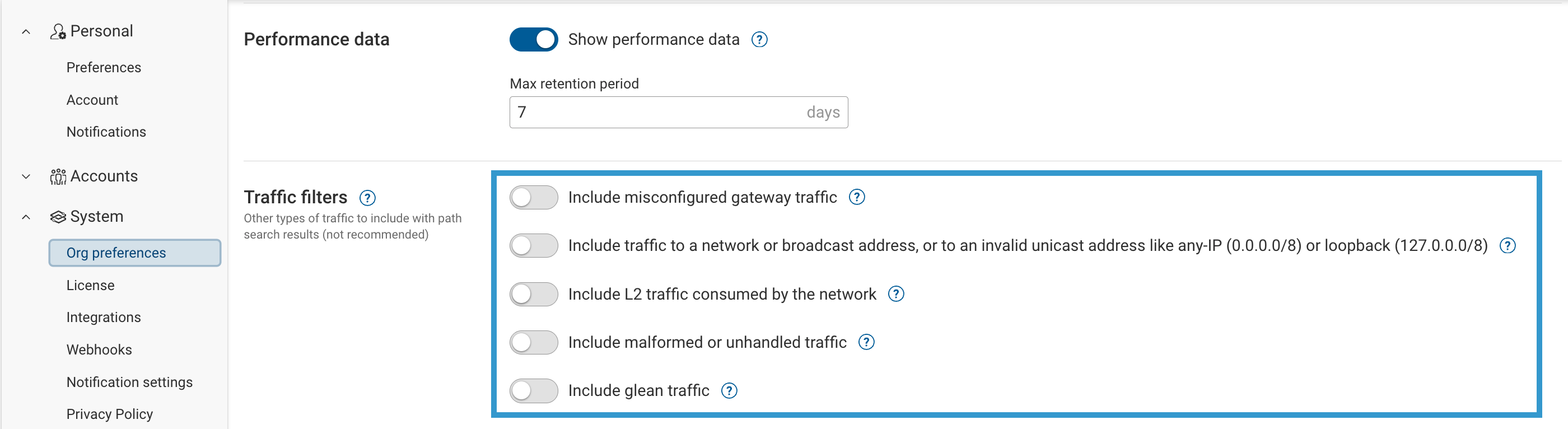
Exclusions are tuned for typical network analysis. Disabling one floods results with operationally irrelevant paths. Override only when you're specifically investigating edge-case or abnormal traffic.
The categories:
- Misconfigured gateway traffic: frames sent to an incorrect default-gateway MAC. Indicates a host-side problem, not a forwarding issue.
- Traffic to network or broadcast addresses: destinations like
0.0.0.0/8,127.0.0.0/8, or subnet network and broadcast addresses. Not end-to-end flows. - L2 traffic consumed by the network: control-plane and management frames (LLDP, CDP, STP, LACP, and similar) that the receiving device terminates rather than forwards. They do not traverse the network end-to-end.
- Malformed or unhandled traffic: packets that can't be forwarded because something in the frame is invalid — a bad frame CRC, a failing header checksum, or another header malformation the forwarding logic rejects rather than processes.
- Glean traffic: L3 traffic that reaches a directly-connected subnet but is dropped because the specific destination host cannot be resolved (no ARP/ND entry).
Exclusions apply in two places: the organization-level baseline (Settings → Organization Preferences, with all exclusions on by default) and the per-query override in the filter panel. A per-query change overrides the org baseline for that search only. Leave the query setting untouched to inherit the org defaults. Override per query when auditing misconfiguration, looking for spoofed traffic, or specifically investigating one of the abnormal classes above.
Constraints
When filtering the traffic class isn't enough — the result is scoped to the right traffic but still shows more paths than you want, or you need to require or forbid a specific transit point — add a constraint. Constraints narrow which paths Forward returns. They do not move the anchor; they filter the result set.
| Constraint | Behavior | Order-sensitive |
|---|---|---|
through(X) | Require paths to include device or interface X. | Yes |
bypass(X) | Require paths to exclude device or interface X. | — |
ingress(X) | Require traffic to enter device or interface X within the path. | Yes |
egress(X) | Require traffic to exit device or interface X within the path. | Yes |
"Order-sensitive" means that when the constraint appears more than once, Forward matches paths against the listed
devices in the order they appear in the query. bypass() has no order: when it repeats, the path must avoid every
listed device regardless of the order they appear in the query.
through()
Requires matching paths to transit a specific device or interface.
from(10.1.10.15) through(fw-prod-01) to(10.2.20.10)
Common for confirming that traffic reaches an enforcement point such as a firewall, IPS, or WAF, or that a segmentation boundary is actually being crossed.
bypass()
Requires matching paths to avoid a device or interface.
from(10.1.10.15) to(10.2.20.10) bypass(fw-prod-01)
Common for segmentation checks: is there any way for traffic to reach the destination without going through the firewall? A non-empty result is the answer.
ingress() and egress()
Require traffic to enter (ingress) or exit (egress) a specific device or interface at that point in the path. Unlike
through() and bypass(), these are directional: entering versus leaving matters.
from(10.1.10.15) ingress(core-1) to(10.2.20.10)
ingress(core-1 xe-0/0/1) egress(edge-fw xe-0/0/2)
Common for pinning one device in a redundant pair (such as two HSRP/VRRP peers or two upstream firewalls), confirming which uplink carries the flow, or reasoning about asymmetric routing.
ingress() and egress() constrain transit, not network edges. They do not imply that traffic enters or exits the
modeled network at that point.
Combining and Repeating
Constraints can appear multiple times and in any combination, and they mix freely with header filters and a mode. When a
constraint repeats, Forward matches paths in the listed order (except bypass(), which is order-agnostic). The query
below pairs a source anchor and two destination header filters with three constraints — through(), ingress(), and
bypass() — plus permit-all mode:
from(172.17.33.41) ipv4_dst(62.48.5.1) tp_dst(443) through(SJ-DC-S-NGFW-5) ingress(SJ-DC-S-LB-12) bypass(SJ-DC-TRN-01) m(permit_all)
In the search bar it renders as one chip per clause:

Most investigations do not need more than two or three constraints. When a query becomes hard to read, the underlying question is usually not stated precisely; restating it often shortens the query.
Modes
Security Mode
Security mode is a toggle next to the search bar. When on, results hide pure-forwarding hops and keep only devices that make a security decision: ACLs, firewall rules, and NAT.

Use it while building a query to confirm that traffic reaches the expected enforcement points, or to locate where a drop happens without scanning through routing hops.
Security mode is a display filter, not a query token. There is no typed form, and toggling it does not re-run the query. The same trace data is re-rendered with forwarding-only hops hidden.
Permit-All Mode
Permit-all mode evaluates the same snapshot with ACLs and firewall rules treated as permits. The rest of the model runs
normally: routing, L2 forwarding, ARP and ND resolution. A path that drops because of a missing route (blackhole) or a
failed adjacency (unreachable) continues to drop in permit-all.
Enable it with the m(permit_all) token, either by typing it or by selecting permit all from the mode suggestion.
When the mode is active, the m(permit_all) chip stays visible in the query bar as an indicator.
from(10.1.10.15) to(10.2.20.10) m(permit_all)
Permit-all is useful in two situations:
- Separating policy from connectivity. Run the query normally, then run it again with
m(permit_all). If permit-all delivers the traffic and the normal run doesn't, the cause is policy; if both still fail, the cause is routing, switching, or missing state. - Enumerating the enforcement chain. Paths that appear only in permit-all show every firewall and ACL device the traffic would have to pass through. Useful for understanding how many policies would need to change to let the traffic through.
Permit-all is global to the path. There is no way to scope it to a single device. When the mode is active, ACL rules along the way are individually annotated (ignored in permit all mode) in the hop detail.
Common Intent Patterns
The six query shapes below cover most investigations. Pick the one that matches the question you are actually asking.
Reachability Between Two Endpoints
Intent. Can traffic from A arrive at B?
from(10.1.10.15) to(10.2.20.10)
Anchors both ends. to() runs IP localization and constrains the result to paths that terminate at the destination with
that IP as the destination address at the final egress. The packet may have been translated in transit (destination
NAT, load balancing, virtual IPs); what matters is that it arrives at B's modeled location with B as the destination.
Use this when you want to validate delivery to a specific endpoint.
When you have a destination IP but the path should not terminate at that IP's modeled location (typical for NAT, load balancers, or virtual IPs), anchor only the source and use a destination header filter:
from(10.1.10.15) ipv4_dst(62.48.5.1)
This asks "how does the network process traffic addressed to B?" rather than "does A reach B?" The two can produce very different result sets. See Overview → Anchors and constraints for the conceptual distinction.
What Can This Host Reach?
Intent. Starting at A, what destinations are reachable?
This is one of the exploratory shapes described in Broad Queries: a from() with no destination
anchor. The query form is:
from(10.1.10.15)
Useful for a quick look at exposure from a single host, but expensive and usually capped before it enumerates everything. For anything actionable (audits, exhaustive reachability enumeration, or answering "what can this host reach?" as a recurring question), use Blast Radius instead. It is indexed for that shape of question; Path Analysis is not.
Does Traffic Go Through a Specific Enforcement Point?
Intent. Is traffic from A to B actually passing through the firewall, IPS, or inspection device it should?
from(10.1.10.15) through(fw-prod-01) to(10.2.20.10)
Returns only paths that transit the named device. "Transit" means traffic arrived on the device and the device forwarded
it onward (any policy applied was permissive enough to let that happen). An empty result does not say why: the traffic
might never have arrived on the device, or it arrived but was dropped there. To distinguish the two cases, swap
through() for ingress() on the same device. Traffic that ingresses but does not reach the destination was dropped
somewhere after entry. Traffic that does not even ingress never got there.
Can Traffic Bypass an Enforcement Point?
Intent. Is there any path from A to B that avoids the firewall or inspection point?
from(10.1.10.15) to(10.2.20.10) bypass(fw-prod-01)
Returns only paths that do not transit the named device. A non-empty result is the finding: the network has a path that
carries traffic matching the query around the device. A non-empty result does not automatically mean misconfiguration.
Something earlier in the path may have steered the packet based on its headers, which can be working exactly as
designed. Check the returned paths' header values against what real traffic is expected to carry. If the bypass
disappears once the headers are pinned (specific tp_dst, ip_proto, vlan_vid, and so on) or the right traffic
defaults are set, the path is legitimate for other kinds of traffic but not the one being investigated. If the bypass
stands with realistic headers, the result is a gap worth auditing.
Why Is Traffic Being Dropped — Policy or Connectivity?
Intent. Traffic from A to B isn't getting through. Is it policy or is it underlying forwarding?
Before running the comparison, confirm that Forward can place both endpoints in the model. Search for A and B separately (as hostnames, IPs, or prefixes) and check what the localization suggestions return. A broken path often turns out to be wrong or missing host localization: the host resolves to a device that looks plausible but is not where that IP actually terminates, or the host does not resolve at all because the placement state was not captured by collection. Misspelled hostnames, IPs off any collected subnet, and hosts behind uncollected devices all fall into this category. If either endpoint cannot be placed correctly, the question is not yet "policy or connectivity"; it is "does Forward know where this host is?"
Once both anchors resolve, run the query with and without permit-all:
from(10.1.10.15) to(10.2.20.10)
from(10.1.10.15) to(10.2.20.10) m(permit_all)
- Permit-all delivers, normal run drops: the issue is policy. Inspect the first drop in the normal run to see which ACL or firewall rule matched.
- Permit-all still drops, but reaches farther than the normal run: the remaining drop is non-policy (no route, no adjacency, missing state). The extra hops permit-all reveals before that drop are the firewall and ACL devices policy was masking — the enforcement chain.
- Both fail: policy is not the cause. Possibilities, roughly in order of how often they come up:
- Routing or switching gap: no route, no L2 adjacency, or no ARP/ND entry. The hop where the path stops names the specific lookup that failed.
- Uncollected device: a device on the real path was not collected, so Forward cannot reconstruct what happens past the gap. The missing-devices banner flags this.
- Parsing or modeling error: a device is collected but part of its config was not parsed cleanly, so the modeled behavior does not match reality. The parsing-errors banner flags this.
- Policy on a device Forward does not know about: the traffic hits an enforcement point that is outside the collection (a cloud security service, a carrier-side ACL, or an uncollected appliance).
See Permit-all mode above, and Troubleshooting when the banners or the dropped hop don't point at a clear cause.
Is Routing or Policy Asymmetric?
Intent. The forward path works, but the return path does not — or the two take unexpectedly different routes.
from(10.1.10.15) to(10.2.20.10)
The forward path is shown by default; below it, a collapsible panel holds the return path, populated for a delivered forward path. Forward does not compute a diff or flag asymmetry between the two. Expand the return path and compare it against the forward path: asymmetric routing, missing reverse ACLs, and NAT that only applies in one direction appear as differences.

See Understanding Results → Return Path for how the panel is laid out.
Forward models firewall rules as stateful or stateless per the device's real behavior. Stateful rules implicitly permit reply traffic once a forward-direction flow matches. Stateless rules evaluate each direction independently. The return path reflects whichever kind the matched rule actually is, which changes how a return-path drop should be interpreted:
- Stateless device. A return-path drop with no matching inbound rule is expected modeling. The reverse direction genuinely has no rule to permit it.
- Stateful device. The same rule should let the reply through without an explicit counterpart. A return-path drop next to a forward-path permit points at something outside that rule: the return packet took a different route, the flow's headers changed asymmetrically (one-way NAT, for example), or a device on the return leg was not collected.
Next
- Understanding Results: reading hops, outcomes, sample packets, and path diffs.
- Overview: concepts behind the query language.
- Layer-7 User-Group Filtering and Layer-7 URL Filtering: L7 filter semantics in depth.
- Reference: full catalog of tokens, outcomes, drop reasons, and network functions.