Troubleshooting & FAQ
This page collects common Path Analysis problems, keyed by symptom. Each entry describes what the model is showing, then what to try. For background on how results are structured, see Understanding Results. For the full catalog of outcomes, drop reasons, and tokens, see Reference.
My path is dropped — is it policy or connectivity?
A dropped outcome means a device along the path explicitly stopped the packet. The hop where the drop happens identifies the network function responsible — most commonly an ACL, a firewall rule, a NAT translation, an interface ACL or RPF check, or a route-table miss.
What to try:
- Click the dropped hop. The hop details panel names the function (ACL, NAT, IP route, ARP, etc.) and links to the exact rule or table entry that drove the drop via See device state.
- To separate policy enforcement from forwarding plane reachability, re-run the query in permit-all mode. ACL and firewall denials are bypassed; the path either proceeds further (the underlying connectivity exists) or stops at a non-policy reason (the connectivity is also broken).
In permit-all mode, hops that would have denied the traffic are annotated inline as (ignored in permit all mode) so
you can see exactly which rules were bypassed.
If a query returns no paths at all, the empty-results panel includes a permit all link as a one-click option to re-run with policy ignored, unless the query is already in permit-all mode.
The sample packet shows a header value I never set
You run a query without touching a particular field, and the result comes back with a value set on it anyway. This is
most visible on an L7 field — a URL category such as artificial-intelligence, or an app-id — but it happens with DSCP,
VLAN, a TCP/UDP port, or any other header field. That value is not cosmetic: it can be what drives the outcome. If you
then constrain the field in the query — say, excluding the URL category that showed up — the search picks a different
value, and a hop that was dropped can come back delivered.
A query does not describe a single packet. It describes every packet that fits the constraints you typed; each field you leave unspecified can take any value. The hop details panel shows one sample packet drawn from that set, picked to make the path readable (see Overview → The Sample Packet).
The unset field gets a value because a rule along the path filters on it. Say a firewall has rules that permit several
URL categories. Your query left the category open, so traffic of every category enters the firewall, and all the
permitted categories make it through. From that hop onward the surviving traffic carries any of those categories — the
sample packet has to show one, so Forward picks one of them (artificial-intelligence, say) to display. The choice is
arbitrary: it's one representative of the permitted set, not a value the device singled out and not the only value that
could appear. The same happens for any field a rule keys on — app-id, VLAN, DSCP, a port within a range.
The figure below follows two unset fields — url_category and tp_dst — through an edge firewall and an edge router as
each device applies its rules. Both fields enter as any. The firewall enforces a URL-category policy and narrows
url_category to the categories it permits; the router enforces an ACL and narrows tp_dst to the port it permits. A
field passes through untouched at any device whose rules don't match on it. By the time the traffic reaches the end,
each field has been narrowed to whatever survived the rules along the way, and the sample packet displays one value from
each surviving set.

This is why the sample packet value can shift when you constrain the query. If you exclude artificial-intelligence,
that category leaves the surviving set and Forward picks another permitted one (bittorrent, say). And if the rule that
matched is a deny, the displayed value is one of the categories that rule blocks — which is the case worth examining
when a path is dropped but you expected it to pass.
What to try:
- Set the field explicitly in the query so the search evaluates the value you intend instead of picking one. This is the general fix for any field — URL category, app-id, port, DSCP, VLAN.
- For URL specifically, enable Set URL to none in Org Settings. Unspecified searches then default the URL to none at the flow's first device instead of letting the search select a category.
- If the drop is policy-related, re-run in permit-all mode to confirm the rule is what's stopping the traffic — see My path is dropped.
Does setting a port or app-id pin the other header fields?
A port name and an app-id are not the same kind of filter, and they constrain different fields. The common confusion is
expecting app_id(https) to behave like tp_dst(https) — it doesn't.
| What you set | Fields it constrains | Left unset (matches any) |
|---|---|---|
tp_dst(https) | tp_dst = 443, ip_proto = TCP | — |
tp_dst(443) | tp_dst = 443 | ip_proto |
app_id(https) | app_id = https | ip_proto, tp_src, tp_dst |
url_category(X) | url_category = X | ip_proto, tp_src, tp_dst |
A port name like https is a well-known alias for the port field. Setting tp_dst(https) resolves to port 443 and also
pins ip_proto to TCP, because that port name implies its transport. tp_dst(443) (the number) pins only the port and
leaves the protocol open.
An app-id is its own header field. It has no relationship to a port or protocol in the model, so app_id(https)
constrains only the application identity and leaves ip_proto, tp_src, and tp_dst free to take any value. The same
is true of url_category and url — they constrain the L7 field alone. This matters when a downstream firewall rule
filters on the L4 port: an app-id query won't restrict the protocol or port the way you might expect, so the rule can
match traffic on ports the application would never actually use.
What to try:
- To constrain transport, set
ip_protoandtp_dstexplicitly rather than relying on an app-id to imply them. - To pin a port and its protocol together, use the port name (
tp_dst(https)) instead of the number.
I turned on the TCP flags (SYN) traffic default but the search ignores it
You enable TCP flags: 0x2 (SYN) in Traffic Defaults, either in Settings → Org Preferences or in the per-query
Traffic Defaults section of the Filters panel. You expect the search to model a SYN-only packet, so a firewall rule that
only permits established flows (ACK/RST set) drops the traffic. Instead, tcp_flags stays wildcarded: the sample packet
can carry any flag combination, and the established-only rule permits the traffic rather than dropping it. Add
ip_proto(tcp) to the query and the SYN value is applied.
A traffic default is applied only when the query already constrains the protocol that field belongs to. tcp_flags is a
TCP-only field, so its default is set only if the query pins ip_proto to TCP (or to a set contained in TCP). If you
leave the protocol open, the traffic could be UDP, which has no TCP flags. Forward won't force a TCP-only value onto a
flow that might not be TCP, so it leaves tcp_flags wildcarded. The same rule governs the tp_src default, whose field
depends on ip_proto being TCP or UDP.
Adding a filter that only implies TCP isn't enough: app_id(https), a numeric port like tp_dst(443), and a URL filter
all leave ip_proto spanning TCP and UDP, so the SYN default stays inactive. Pin ip_proto to TCP to satisfy the
dependency.
This is why enabling the SYN default has no visible effect on a query like
from(10.253.88.32) ipv4_dst(10.246.246.0/24) tp_dst(25). Nothing constrains the protocol, so the dependency isn't
satisfied and the flag isn't set.
What to try:
- Add
ip_proto(tcp)to the query (or set IP protocol to TCP in the Filters panel). With the protocol pinned, the SYN default applies and the search models a new-connection packet. - To match exactly a pure SYN packet with no other flags, set
tcp_flags(0x2)explicitly in the query. The default and the filter-panel0x2/0x2selection match any flag combination that includes SYN (so0x6SYN+RST and0x12SYN+ACK also qualify); the explicit query value pins every flag bit, leaving only SYN set. - See Traffic Defaults for the full list of defaults and the fields each depends on.
Results look incomplete — how do I narrow the query?
Broad queries — for example from(host) with no destination, from(anywhere), from(large_prefix), or to(prefix)
with a large prefix — return every feasible path the model can produce. The result set can be too wide to read.
What to try:
- Add a destination anchor with
to(), or a destination header filter (ipv4_dst(X)). - Add a
through()constraint to require the path to traverse a specific device or interface. - Add header filters in the Filters panel (IP protocol, L4 ports, VLAN, app-id, etc.) to narrow the traffic class.
- Check Traffic to exclude in the Filters panel. Exclusions remove well-known noise categories (gleans, broadcast, consumed L2 traffic, etc.) and are on by default; turn one off only when investigating that specific category.
For the full set of operators and filters, see Running Path Analysis.
What changes when I type a prefix instead of a plain IP in from or to?
Both resolve the same way. Forward works down a single resolution priority list — from an exact interface address at the top to route-table fallback at the bottom — and stops at the first tier that matches (see Reference → Anchor Resolution for the full table). A plain IP is one address; a prefix is a block of addresses. Both go through that same list. A prefix changes two separate things — where the search starts, and what traffic it covers:
- The locations matched. Even a single address can resolve to several locations. Multiple hosts can share it, or it
can sit on more than one interface. Specifying a prefix instead of a single IP in the
fromortoclause widens the set further, to every interface, host, or route inside the block, so the search can enter the network at several points at once. The search always runs against every matched location, so a match that spans several locations returns paths from each one, which can show up as several path groups in the results. The GUI picker prompts you to choose a single location only when those candidates are interfaces, attached subnets, or routes. Host matches are the exception: whether the argument matches one host or several, the GUI never raises the picker, and the search traces from all matched hosts at once. - The traffic searched. The address you type sets the source addresses for
from(or the destination addresses forto). A mask widens the traffic only when the host bits are zero — otherwise the address you typed is searched as-is.
A mask widens where the search starts, but widens the set of addresses searched only when the host bits are zero:
| Anchor | Where the search can start | Addresses searched |
|---|---|---|
10.16.1.5 | wherever that address resolves | one (10.16.1.5) |
10.16.0.0/22 | any location matching the /22 | 1,024 (the whole block) |
10.16.1.5/22 | any location matching the /22 | one (10.16.1.5) |
The third row is the case to watch: the /22 on 10.16.1.5/22 broadens where host 10.16.1.5 can enter the network,
but the traffic stays that single address because the host bits aren't zero.
Widening the mask only ever adds candidate locations, never narrows to one. To start the search at one specific device,
name that device: at() in the GUI, or the Paths API's from parameter, which pins the source to
a named device (pass the address in srcIp). For the limits on what from can pin, see
Can I set an at location through the API?.
An interface source returns no path to a host on its own subnet
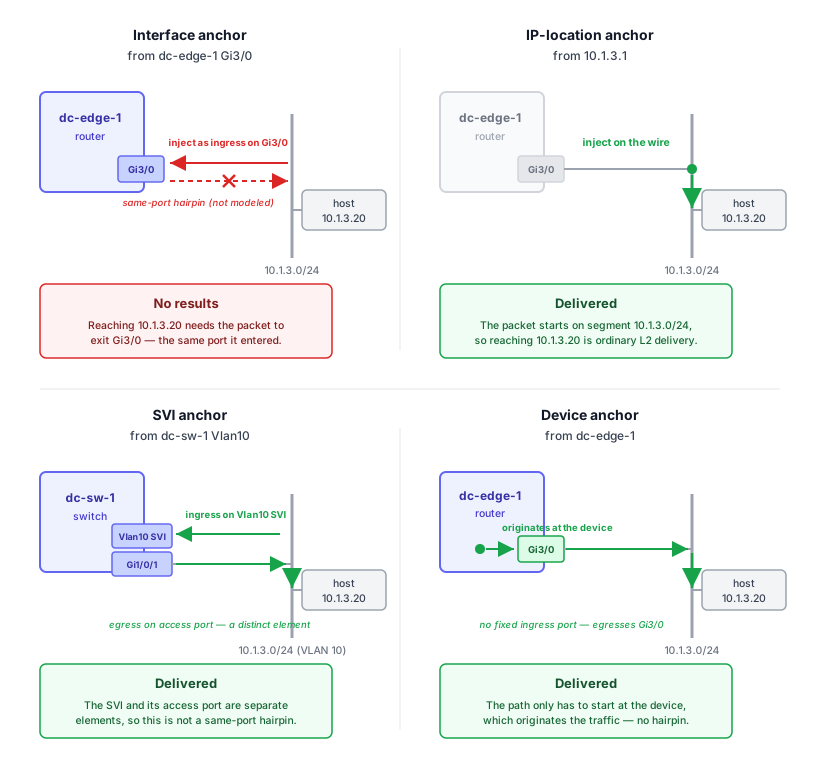
A path query whose source is a routed L3 interface and whose destination is a host on that interface's directly-connected subnet can return No results found, even though the host is reachable. The same destination returns a delivered path when the source is the IP-location anchor for that interface's address, or an SVI.
For example, take router dc-edge-1 whose interface Gi3/0 (10.1.3.1/24) faces subnet 10.1.3.0/24, with host
10.1.3.20 on that subnet:
| Query | Source anchor | Result |
|---|---|---|
from dc-edge-1 Gi3/0 → 10.1.3.20 | interface | No results |
from 10.1.3.1 → 10.1.3.20 | IP location | Delivered |
from dc-sw-1 Vlan10 → 10.1.3.20 | SVI | Delivered |
from dc-edge-1 → 10.1.3.20 | device | Delivered |
An interface anchor models the packet as ingressing the device on that port. For a destination on the ingress port's own subnet, the only delivery is back out the same physical port, and Path Analysis does not return same-port paths for unicast traffic — so the result set is empty. The IP-location anchor instead injects the packet at the address's location on the wire, where directly-connected delivery is an ordinary L2 path. An SVI source isn't affected because the SVI and its underlying access port are distinct elements in the model.
Sourcing from the device alone — from dc-edge-1, with no interface or IP — behaves differently again. It doesn't
pin an ingress port; it only requires the path to start at that device. There's no single physical port to hairpin out
of, so the same-subnet destination doesn't hit the interface-anchor problem.
A device anchor constrains only where the path starts, not what the packet looks like. It contributes no source
header values — it does not stamp the device's own interface IP or MAC onto the packet. Every source field you didn't
set is treated like any other unspecified field: source IP, source MAC, and destination port are wildcards that get
sampled for display, while fields covered by traffic defaults take their default (ip_proto resolves to TCP or UDP,
tp_src to 65000, and so on). If you need the source to look like traffic originated by the device, set ipv4_src
explicitly to one of its addresses.
What to try:
- Use the IP-location anchor instead of the interface. When you type an interface IP into the source field, the dropdown offers both the interface and the IP location — pick the IP location for a directly-connected destination.
- For a switched (SVI / access-port) topology, source from the SVI.
- To check reachability from the device without pinning an ingress port, source from the device alone
(
from dc-edge-1).
"No results found" is not the same as a dropped path
An empty result and a path that ends in dropped are different signals, and they point at different problems.
| Signal | What it means |
|---|---|
| No results found | The flow search returned nothing. Usually a query-shape problem: the anchor is too narrow, scope filters removed everything, or no flow matches the constraints (for example the interface-anchor / same-subnet case above). |
| Dropped path | A flow was found and traced; the trace ended at a drop with a specific reason on the offending hop (ACL, blackhole, NAT, route miss, etc.). |
No results means the network never had a flow to evaluate — it does not by itself mean the packet is dropped.
What to try:
- Loosen the anchor before concluding the traffic is dropped. Source from the IP location instead of an interface, or from just the device, or remove constraints.
- Use the permit all link in the empty-results panel to rule out policy.
- If the traffic really is dropped, the path reappears with a
droppedoutcome and a reason you can click into — see My path is dropped.
The forward path is delivered but the return isn't
The result panel shows both forward and return paths. The return path is collapsed by default under a "Return path" section; expand it to see the reverse direction. There is no automatic diff between the two — compare them by eye.
A delivered forward path with a non-delivered return points to asymmetric routing or asymmetric policy. Common causes:
- Reverse-direction ACL or firewall rule that the forward direction doesn't hit.
- Reverse path forwarding (RPF) check on a return-side interface.
- Different routing tables, VRFs, or zones in each direction.
- NAT in one direction not paired with the corresponding rule in the other.
What to try:
- Expand the return path and click any non-delivered hop on it. Apply the same approach as My path is dropped.
- If the return path differs in routing rather than policy, look at the device's IP route table or VRF mapping for the reverse direction.
A device is shown as missing from a path
When a collected device's CDP or LLDP neighbor table points to a device that wasn't included in the snapshot, the path-results panel displays a Missing from collection: section with the inferred devices. A banner above the diagram reads, for example, "1 device is missing from the collection."
What to try:
- Click See details on a missing device to see the CDP/LLDP neighbor entry Forward used to detect it.
- Click Add this device (when present) to pre-fill an Add Device form for the next snapshot collection. The link appears for users with permission to add and remove devices; if it's not visible, an admin needs to add the device.
- If multiple missing devices appear after the same hop, they represent alternative next hops the path could have ended at — not a chain of consecutive missing hops.
Some hops show parsing failures
When one or more devices in the path had parsing errors during snapshot processing, a warning banner above the diagram reads, for example, "2 devices have parsing failures." Hops on those devices are flagged with a warning color in the diagram.
A parsing failure means the model has incomplete configuration data for the device — analysis involving it can be inaccurate. Results are still shown, with the caveat that the affected hops may be incomplete. The banner's help callout states the same caveat and points to Forward Support; the flagged hops themselves carry no parsing detail beyond the warning color.
What to try:
- Treat any path that traverses a flagged device as provisional — the modeled forwarding for that hop may not reflect the real device.
- Contact Forward Support if the parsing failure is unexpected — they can investigate which configuration construct isn't being recognized.
A device or interface shows as unhealthy
The hop diagram overlays a health icon on devices and interfaces with elevated health-check thresholds. Hovering the icon shows "Unhealthy device" or "Unhealthy interface". The icon distinguishes severity (HIGH and MEDIUM) but does not otherwise change how the path is computed.
Path Analysis traces forwarding from the modeled network, which is built from both collected configuration and operational state (routing tables, ARP/MAC entries, and so on). The health overlay is a separate signal derived from SNMP-collected performance metrics — CPU, memory, interface utilization, and error/discard counters — and does not feed into the forwarding computation. A path can be delivered through an unhealthy interface — the model will still trace it.
What to try:
- Use the icon as a hint that the path's stability may be affected, even if the modeled outcome is delivered.
- Check the device's health detail (link in the hop details panel) to see which counter or check triggered the icon.
My path is delivered to the wrong location
A separate outcome, delivered to incorrect location, applies when a path terminates somewhere other than the modeled location of the destination anchor. Typically this means traffic is being forwarded to a device or VRF that owns a matching but unintended route — for example, a default route catching traffic that should match a more-specific route on a different device.
What to try:
- Open the final hop and read its forwarding decision — the route table entry, NAT rule, or similar that selected the egress. It names the device and table that made the decision.
- Trace upstream from the final hop, hop by hop, to find where the path diverged. At each hop, read the forwarding decision and check whether it sent the packet toward the wrong device. The first hop that forwards away from your expected destination is where the wrong turn happened — often a more specific or higher-priority route winning over the one you expected.
- If the destination anchor is an IP with more than one match in the network, the path may have started from an unexpected ingress. See The API picked a different ingress than I expected.
The API picked a different ingress than I expected
When a query references an IP, prefix, or hostname that resolves to multiple candidate locations, the GUI and API behave differently:
- GUI: The search bar prompts to pick from the candidate list ("Unable to locate a unique path source/destination. Pick an entry/end point:") and groups candidates by interface, attached subnet, and route.
- API: The path-search endpoint takes the query as-is and runs against every candidate. It doesn't pause to prompt; which path surfaces first depends on the search engine's path ordering, not on a per-anchor preference.
The resolution itself is segment-ordered: interface-attached subnets first (longest-prefix wins), then NAT (longest
prefix; only kept if it strictly beats the interface match), then synthetic Internet nodes, then routes. The route
segment doesn't narrow by prefix length — every overlapping route is kept, which is why a query against a /17 prefix
can return a path rooted at a device that owns only the matching /8 default route.
What to try:
- In the GUI: select the candidate explicitly from the disambiguation panel. The selection becomes part of the query
(
at()orin()clause) and is preserved when the URL is shared. - From the API: pass an anchor that resolves uniquely — a specific device or interface, or a more specific prefix.
For the full segment hierarchy and the resolution mechanics, see Reference → Anchor resolution.
A query returns no results one run, then works the next with no snapshot change
The same query, on the same snapshot, returns No results found for a stretch of time and then succeeds later without the snapshot being reprocessed. This is the search timeout interacting with result caching.
Path search has a per-search timeout (default 30 seconds, set in Settings → Preferences). When a search exceeds it, the result — including an empty one — is cached on the search worker. An identical query with the same parameters can pick up that cached timed-out result until the cache expires under its time- and size-based policies, so the query can report no results for hours and then run clean later. Timeouts near the true execution time are non-deterministic: a search whose real cost sits close to the limit times out on some runs and completes on others.
What to try:
- Force a fresh run without reprocessing. The cache key includes the timeout and the result limits, so changing any of
them by even one produces a miss and recomputes the search:
- In the GUI, edit Search timeout (seconds) or Max search results under Settings → Preferences → Advanced, then rerun the query.
- On the API, pass a different
maxSeconds,maxResults, ormaxCandidatesvalue on the path-search request.
- Raise the per-search timeout in Settings → Preferences if a snapshot consistently runs close to the limit.
- A timed-out search is marked as results incomplete in the Filters panel. If a snapshot consistently times out, contact Forward Support — they can confirm it in the search-worker logs and investigate the search performance.
from(<IP>) returns no results but from(internet) source-ip(<IP>) works
from(<ip>) tells the search to locate that address in the model and inject the flow where it lives. A public IP
that isn't on any interface or in a NAT pool normally locates at the Internet node, and the search runs as expected. If
that same address is the outside address of a NAT pool — say it sits in an edge firewall's SNAT range — it locates at
the firewall that owns the rule instead, since NAT is consulted before the Internet node.
The problem is broad prefixes, not single addresses. To locate a prefix at the Internet node, from(<prefix>)
requires the whole prefix to be public:
- The Internet node owns public address space minus the subnets it routes back to your sites.
- The wider the prefix, the more address space it sweeps in. A
/12spans about a million addresses, so it almost always overlaps a few hundred of those site-routed subnets — even though most of the range is ordinary public space. - Because part of the prefix belongs to sites, it isn't fully owned by the Internet node, so it doesn't locate there and
the search returns no results. A single public address inside that same
/12would locate fine.
from(internet) source-ip(<ip>) sidesteps the whole issue. It anchors ingress directly at the Internet node and carries
the address as the source header, so nothing has to be located — it works for any prefix length.
What to try:
- For traffic entering from outside the modeled network, anchor at the Internet node and set the address as a header:
from(internet) source-ip(<ip>). - If a broad
from(<prefix>)returns nothing, narrow to a single public address that isn't carved up by site routes, or switch tofrom(internet) source-ip(<prefix>). - A private or otherwise unmodeled address that locates nowhere — no interface, NAT, Internet node, or route — has no
ingress to start from. Confirm with a text search; if nothing is found,
from(<ip>)can't anchor. See Reference → Anchor resolution.
from(anywhere) returns fewer paths than I expected
from(anywhere) means from every device in the snapshot — Forward does not ground the specific source IPs you have
in mind. The search is bounded by the same result cap as any other query (5,000 candidates by default), so on a large
network anywhere hits that cap and returns a small, arbitrary-looking slice rather than the flows you're after — see
Understanding Results → Incomplete Results.
A specific source often returns more relevant (and longer) paths because the search isn't competing with every other
origin in the model for those slots.
What to try:
- Scope the source to a device or interface group when you have a known set of origins, rather than using
anywhere. - To express "from this set of IPs," anchor on the devices or interfaces those IPs sit behind;
anywherewon't restrict the search to the addresses you intend.
Anchoring a path on a NAT address (SNAT or DNAT)
A NAT device rewrites a header field as traffic crosses it. SNAT rewrites the source IP (and the source port under
PAT); DNAT rewrites the destination IP (and the destination port). At the NAT hop, the function panel labels the
operation Source NAT or Destination NAT and shows the rewrite as original → translated — for example
Source IP: 10.1.1.100 → 203.0.113.42.
Because both the pre- and post-translation addresses are modeled, you can anchor a query on either one, and where the path starts or ends depends on which you pick.
SNAT
An internal host 10.1.1.100 reaches 8.8.8.8 through edge firewall fw1, which SNATs to pool address 203.0.113.42.
The host's real address locates on its interface; the pool address isn't on any host — it locates at fw1, the device
that owns the SNAT rule.

from(10.1.1.100) to(8.8.8.8)starts at the host and crossesfw1, where the source is rewritten to the pool address.from(203.0.113.42) to(8.8.8.8)starts atfw1— the pool address is located there, not on a host.
A pool prefix works as a source anchor too, as long as you query the pool's own range or an address inside it: a
single pool address, the exact pool prefix (203.0.113.32/28), or a more specific sub-prefix all resolve to fw1. A
prefix broader than the pool does not — it isn't covered by the SNAT rule, so it skips the NAT match and resolves as
an ordinary public prefix (Internet node or routes) instead.
DNAT
An external client reaches public VIP 203.0.113.10 on load balancer lb1, which DNATs to backend server 10.1.1.50.
The VIP locates at lb1; the backend's real address locates on its own interface.

from(<client>) to(10.1.1.50)runs throughlb1and ends at the backend interface that owns the real address. The real address is a normal interface location, so this resolves cleanly and the trace shows the DNAT rewrite atlb1.from(<client>) to(203.0.113.10)is the case to be careful with — see below.
Anchoring on the VIP: use a header filter, not to()
A to() clause is a location anchor — the path must terminate where that address lives — and it does not resolve a
destination through DNAT. A VIP that exists only as a DNAT rule (not also configured on an interface) therefore may not
resolve as a to() target. To trace traffic to the service, set the VIP as a destination header filter on the
ingress packet instead, and let forwarding carry it through the DNAT:
from(<client>) ipv4_dst(203.0.113.10)   # ingress dst = VIP; DNAT rewrites it; path ends at the backend
from(<client>) to(10.1.1.50)            # terminate at the real server; path crosses lb1 with DNAT applied
The first form is the idiomatic one for a DNAT service: the packet enters with the VIP as its destination, lb1
rewrites it, and the trace follows through to the backend. This is the same from()-vs-to() placement rule covered in
Running Path Analysis → Placement Matters
— a header after from() constrains the packet as it enters, leaving translation free to happen along the way.
Tracing the reverse direction (service → client)
A natural next step is to trace the return direction by starting the query at the service:
from(203.0.113.10) to(<client>). This usually won't do what you expect. The from() clause resolves a source against
real source locations and post-SNAT pool addresses — it does not resolve a DNAT VIP. A VIP is the pre-translation
destination of a DNAT rule, not a source the model can ground traffic at, so from(VIP) finds nothing to anchor
(unless the VIP also happens to be a real interface or routed address, in which case it grounds there — not via the NAT
rule). The query then either returns no results or starts somewhere unexpected.
To trace the return path, anchor on the real server and let the model apply the reverse translation:
from(10.1.1.50) to(<client>) # return traffic from the backend; lb1 applies reverse DNAT
The backend's real address is a normal location, so the path starts there cleanly, crosses lb1 where the source is
rewritten back to the VIP, and continues to the client. Forward also models forward and return paths together for a
single query — see
Understanding Results → Return Path rather than
building the reverse trace by hand.
What to try:
- Anchor on the pre-NAT (real) address when you want the flow to start or end at the host's actual location and let the path cross the NAT device in the trace.
- For a SNAT pool address as a source, anchor it with
from()— it locates at the SNAT device. - For a DNAT VIP as a destination, set it as a header filter after
from()(ipv4_dst(<vip>)) rather than as ato()anchor, so the path follows the translation through to the backend. - If a post-NAT address grounds at an unrelated co-located interface rather than the NAT device, capture the query and the text-search (location) result and file it with Forward Support.
The sample packet's source IP isn't an address on the source device
When you anchor on a device by name — from dc-edge-1, with no interface or IP qualifier — Path Analysis doesn't
choose a source IP for you. This is about how you wrote the anchor, not the device's role: it applies to any device you
source from this way, including a fully routed L3 switch or router, not just an L2 switch with no addressed interfaces.
The device anchor only requires the path to start at that device and contributes no source header values, so Path
Analysis returns every flow originating there — up to the result cap (5,000 candidates by default). A broad query can
surface a sample packet whose source address isn't configured on the device or on any host behind it.
What source IP ends up in the header: ipv4_src is left wildcarded, so the sample packet shows one arbitrary address
sampled from the open source-address space — like any other unset field (see
The sample packet shows a header value I never set). It is
not the device's own interface IP — the device anchor never stamps that. The displayed source address carries no
meaning on its own; it's just one representative of the set the search was free to pick from.
What if the sampled source address is discovered somewhere else in the network?
The sampled address can even be one that's configured or discovered somewhere else in the network — an address whose home is a subnet on a different site, entering at an edge port with an unrelated subnet. That looks wrong, but it isn't: an edge port isn't limited to traffic from its own subnet. Any edge interface can carry transit traffic sourced from anywhere, so the search admits the full source-address space at that ingress. The only addresses it excludes are ones known to be located at another edge port in the same LAN segment — those are pinned to where they live, so they can't enter here as well. An address with no such known location stays admissible at every edge port, so the sample packet the search displays can use it as the source. This is expected: the anchor pinned where the path starts, not which source addresses may start there.
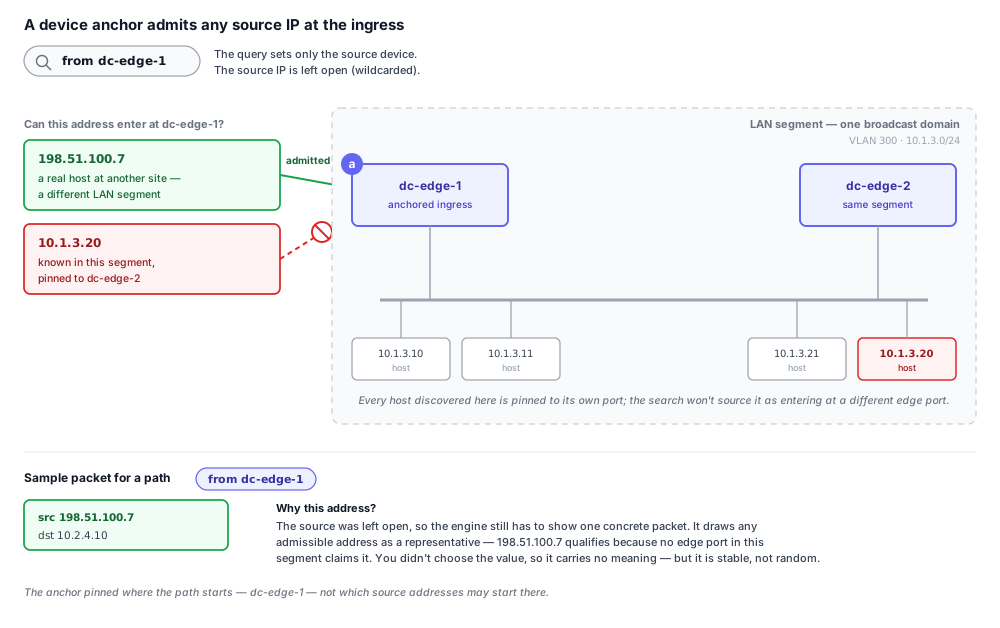
The path does correspond to that displayed source — it's a real admissible packet the search traced. But the address isn't a claim that this host actually sends the traffic. The search never checks that the anchor device can route back to that source, and the address need not be configured or discovered anywhere. To reason about a specific source, set it in the query.
What to try:
- Add a source header filter (
ipv4_src(<address>)) or anchor from the IP location to constrain the source to the address you mean. - For why an unset field takes an arbitrary value, see The sample packet shows a header value I never set.
Can I trust a result marked incomplete?
An incomplete marker — a + after the path count, or "incomplete, please refine your search" — means the search hit
the candidate-path cap (5,000 by default, 10,000 maximum in the GUI) before it finished exploring the model.
Whether the truncation matters depends on what filled the cap. The cap counts paths, not flows: if the capped paths all carry the same traffic, truncation drops duplicates and the top result still holds; if they carry genuinely different traffic, the path you want may never have been reached. The next two sections explain how to tell which case you're in.
Two things multiply candidate paths:
- Topology — equal-cost and redundant routing. One flow can traverse the network by many device sequences (ECMP, parallel links, redundant cores). Each distinct sequence is a separate candidate path, even though they all carry the same traffic.
- Header space — the set of packets your query describes. Any field you leave open, or any field a device splits on (app-id, URL category, user group, a port range), divides the traffic into sub-flows that each generate their own paths.
That gives two regimes:
- Narrow header space — the query pins the packet down to essentially one flow (a single source and destination address with the protocol and ports set). The cap then fills almost entirely with topology variants of that one flow: redundant equal-cost paths, all valid for the traffic you asked about. Truncation drops duplicates, not the answer, so the top-ranked result is trustworthy. (A query that pins the source to a single address and the destination to a single address, with the protocol and ports set, is the extreme of this — but a wider prefix whose addresses all route the same way behaves identically.)
- Wide header space — the query leaves addresses, ports, or L7 fields open, so it admits many genuinely distinct flows. The cap can be reached while enumerating paths for flows you don't care about, before the search ever produces the one you do — so the path you're looking for may never be ranked or shown.
permit-all always produces more paths than the default mode for the same query, because it traces traffic downstream past firewalls that would otherwise have dropped it; the higher count by itself doesn't indicate a problem.
What to try:
- Narrow until the result completes: pin the egress with
through()(a device or interface), constrain the source with a MAC, or set open header fields —ip_proto,tp_dst, and any L7 field (app_id,url_category) that's splitting the traffic. See Results look incomplete. - The published paths API enforces the same candidate cap as the GUI, so automation that needs an exhaustive result is subject to the same limit.
Why is only one return path shown?
Forward computes one return path by default, selected in this order:
- The reverse of the forward path, ending at the forward query's ingress port.
- Any path ending at that ingress port.
- Any return path.
Confidence in the first return path is high for most flows. The Load more paths control for the return path is available only with debug features enabled; with it on, Forward computes up to 5,000 return hits and ranks and groups them with the same criteria used for forward paths.
What to try:
- If the displayed return path doesn't match the direction you're troubleshooting, turn on Enable debug features under Settings → Preferences → Advanced, then use the Load more control on the return path to compute and browse the alternatives. The toggle requires the permission to view collected files.
- There is no automatic diff between forward and return — see The forward path is delivered but the return isn't.
Can I check whether a specific firewall rule denies traffic?
Path Analysis doesn't target an individual firewall rule directly — there's no "through this rule" selector. What you
can do is craft a query whose header matches the rule's match conditions and read the outcome at the firewall hop. A
firewall denial surfaces as a dropped outcome; status(dropped) covers firewall-denied flows, not only ACL drops.
Say the rule you want to exercise denies TCP/443 from the 10.1.0.0/16 user subnet to server 10.2.5.10. Turn those
match conditions into the query directly:
from(10.1.0.5) to(10.2.5.10) ip_proto(tcp) tp_dst(443)
Set every field the rule keys on. Leaving one open lets the search sample a value that might miss the rule (or hit a
different one) — see
The sample packet shows a header value I never set. If the rule
also matches an app-id or URL category, add app_id(<x>) or url_category(<x>). Run it and click the firewall hop: a
dropped outcome with See device state pointing at that rule confirms the rule denies this traffic; a
delivered outcome means the traffic clears the firewall (an earlier permit rule won, or the deny didn't match).
Pinning the drop to one firewall. To see only paths that drop at a particular firewall, anchor the destination on
that device — to(fw-edge-1) — and filter to dropped:
from(10.1.0.5) to(fw-edge-1) ip_proto(tcp) tp_dst(443) status(dropped)
to(<device>) makes that device the path's last hop, and for a dropped flow the last hop is the dropping device, so
this returns exactly the flows that die there. Don't reach for through(fw-edge-1) to do this: through() requires the
device to be a transit (non-terminal) hop, so it can never match a flow that dies at that firewall — it returns paths
that pass through it and drop somewhere downstream instead.
What to try:
- Build the query from the rule's match conditions (source, destination, port, protocol, app-id), setting each field explicitly, and watch the firewall hop's outcome.
- To constrain the drop to a specific firewall, anchor it with
to(<device>)and addstatus(dropped)— notthrough(). - Click the firewall hop and use See device state to confirm which rule matched.
A path diff's compared side shows fewer groups than the search did
The diff answers "for this specific entry point, how do the paths differ between the two snapshots?" — not "how do the full result sets compare?" So its group counts are scoped to the path you selected and aren't meant to match the standalone search's count. Comparing the two directly is apples to oranges.
Here's the situation that surfaces it. You run a query — say from(10.1.0.0/16) to(10.2.5.10) — in the current snapshot
and get 8 path groups. You select one of them and open the diff against another snapshot. The compared snapshot lists
only 3 groups, and it looks like 5 paths disappeared. They didn't.
The 8 is a full search: it covers every ingress the query allows — every source in 10.1.0.0/16, across every
first-hop device those sources enter — and groups all the resulting paths together.
The 3 is not that same search re-run on the other snapshot. When you open a diff, Forward takes the single path you selected and re-searches the compared snapshot constrained to just that path's ingress: the same first-hop device, the same ingress ports, the same ingress header space. So the compared side only shows the groups reachable from that one ingress — naturally a subset of the 8, which spanned all of them. Select a different base path and the diff re-searches from its ingress, giving a different count again.
A second, unrelated cause: the diff search obeys the same candidate-path limit as a normal search. If it hits the cap or times out, the compared side is truncated and shows a "+" or incomplete marker — fewer groups are materialized than actually exist.
What to try:
- Read the diff's group counts as scoped to the selected path's ingress, not as a re-count of the full search. To compare a different path, select it first, then open the diff.
- Check whether the compared side is marked incomplete; a capped or timed-out diff search truncates its groups — see Can I trust a result marked incomplete?.
- If a group you expect on the compared side is genuinely gone (not merely outside the selected ingress's scope), that's a real routing or policy change between the snapshots — which is what the diff is for.
- If the counts still look wrong after accounting for ingress scope and the cap, capture both snapshots and the query for Forward Support.
Can I set an at location through the API?
Partly. The published paths API has a from parameter that pins the source to a named device, which is the
equivalent of the GUI's at(device) on the source anchor: pass from with the device name and srcIp with the
address, and the search injects that source at that device instead of resolving the address to every candidate ingress.
There is no equivalent for the other cases the GUI's at()/in() cover: no way to pin the source to a specific
interface (the from parameter takes a device, not an interface), no destination-side pin, and no in(logical-network)
parameter. For those, the API resolves the anchor on its own and runs against every candidate location.
What to try:
- To pin the source ingress, pass
from(device) together withsrcIp(address) on the path-search request. - For a destination, or when device-level source pinning isn't enough, pass an anchor that already resolves uniquely — a specific device or interface, or a more specific prefix.
- See The API picked a different ingress than I expected for how the API resolves multi-candidate anchors.