Model Providers
On a self-hosted deployment, Forward AI runs on an Anthropic Claude model in your own AWS account, accessed through Amazon Bedrock. The Model providers integration holds the Bedrock connection, the credentials Forward uses, and the model settings. Forward AI is unavailable on a self-hosted deployment until a model provider is set up and active.
The active model provider serves every AI feature on the deployment:
- Forward AI conversations, including NQE query generation and NQE documentation answers.
- The AI summaries on the Run Predict analysis step of Predict.
- The MCP server tools marked Requires AI.
Forward sends prompts and tool results to the model in your AWS account. See Data sent to the LLM.
Prerequisites
| Requirement | Details |
|---|---|
| Role | Org Admin. Only an Org Admin can open Settings > System > Integrations. |
| Forward AI setting | Available for all users is on in the Forward AI section of Org preferences. If it is off, the Model providers row asks you to activate Forward AI first. |
| AWS account | An AWS account with Amazon Bedrock access to the supported Claude Sonnet model in the region you plan to use. Forward calls the model through a system-defined cross-region inference profile, so Amazon Bedrock can process a request in a region other than the one you select. See 5. AI Capabilities. |
| AWS credential | An IAM user access key and secret access key (recommended), or a long-term Bedrock API key. |
| IAM permissions | The Forward policy, attached to the IAM identity behind the credential. The setup wizard shows the policy. See Required IAM Permissions. |
| Network access | The Forward deployment reaches the regional Amazon Bedrock endpoint, directly or through an outbound proxy. |
| Documentation retrieval | Optional. Access to the supported Amazon Titan Text Embeddings model in the same account and region lets Forward AI answer NQE documentation questions. |
Supported Models
Setup requires access to these exact Amazon Bedrock models. Access to a different Claude Sonnet or Titan version does not complete setup.
| Use | Model | Model ID |
|---|---|---|
| Forward AI chat | Anthropic Claude Sonnet 4.6 | anthropic.claude-sonnet-4-6 |
| Documentation retrieval | Amazon Titan Text Embeddings V2 | amazon.titan-embed-text-v2:0 |
Forward calls Claude Sonnet through an inference profile, so the resolved model ID adds a prefix, such as
us.anthropic.claude-sonnet-4-6. See 5. AI Capabilities.
Set Up Amazon Bedrock
- Navigate to Settings > System > Integrations and look for Model providers.
- Click Set up. The Model providers drawer opens with No custom models configured.
- Click Set up Amazon Bedrock. The Set up Amazon Bedrock wizard opens. Complete its six steps, described below.
Click Cancel at any step to close the wizard without saving.
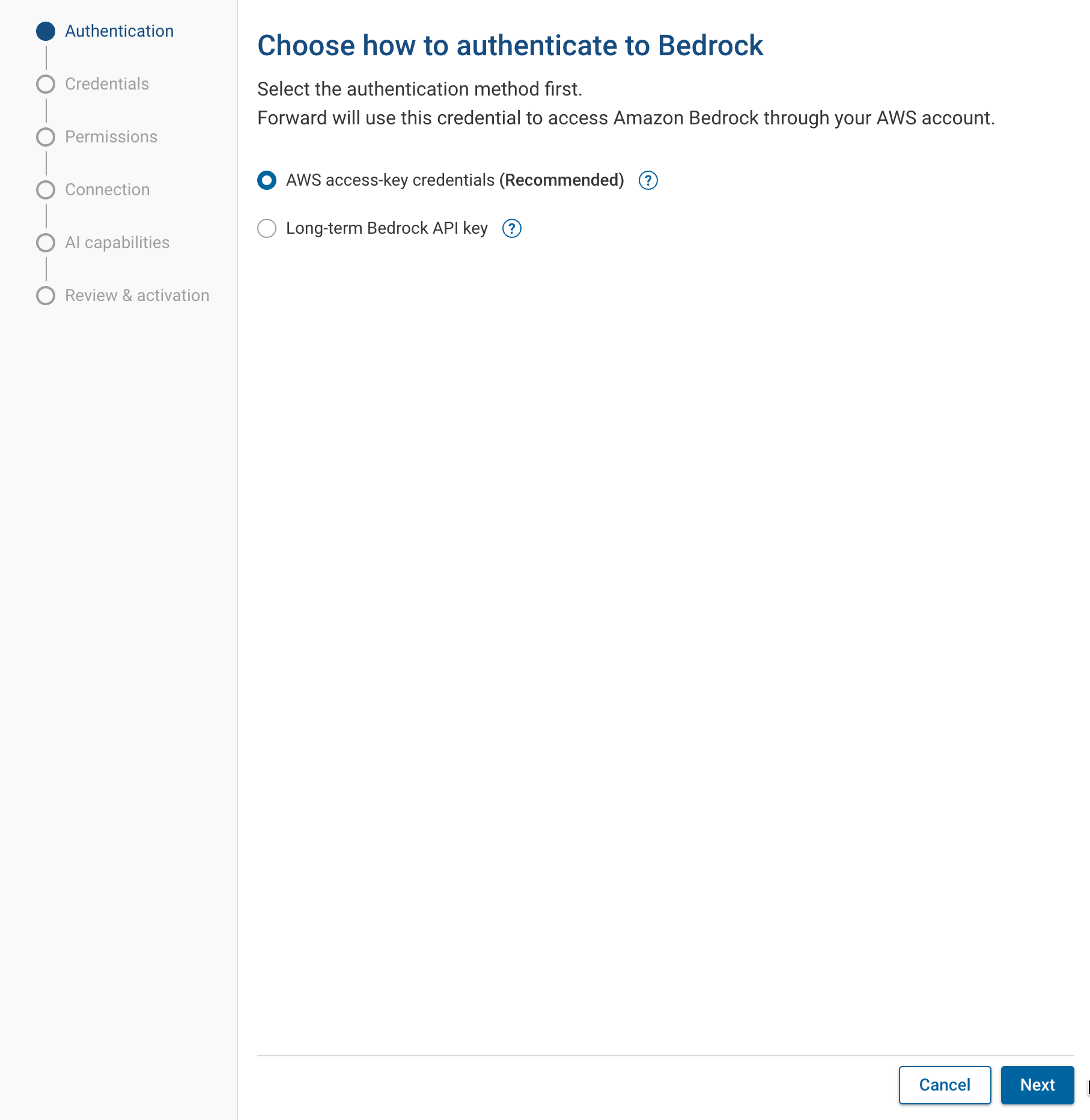
1. Authentication
Select how Forward authenticates to Amazon Bedrock:
| Option | Credential | Notes |
|---|---|---|
| AWS access-key credentials (Recommended) | An IAM user access key ID and secret access key. Forward signs each Bedrock request. | Use for production. |
| Long-term Bedrock API key | A long-term Bedrock API key that Forward sends as a bearer token. | The option shows Not recommended for production. Long-term API keys expire and must be rotated manually. Forward detects an expired or revoked key only when a health check or AI request fails. |
2. Credentials
Enter the credential for the method you selected:
| Field | Method | Description |
|---|---|---|
| AWS account ID | Both | The 12-digit ID of the AWS account that owns your Bedrock access. |
| Access key ID | Access key | The access key ID of the IAM identity that the Forward policy is attached to. |
| Secret access key | Access key | The secret access key paired with the access key ID. |
| Bedrock API key | Bedrock API key | The long-term Bedrock API key generated in the AWS console. |
For a Bedrock API key, the step lists the AWS console instructions to generate one: in Amazon Bedrock, open API keys, select Long-term API keys, choose Generate long-term API keys, choose an expiration time, and copy the key. AWS shows the key only once.
Forward stores the credential on the Forward server. After you save it, the UI and the API never return the secret access key or the Bedrock API key.
3. Permissions
The step shows the Forward IAM policy as JSON for the selected method. Copy it and grant it in AWS before you continue:
- Access key: in IAM, create a policy from the JSON and attach it to the IAM user that owns the access key.
- Bedrock API key: in Amazon Bedrock API keys, select the key and choose Manage in IAM Console. Remove the
AmazonBedrockLimitedAccesspolicy, then add the Forward policy as an inline policy. The Forward policy limits the key to the Bedrock access Forward needs.
This step does not test the policy. Test connection and Test model access in the next steps fail if a permission is missing.
4. Connection
| Field | Description |
|---|---|
| AWS region | The region whose Bedrock endpoint Forward calls. The supported Claude Sonnet model must be available through an inference profile in this region. |
| Custom Bedrock endpoint | Optional, under Advanced settings. An endpoint URL to use instead of the regional endpoint, for a VPC endpoint, PrivateLink, a FIPS [Federal Information Processing Standards] endpoint, or an organization gateway. |
| Enable proxy | Optional, under Advanced settings. Turn it on and enter the proxy URL, such as https://proxy.example.com:3128. |
| Verify certificate | Shown for an https:// proxy URL. Controls whether Forward verifies the proxy's TLS certificate. |
Click Test connection. The test must show Connection successful before you can continue. Changing the region or the connection settings after a successful test requires a new test.
5. AI Capabilities
| Setting | Description |
|---|---|
| Model tier | The Claude model tier for Forward AI. Claude Sonnet is the supported tier. Forward can switch to a newer Claude Sonnet model without a configuration change. The AWS account then needs access to the newer model, or requests fail. |
| Documentation retrieval | Use this AWS account (with Amazon Titan Text Embeddings) or Turn off retrieval (chat remains available without documentation answers). Forward AI uses retrieval to answer NQE documentation questions. With retrieval off, Forward AI does not answer them. |
Click Test model access. On success, the step shows Model access verified and the model ID Forward resolved for the region. The test sends a small request to the model and uses a few tokens.
The prefix of the resolved model ID names the inference profile that Amazon Bedrock routes requests through:
| Prefix | Where Amazon Bedrock can process a request |
|---|---|
global. | Any supported commercial AWS region. |
A geography, such as us or eu | A supported region in that geography. |
The test uses the first inference profile that the Forward policy allows. To keep requests in one geography, limit the
inference-profile resource of the bedrock:InvokeModel statement in the policy to that geography's profiles, such as
arn:aws:bedrock:*:*:inference-profile/us.*. See Required IAM Permissions.
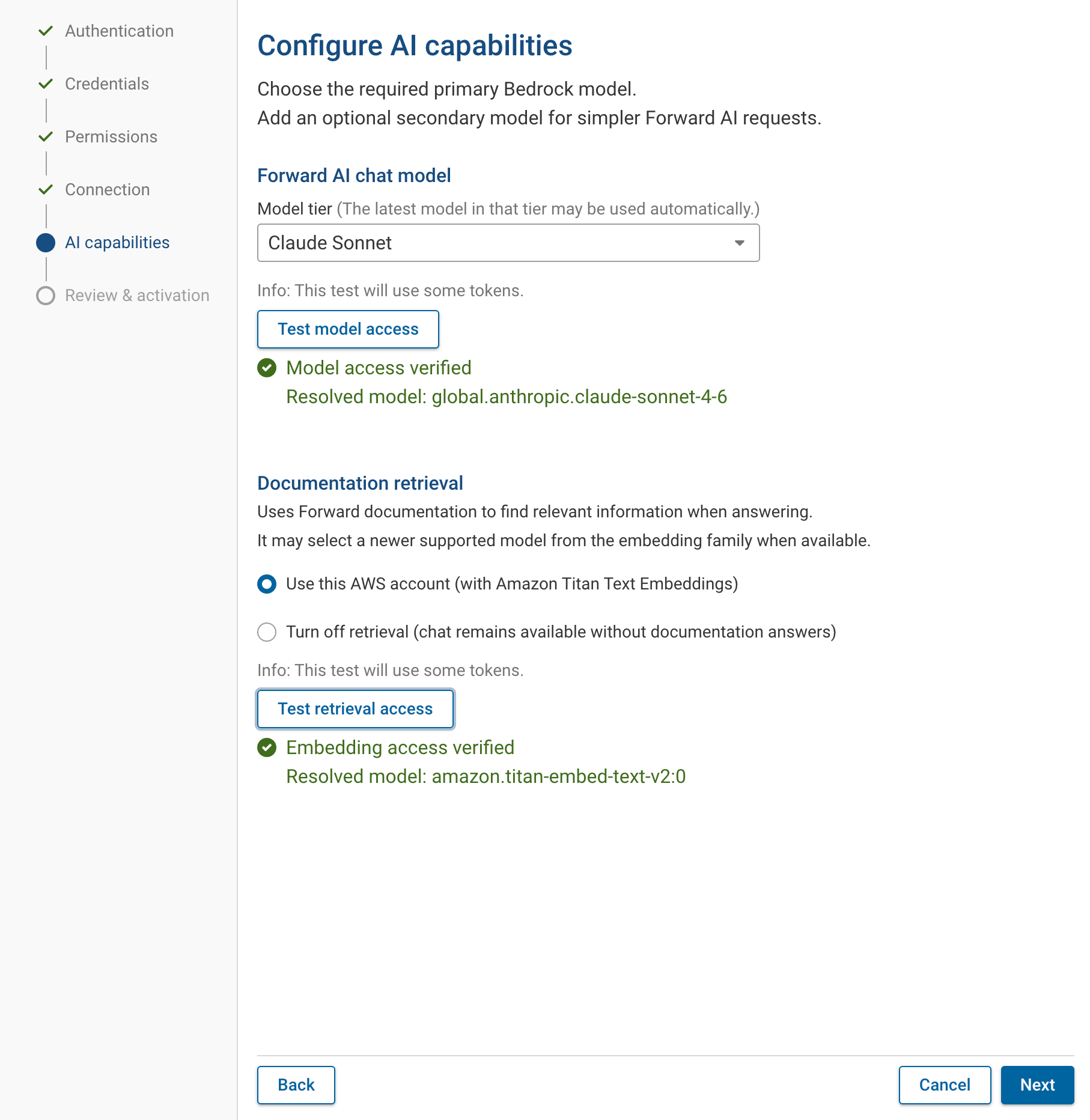
When Amazon Titan Text Embeddings is not available in the account and region, the Use this AWS account option is disabled and shows Model not present on AWS. Turn off retrieval, or enable Titan in AWS and test again. Otherwise, click Test retrieval access and wait for Embedding access verified.
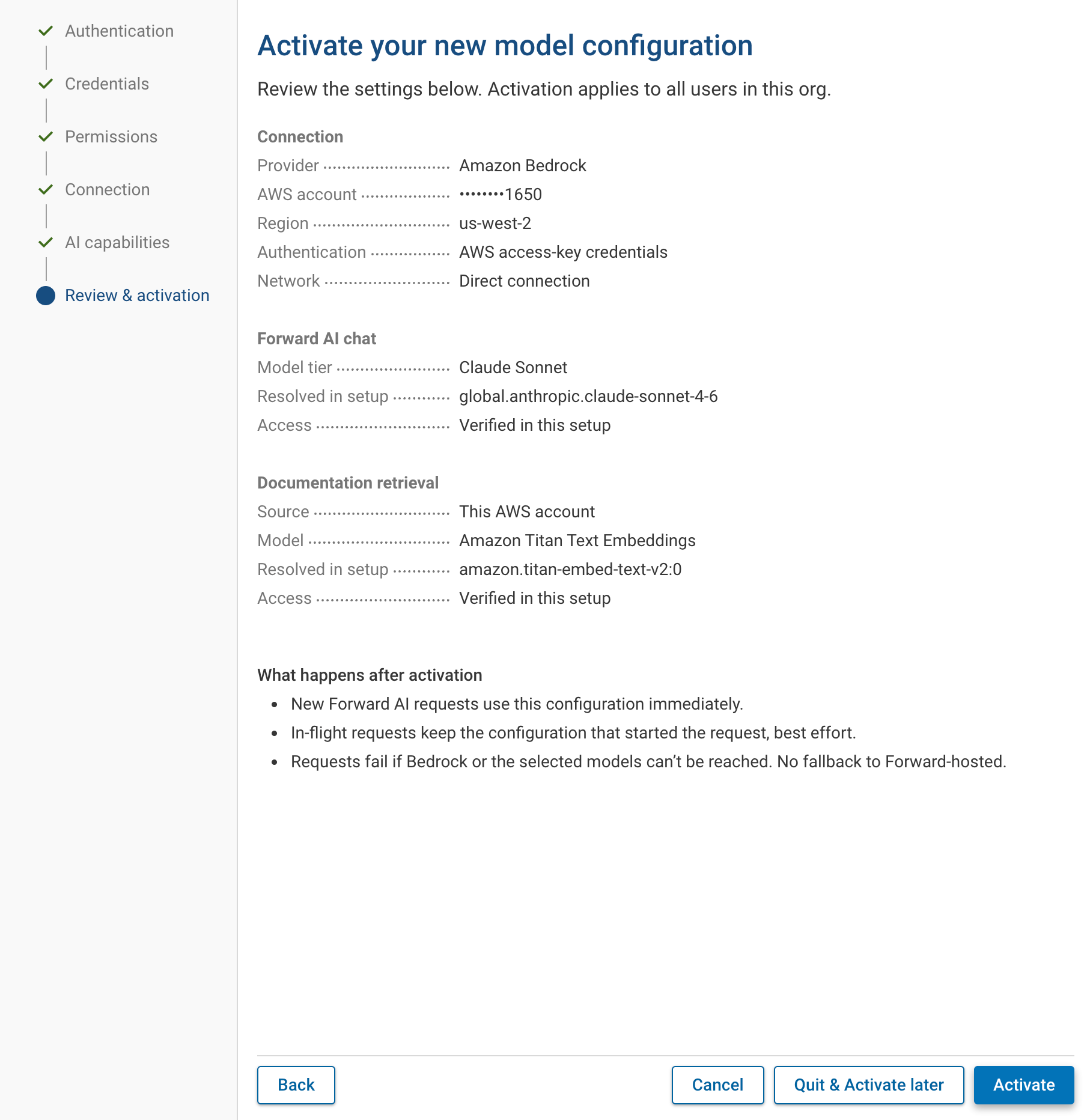
6. Review & Activation
The step summarizes the connection, the chat model, and documentation retrieval. Activation applies to every user on the deployment.
| Button | Result |
|---|---|
| Activate | Saves the model provider and makes it active. Forward AI becomes available. |
| Quit & Activate later | Saves the model provider without activating it. Activate it later from the Model providers drawer. |
After activation:
- New Forward AI requests use the configuration immediately.
- A Forward AI reply in progress switches to the new configuration at its next model request. A model request that is already running finishes with the previous configuration.
- Requests fail if Forward cannot reach Amazon Bedrock or the selected models. Forward does not fall back to another model.
Required IAM Permissions
The Forward policy grants these Amazon Bedrock actions. The wizard shows the full JSON for the method you selected.
| Action | Resource | Purpose |
|---|---|---|
bedrock:InvokeModel | Foundation models and inference profiles | Send Forward AI requests and embedding requests. |
bedrock:InvokeModelWithResponseStream | Foundation models and inference profiles | Granted so the policy covers streamed responses without a later change. Forward does not call it. |
bedrock:ListInferenceProfiles | Inference profiles | Discover the inference profile for Claude in the region. |
bedrock:ListFoundationModels | All | Discover Amazon Titan Text Embeddings. |
bedrock:CallWithBearerToken | All | Bedrock API key method only. Allows bearer-token calls. |
Manage the Model Provider
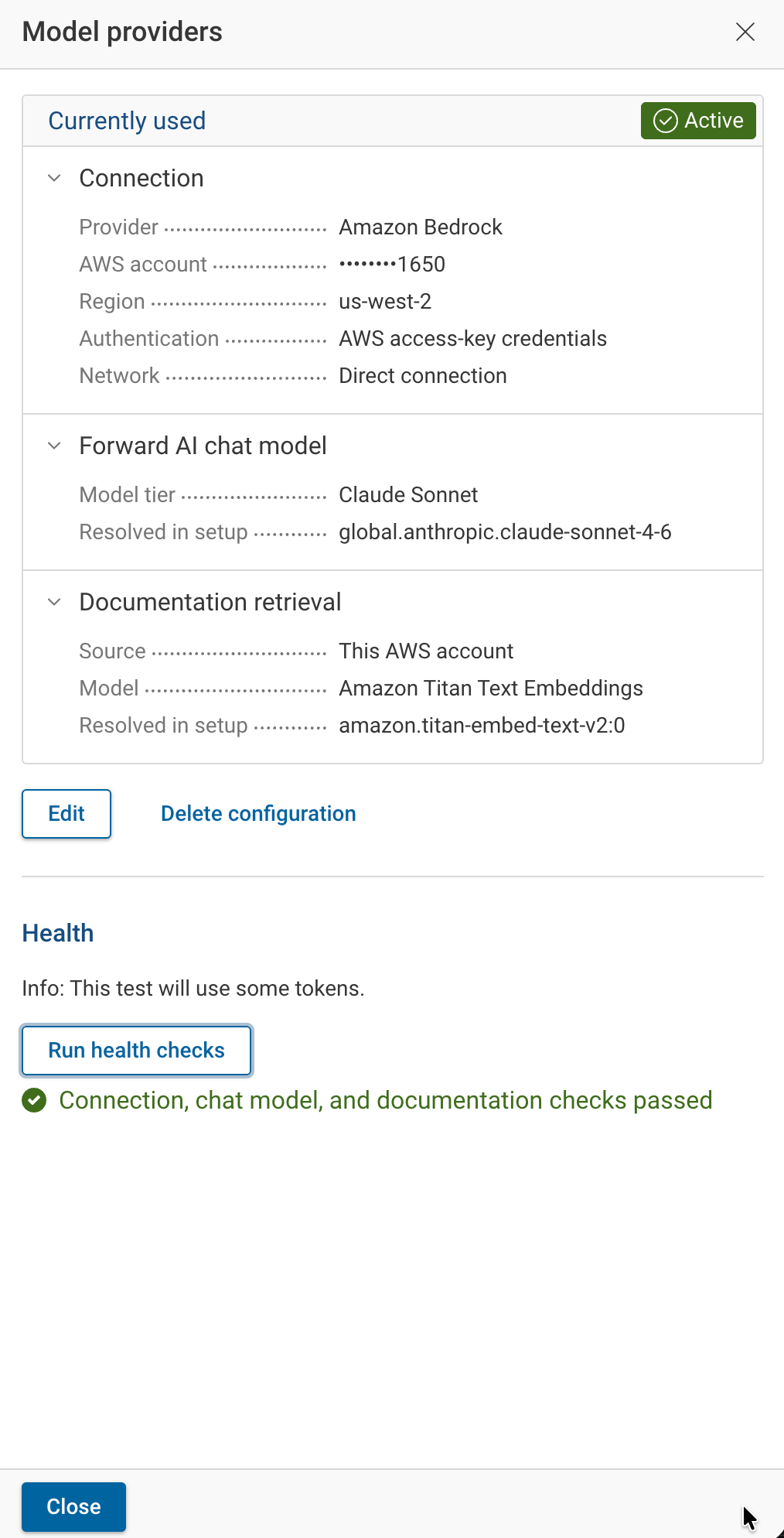
After setup, the Model providers row shows an Enabled switch. Click Configurations to open the Model providers drawer. The drawer shows the provider as Currently used with an Active tag, or as Ready to use with an Inactive tag, and lists its settings:
| Section | Shows |
|---|---|
| Connection | Provider, masked AWS account, region, authentication method, and direct or proxy connection. |
| Forward AI chat model | Model tier and the model resolved during setup. |
| Documentation retrieval | This AWS account with Amazon Titan Text Embeddings and the model resolved during setup, or Retrieval is turned off. |
The drawer has these actions:
| Action | Result |
|---|---|
| Activate | Shown for an inactive provider. Makes it active. |
| Edit | Opens the wizard with the saved settings. Leave a credential field blank to keep the saved credential. Finish with Save & Activate or Save & Activate later. |
| Run health checks | Tests the connection, the chat model, and documentation retrieval with live requests, which use a few tokens. When every check passes, the drawer shows one success message. When a check fails, the drawer lists each check with Reachable or its error. |
| Delete configuration | Deletes the provider settings. Deleted settings can't be recovered. |
Disable or Delete
- Disable: turn off the Enabled switch on the Model providers row and confirm Disable in the Disable Forward AI for all users? dialog. Forward AI is unavailable to every user until a model provider is enabled again. The settings are kept, and the row shows Delete settings.
- Delete: click Delete settings on a disabled row, or Delete configuration in the drawer. Deleting the active provider disables Forward AI for all users first. Forward AI stays unavailable until a new model provider is set up.
Troubleshooting
Test and Health Check Errors
Tests and health checks show these errors:
| Message | Action |
|---|---|
| The credentials are invalid, expired, or revoked. | Generate a new access key or Bedrock API key and enter it with Edit. |
| Access denied: the credentials are invalid or lack the required Bedrock permissions. | Attach the Forward policy to the IAM identity, or check that the API key is valid. |
| The requested model is not available in this account and region. | Enable access to the supported models in Amazon Bedrock for the account, or select a region where they are available. |
| No supported chat model is available through an inference profile in this account and region. | Select a region with an inference profile for the supported Claude Sonnet model. |
| Could not reach the Bedrock endpoint. Check the endpoint, network, and proxy settings. | Check that the deployment can reach the Bedrock endpoint, the custom endpoint URL, and the proxy settings. |
| The Bedrock request failed. Check the connection settings and try again. | Run the test again. Check for Bedrock quotas and throttling. If it keeps failing, contact Forward support. |
When Forward AI is on in Org preferences but no model provider is active, the Forward AI section of Org preferences shows: "Set up your own LLM models on the Integration page. Forward AI isn't available until setup is complete."
Bedrock Quotas and Throttling
Forward AI requests count against the Amazon Bedrock quotas of your AWS account, such as tokens per minute and requests per minute for Claude Sonnet in the selected region. AWS bills the account for the tokens used. Forward does not apply its own token limit or show token usage for a model provider.
When the account exceeds a quota, Amazon Bedrock rejects requests. Forward retries a rejected request with increasing delays. If Bedrock still rejects it, the request fails:
| Where | Result |
|---|---|
| Forward AI conversation | The reply reads "Something went wrong while answering this. Please try again in a moment." |
| Predict Insights | The affected summary shows No summary available. |
| Health checks and tests | The check shows "The Bedrock request failed. Check the connection settings and try again." |
The same results appear for other Bedrock failures. To confirm throttling, check the Amazon Bedrock invocation metrics in Amazon CloudWatch for the account and region. To raise the limits, request a quota increase for the Claude Sonnet model in the Service Quotas console. Requests succeed again once usage is back under the quota.