Log Files
This page provides a brief description of several ways to export data from a running Forward system.
Your Forward support team may ask you to provide a collected Snapshot or log files to diagnose an issue.
The API endpoints referenced in this page are not published in the Forward API docs and are subject to change.
Snapshot Download
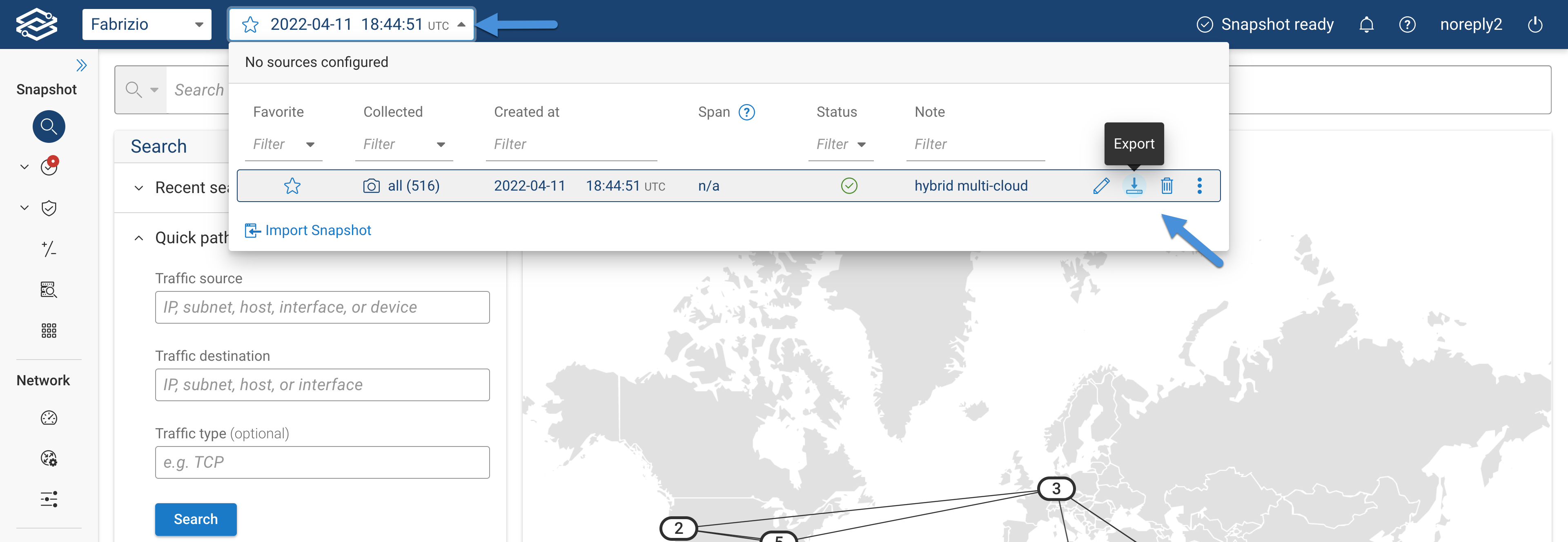
Scroll to the needed Snapshot from the Snapshots list, then click on the Export icon.
Forward Collector Logs
Instructions to retrieve collector logs can be found here: Collector Logs
Forward Platform System Logs
The Forward support team may ask users to retrieve and share the Forward Platform System Logs from Forward UI and some additional system logs.
System Logs from Forward UI
The system logs from Forward UI are available for on-prem deployments only.
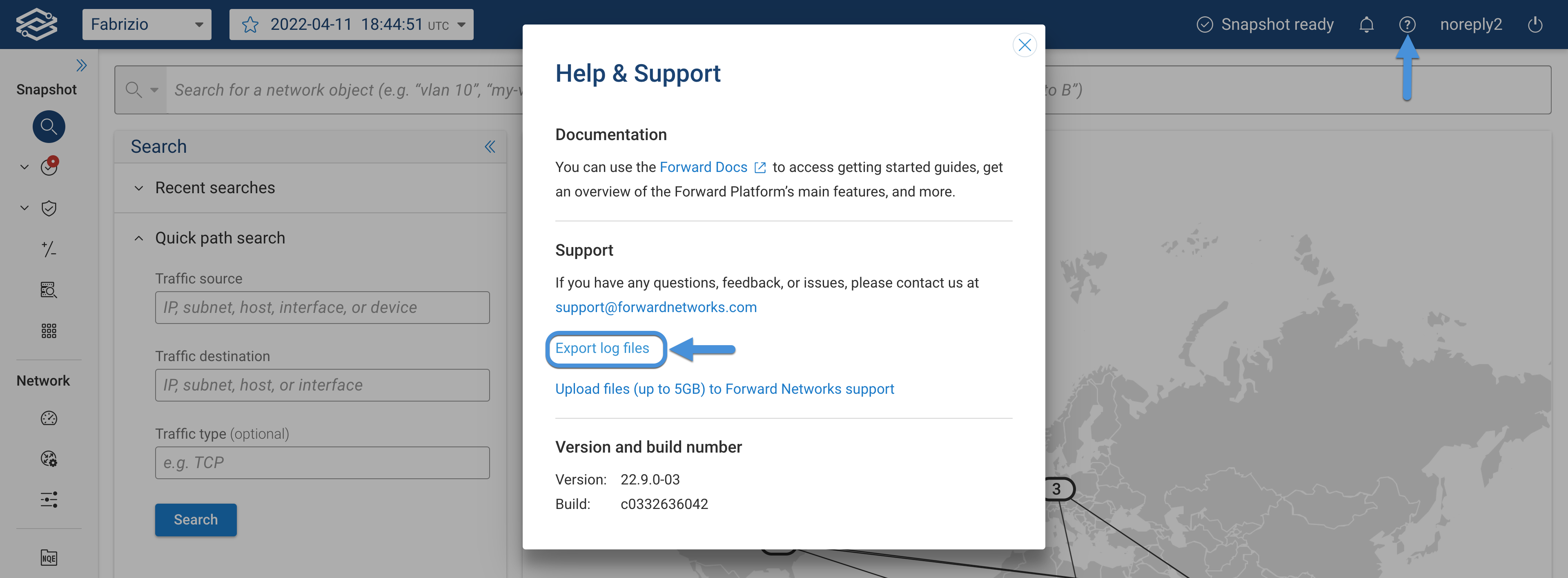
Org admins can export logs from the Export log files dialog, which can be accessed from the Help & Support dialog.
The Export log files dialog allows users to customize the logs included in the export.
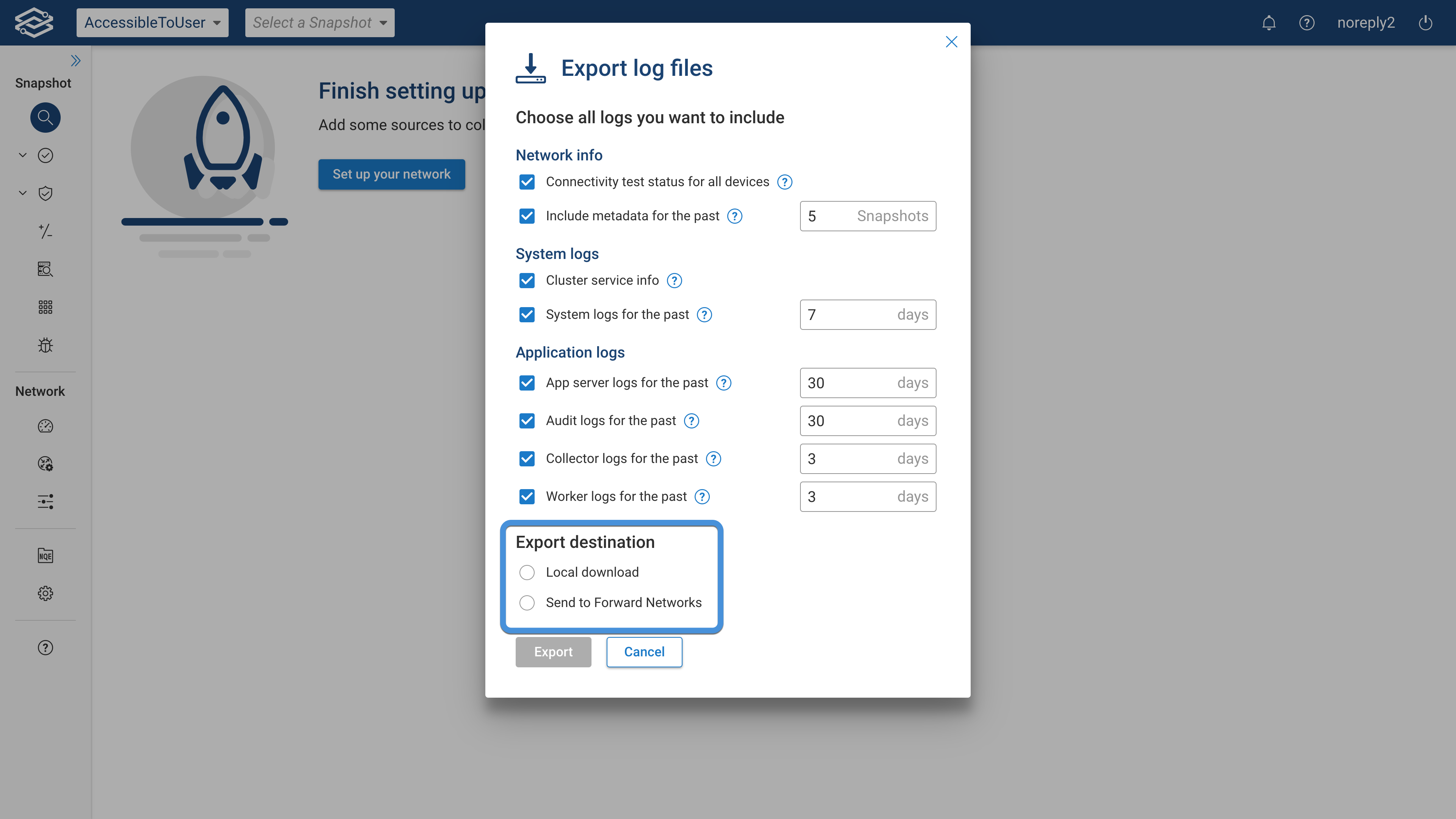
Users can select one of the following Export destination options:
- Local download: the downloaded file can be shared with the Forward support team via e-mail.
Contact the Forward support team if the file size exceeds max-attachment size of your email provider.
- Send to Forward: the logs will be sent to an Amazon AWS S3 bucket owned by Forward via the
https://uploads-forwardnetworks.s3.amazonaws.comURL.
The file upload is sent via the user's browser, so only the browser needs to be able to reach Amazon AWS S3, not the Forward App server.
Forward http access logs to a syslog server
The Forward Enterprise http access logs can be forwarded to any external syslog server (e.g. Splunk) via this REST API url
https://YOUR_VM_IP/api/vm/admin/syslogConfig
The table below provides some information on events present in the access logs.
| Event | Description | Example Log Entry |
|---|---|---|
| AUTHENTICATION_SUCCESSFUL | User successfully authenticated | 2020-12-15T01:14:17.976Z INFO | t=AUDIT | ev=AUTHENTICATION_SUCCESSFUL | u=test@test.com | addr=10.131.0.3 |
| AUTHENTICATION_FAILED | Failed authentication attempt | 2020-12-15T01:09:21.459Z ERROR | t=AUDIT | ev=AUTHENTICATION_FAILED | u=boo | addr=10.131.0.3 | url=/login | d=Bad credentials |
| LOGOUT | User logged out (including session timeouts) | 2020-12-15T01:11:53.780Z INFO | t=AUDIT | ev=LOGOUT | u=forward | ur=FN_ADMIN | addr=10.131.0.3 |
| UNAUTHORIZED | User doesn’t have access rights to a specific web page or endpoint | 2020-12-15T01:18:14.445Z ERROR | t=AUDIT | ev=UNAUTHORIZED | u=test@test.com | addr=10.194.19.217 | url=/api/orgs/current/users/2fa | d=Missing permission: OrgOperation.MANAGE_USER_ACCOUNTS |
| FORBIDDEN | Access forbidden due to IP restrictions or possible session hijacking | 2025-01-23 20:03:32.899Z [qtp1278677872-75011] WARN audit:36 - | t=AUDIT | ev=FORBIDDEN | oid=0 | u=some@user.com | ur=ORG_ADMIN | addr=1.1.96.20 | url=/ | d=Remote IP /1.1.96.20 Forbidden |
| ACCESS | Logs user access to a URL (all events for admins; non-GET requests for non-admin users) | 2020-12-14T21:48:07.933Z INFO | t=AUDIT | ev=ACCESS | u=forward | ur=FN_ADMIN | addr=10.131.0.30 | hm=GET | url=/api/networks/209/snapshots |
For third-party authentication, only a limited number of logs are provided. For example, SSO authentication failures are handled by the third party and therefore are not logged in Forward
Following are sample cURL commands to enable, disable and read the current configuration:
Enable Forwarding
curl -X PUT -u "username:password" \
  https://YOUR_VM_IP/api/vm/admin/syslogConfig \
  -H 'Content-Type: application/json' \
  -d '{
    "host": "SYSLOG_SERVER_IP",
    "udpPort": SYSLOG_SERVER_PORT_NUMBER
}'
Disable forwarding
curl -X DELETE -u "username:password" \
  https://YOUR_VM_IP/api/vm/admin/syslogConfig
Read the current configuration
curl -X GET -u "username:password" \
  https://YOUR_VM_IP/api/vm/admin/syslogConfig