Collecting with BMP
Advanced Configuration: BGP Monitoring Protocol (BMP)
Overview
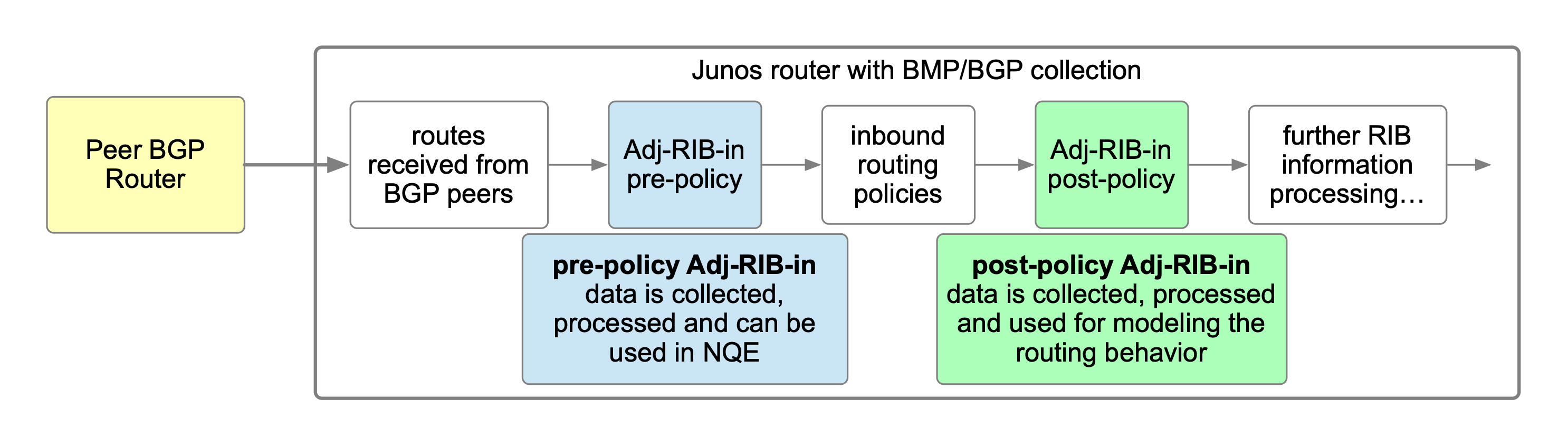
The BGP Monitoring Protocol (BMP) is used by Forward to collect detailed BGP RIB (Routing Information Base) data directly from network devices. BMP provides visibility into the routes received, processed, and advertised by a device’s BGP sessions — without relying on CLI-based routing-table collection.
Key Concepts:
BMP vs. CLI Collection
- CLI/SSH collection gathers the installed RIB (routing tables) data by logging into the device and issuing CLI commands.
- BMP collection gathers BGP routing data directly via the peer-to-peer BMP feed configured on the collector and the device itself. Forward still uses SSH/CLI on the same device to detect the BMP configuration and to collect everything outside the BGP routing table.
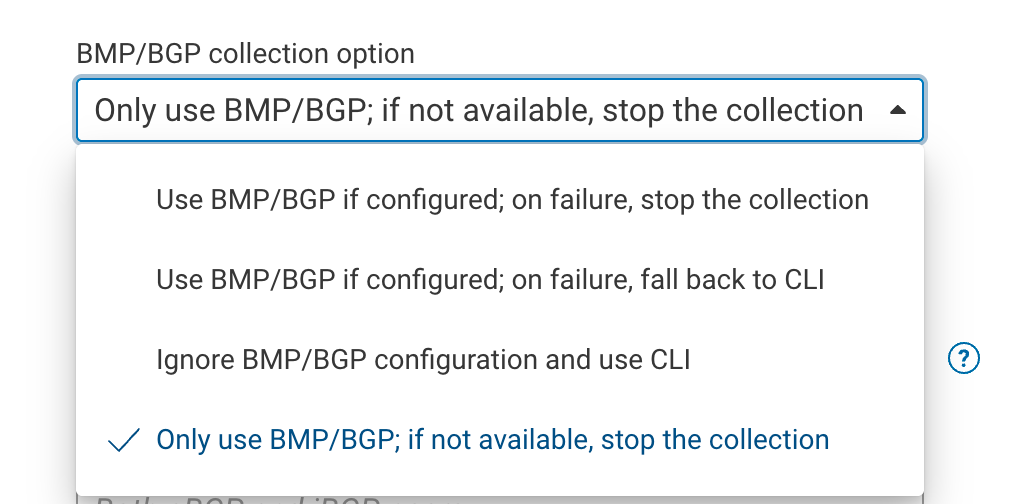
- For the BGP routing table, BMP and CLI are mutually exclusive: when BMP routes are collected, Forward does not also
collect the BGP routing table over CLI. Control this with the BMP/BGP collection option under Sources ->
Devices -> Edit Device -> Advanced settings:
- Use BMP/BGP if configured; on failure, fall back to CLI
- Use BMP/BGP if configured; on failure, stop the collection
- Only use BMP/BGP; if not available, stop the collection
- Ignore BMP/BGP configuration and use CLI
Device-Level Configuration
- The device’s BMP configuration determines what data is sent to Forward:
- Adj-RIB-IN (pre-policy or post-policy) exports the routes the device receives from its BGP peers.
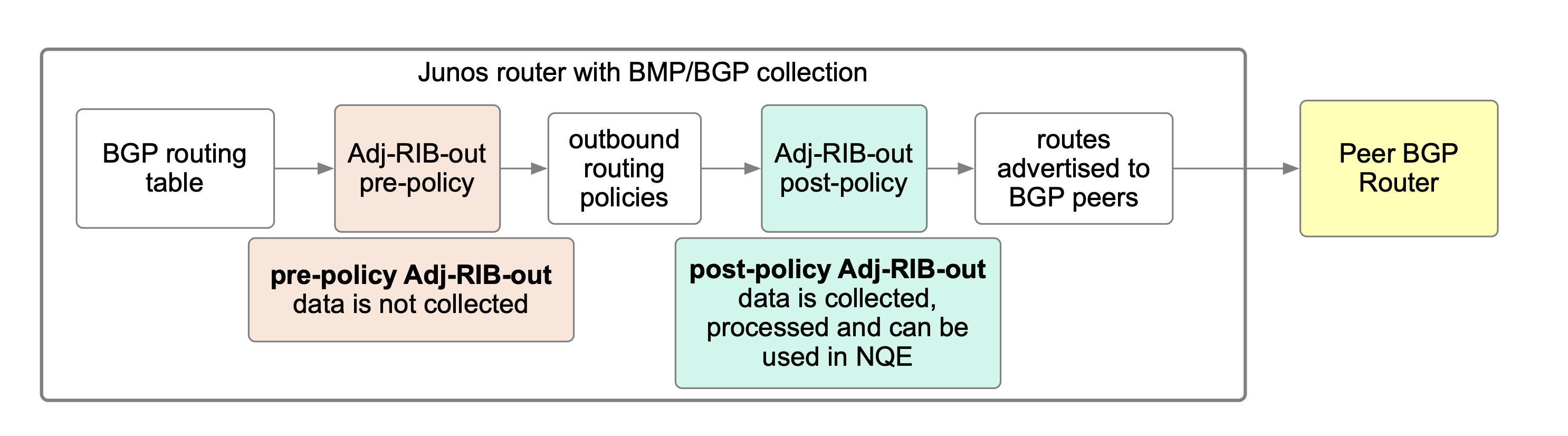
- Adj-RIB-OUT (post-policy) exports the routes the device advertises to its BGP peers.
- These settings are defined in the router’s BMP configuration, not in Forward:
routing-options {
   autonomous-system 3356;
   bmp {
       station FWD-COLLECTOR {
           connection-mode active;
           route-monitoring {
               pre-policy; #adj-rib-in
               post-policy; #adj-rib-in
               rib-out post-policy;
           }
           station-address 172.27.10.225;
           routing-instance mgmt_junos;
           station-port 5400;
       }
   }
Even when configured on device, Pre-policy Adj-RIB-OUT data is not collected by Forward.
Connection Modes: Active and Passive
The device’s BMP connection-mode determines which side opens the TCP session, and the collector takes the opposite
role. Forward supports both modes:
- Active mode (
connection-mode active): the device initiates the connection, and the collector listens on the device’sstation-port. This is the configuration shown in the example above. - Passive mode (
connection-mode passive): the collector initiates the connection to the device on the device’s local BMP port. Forward supports passive mode for devices that report it, such as Juniper.
In active mode, the collector opens a listening socket on the station-port for each device it collects. Use a
unique station-port per device on any collector that handles more than one BMP-enabled device. If two devices
share the same station-port, only one BMP session can bind to it and the others fail to collect with an
Address already in use error. Passive mode does not have this constraint, because the collector opens a separate
outbound connection for each device.
BMP Station Address
- The BMP station (the destination collector) is where the device sends its BMP data.
- This address is optional in Forward’s configuration — the device controls whether and where it exports BMP data. Set it in the BMP monitoring station IP/host field under Sources -> Devices -> Edit Device -> Advanced settings (it defaults to the auto-detected collector IP).
- You only need to specify a BMP station address in Forward if, for example, the BMP traffic passes through a NAT or firewall that alters the apparent source or destination.
Setting this field also disables the jump server for BMP collection — the collector reaches the device’s BMP session directly. Leave it unset if BMP traffic must route through a jump server.
Using BMP in Forward
Forward supports two main use cases for BMP-based data collection:
Effective BGP RIB (Installed RIB) Collection
Used for modeling forwarding behavior.
- Configure the device with a BMP station pointing to the Forward collector using post-policy Adj-RIB-IN.
- Forward uses this data to model actual forwarding decisions based on the installed routes (the effective RIB), and not for advertisement collection
BGP Advertisement Collection
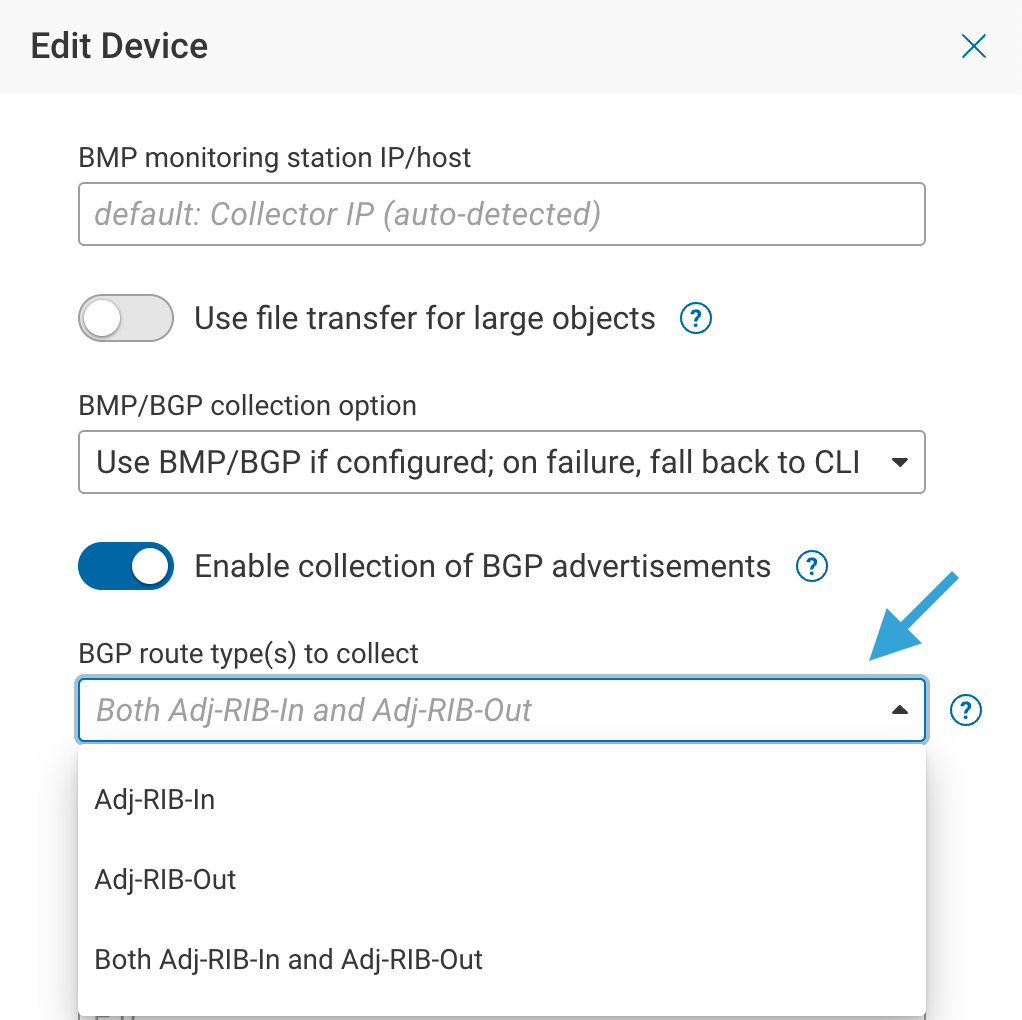
When the Enable collection of BGP advertisements toggle is enabled, Forward processes and stores BGP neighbor advertisement data, provided the matching configuration is present on the device. The BGP route type(s) to collect option controls which directions are retrieved — Adj-RIB-In, Adj-RIB-Out, or Both Adj-RIB-In and Adj-RIB-Out (the default):
- When a pre-policy Adj-RIB-IN BMP configuration is detected on the device, Forward automatically collects the Adj-RIB-IN advertisement data via BMP.
- If a post-policy Adj-RIB-OUT BMP configuration is detected, Forward collects the Adj-RIB-OUT advertisement data via BMP
Pre-policy Adj-RIB-OUT data is not collected by Forward.
What to expect
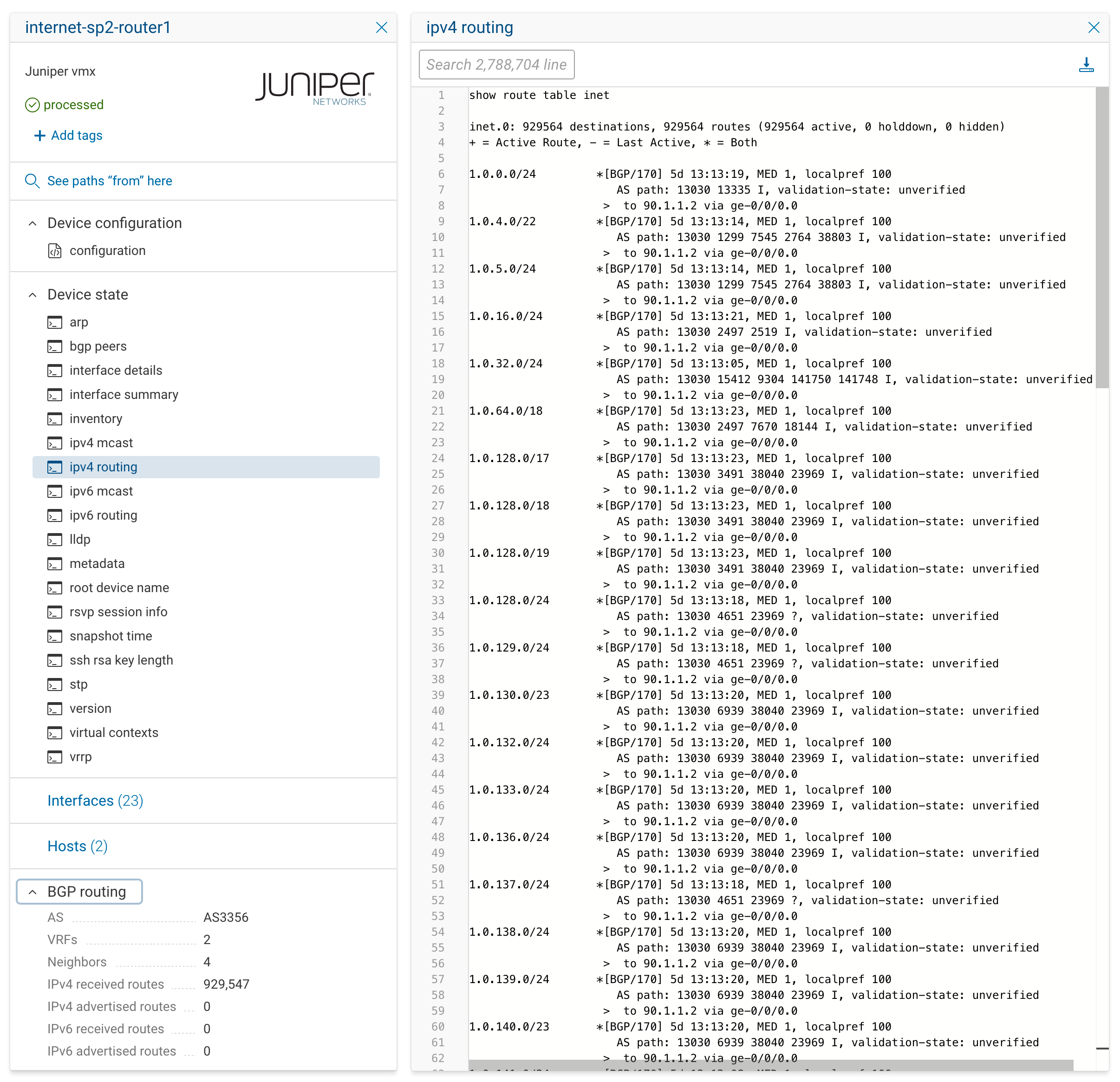
Below is a screenshot of the device state data for Juniper router with disabled BMP collection. Note that all routing information is contained within the ipv4 routing state file:
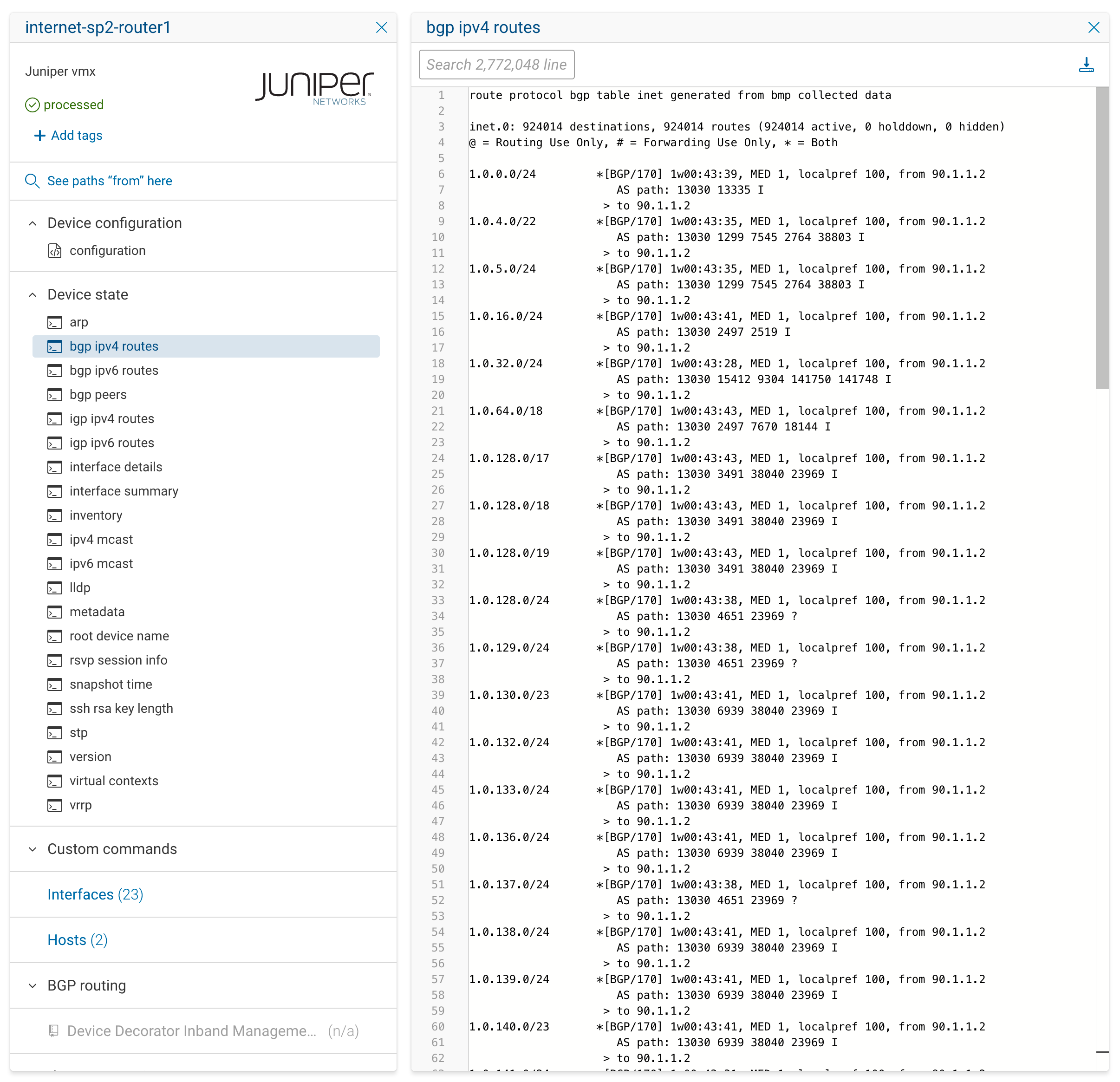
Now let’s compare a device state data for the same device when BMP collection is enabled. New bgp ipv4 routes state is generated from BMP collected data. At the same time, the ipv4 routing state file is replaced with IGP-only routes state file - igp ipv4 routes:
Best Practices
- Use BMP whenever possible — it provides a significantly faster method of collecting very large routing tables derived from the received BGP information.
- Confirm that the device’s BMP configuration aligns with your intended use case (pre-policy vs post-policy, in vs out).
- In active mode, assign a unique
station-portto each device collected by the same collector. - Only specify a BMP station address in Forward if network topology (e.g., NAT) requires it.
For more information on configuring Junos specific BMP settings refer to https://www.juniper.net/documentation/us/en/software/junos/cli-reference/topics/ref/statement/bmp-edit-routing-options.html