Configuring Connections
A synthetic device is a set of connections. Each one ties the synthetic device to a collected interface and describes what's reachable across it. This page covers each connection field and how to set it. To add many connections at once, see Automated Setup with NQE.
The L3 device types (Internet node, Intranet node, Adjacent network, L3 VPN) share the same connection fields, except that the internet node and adjacent network have no VRF field. L2 VPN and WAN Circuit connections are simpler; see their notes below.
Terms
These terms recur throughout the page. Come back here whenever one is unclear.

- Collected device — a real device Forward polled and modeled from the network snapshot.
- Gateway (or collected gateway) — the collected device, and the L3 interface on it, at the edge of your network that routes traffic toward the synthetic device.
- Segment — the uncollected network between the gateway and the synthetic device: an ISP, an MPLS cloud, a provider WAN. Forward doesn't see inside it, so the synthetic device stands in for it. Traffic "crosses the segment" to reach the far side.
- Learned prefix — a subnet the gateway reaches out its uplink, across the segment. The far side owns it; the gateway just receives it.
- Advertised prefix — a subnet the gateway reaches out a LAN-side port, meaning this site owns it and offers it across the segment. Forward turns each advertised prefix into a route on the synthetic device pointing back toward the gateway, so other sites' traffic crosses the segment to reach it.
Adding a Connection
The Synthetic nodes category on the Sources page lists the network's synthetic devices, with Add synthetic device to create one and an edit control on each row.
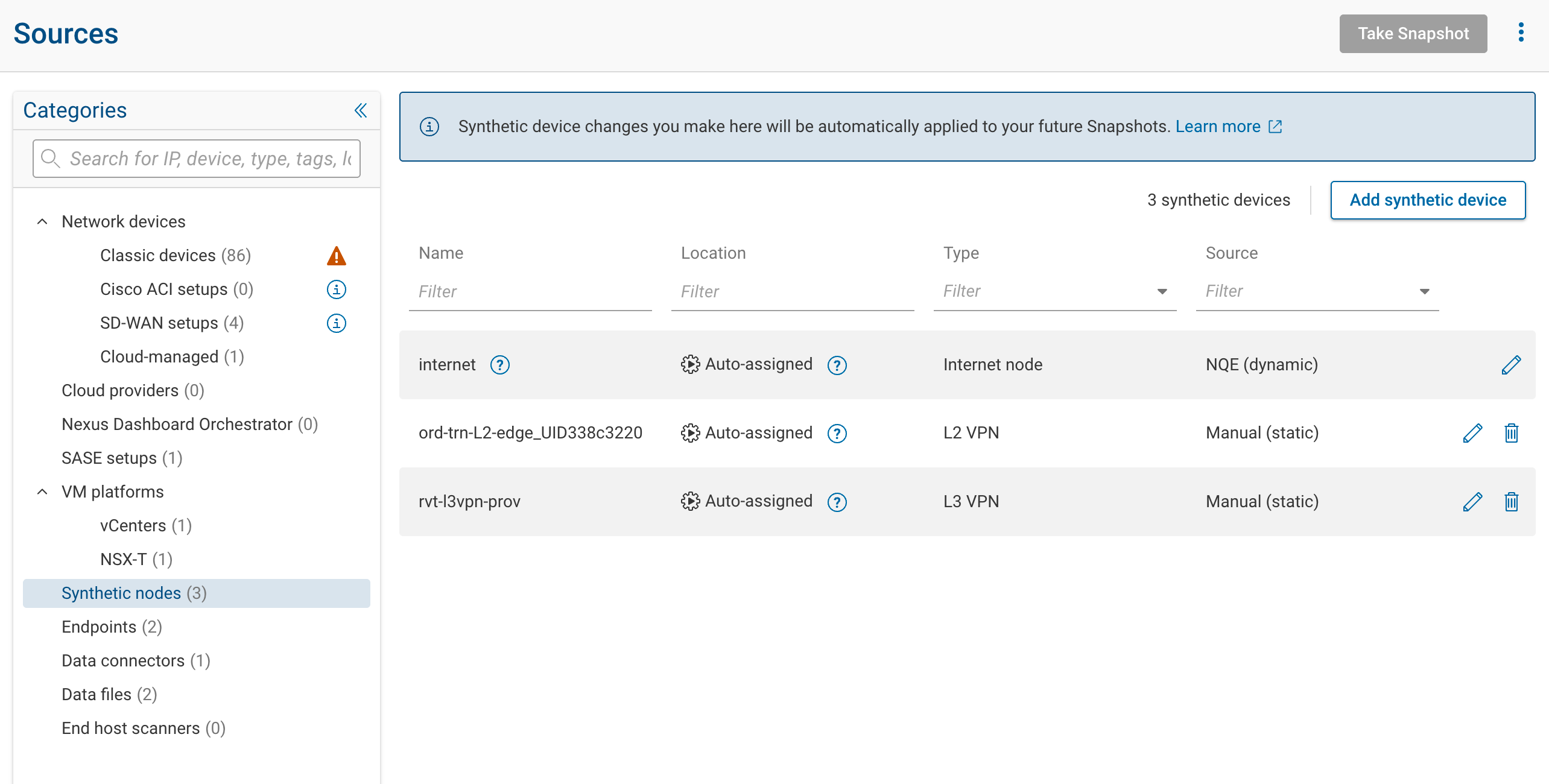
Where you configure a synthetic device depends on its type:
| Type | Where to configure it |
|---|---|
| Intranet node | Add synthetic device wizard (Sources → Synthetic nodes → Add synthetic device) |
| Adjacent network | Add synthetic device wizard |
| L2 VPN | Add synthetic device wizard |
| L3 VPN | Add synthetic device wizard |
| WAN Circuit | Add synthetic device wizard |
| Internet node | Its own drawer on the Sources page; already exists in every network, not in the wizard |
| Encryptor | Encryptors API (REST API) |
In the wizard, pick the type and add connections in the setup step. However you reach a device, you add connections two ways:
- Add a connection manually: one connection at a time, filling in the fields below.
- Batch-add NQE-based connections: generate connections from an NQE query. See Automated Setup with NQE.
Uplink Interface vs. Gateway Interface
This is the distinction people most often get wrong.
- Uplink interface: the physical port on a collected device that connects to the synthetic device, the handoff point where your network meets the uncollected segment.
- Gateway interface: the last L3 interface that routes traffic toward the synthetic device. Leave it blank and it defaults to the uplink interface, with its VLAN.
How the two relate depends on the uplink:
- L2 access or trunk port: the L3 gateway is the SVI (or BDI) that routes for the VLAN, a different interface from the physical port. On the same device, leave the gateway blank and Forward infers that SVI.
- L3 routed physical port: the port both connects to the segment and routes toward it, so the uplink and gateway are the same interface and the VLAN is untagged.
- L3 dot1q subinterface: point the uplink at the subinterface (for example
Et1/10.35). Forward resolves the physical parent (Et1/10) as the uplink and the subinterface as the gateway, and takes the VLAN from the subinterface's own dot1q encapsulation. You don't set the VLAN field for this case; a value that disagrees with the encapsulation is ignored.

The gateway does not have to be on the same device as the uplink. But the two cases behave differently:
- Uplink and gateway on the same device: Forward validates and normalizes the pair. It checks that the VLAN is consistent with the access/trunk port, infers the SVI when you leave the gateway blank on an L2 uplink, and rewrites the connection to untagged when traffic egresses untagged.
- Uplink and gateway on different devices: Forward validates that each interface exists but does not infer or normalize anything. Specify the VLAN and the exact gateway interface yourself; nothing is filled in for you.

When the uplink is an access or trunk port and you leave the gateway blank, keep the uplink and gateway on the same collected device so Forward can infer the SVI. If the routing interface is on a different collected device, name that interface explicitly.
Every connection also takes an optional connection name, which labels the interface Forward creates on the synthetic device for it. Leave it blank and Forward builds one from the VRF, uplink port, and VLAN.
VLAN
The VLAN is the on-wire VLAN of traffic as it leaves the uplink interface. Leave it blank for untagged traffic.
Set a VLAN only when the handoff link is VLAN-tagged. The VLAN is locally significant to that link, so a single physical uplink can carry several VLANs to different synthetic devices or connections, and the VLAN is what distinguishes them. If a device sends traffic on a VLAN no connection is configured to accept, Forward creates a Missing Peer for it.
When the uplink is an L3 dot1q subinterface (for example Et1/10.35), don't set the VLAN. Forward takes it from the
subinterface's own encapsulation, so a value you enter here is ignored if it disagrees with the encapsulation. Set the
VLAN yourself only when the uplink is a plain L2 access or trunk port.
Through the API or an NQE query, use a null VLAN for untagged traffic, not 0. Valid VLAN values are 1–4095.
VRF
VRF appears on L3 VPN and intranet-node connections; the internet node and adjacent network don't have it.
It's central to the L3 VPN, where it names the VRF the connection's traffic belongs to on the provider side. Forward
interconnects connections only within the same VRF, so a connection in VRF blue reaches other blue connections
and never a connection in red. One device can carry several VRFs this way, keeping their routing separate.
Leave it blank to place the connection in a single default VRF, which then interconnects with every other blank (or
explicitly default) connection. Set a VRF only when you need to keep VPNs apart on the same device. VRF names follow
the same character rules as site names (see Site).
For the fuller treatment of when to use one VRF or several, see Choosing a Device → VRFs on an L3 VPN or intranet node.
Site
A site groups two or more connections that reach the same uncollected segment through different gateways, so that Forward doesn't model a routing loop across the synthetic device. That's the whole purpose of the field.
To see why, follow how discovery reads a gateway's route to a subnet. The direction the route points decides how Forward classifies it:
- Out the uplink, toward the synthetic device — the gateway reaches the subnet across the segment. Forward calls this learned: the far side owns it.
- Out a LAN-side port — the gateway is telling the segment "this site owns the subnet, send it here." Forward calls this advertised, and turns each advertised subnet into a route on the synthetic device pointing back toward that gateway.
(Learned and advertised are defined at the top of the page.)
Now take a location with a primary and a backup uplink into the same synthetic device, and a subnet 10.1.0.0/16 that
lives across the segment:
- The primary forwards
10.1.0.0/16out its uplink. That's learned, and it's correct. - The backup also has a route to
10.1.0.0/16, but it got that route from the primary through internal redistribution, not across the segment. So the backup forwards10.1.0.0/16toward the primary. The primary sits on the backup's LAN side, so this route leaves the backup out a LAN-side port. By the rule above, Forward reads it as advertised, as if the backup's own location originates10.1.0.0/16.
That misread installs a route on the synthetic device: "to reach 10.1.0.0/16, send it to the backup." Follow where
that route leads. Traffic arrives at the backup, but the backup can only reach 10.1.0.0/16 by handing it to the
primary, and the primary sends it back across the segment. The path loops: synthetic → backup → primary → synthetic.
Even when it doesn't loop, it's a second path across the segment that the real network doesn't have.
The site fixes this. When connections share a site, Forward evaluates their gateways together: a subnet counts as
advertised only when no gateway in the site already learned it across the segment. Since the primary learned
10.1.0.0/16, Forward subtracts it from the backup's advertised set, so no false toward-the-backup route is
installed. The backup's actual route still forwards traffic; Forward just no longer counts it as advertised across the
segment. This only affects the routes and paths across the synthetic device, not where the subnet's addresses are
located.
Set a site when a location has more than one gateway into the same synthetic device. The "already learned it" check runs only among connections in the same site. Without a site, Forward evaluates each gateway on its own, so it never sees that the primary already learned the subnet, and the loop goes unprevented. Connections on the same gateway device are grouped automatically; separate primary and backup devices need an explicit shared site.

A site name (and a VRF name) may contain only letters, digits, ., -, and _. Spaces, commas, and & are not
allowed.
Subnet Auto-Discovery
Subnet auto-discovery determines which subnets are reachable across a connection. You can enter subnets by hand or have Forward infer them from the gateway device's state. Pick the mode that matches how the gateway learns those routes.
Each mode below tells Forward where to read the subnets this gateway advertises across the segment, as opposed to those it learned from across the segment. Forward installs the advertised subnets as routes on the synthetic device, pointing back toward this gateway, so traffic to those subnets is modeled as crossing the segment to reach this connection. The mode you pick decides which of the gateway's routes become those synthetic-device routes.
| Mode | What Forward uses |
|---|---|
| Off | Forward infers nothing. You list the subnets manually in the Subnets field. |
| From IP routes | Subnets the gateway forwards out a port other than the uplink to the synthetic device (the subnets this site owns and advertises across the segment). |
| From BGP routes | Subnets the gateway advertises via eBGP (Adj-RIB-Out, post-policy) to peers reachable across the connection. Narrow to specific peers with Peer IPs. |
| Use interface addresses | Only the gateway interface's own addresses. |
Notes that matter in practice:
- From IP routes is not "every route in the table." Forward excludes routes forwarded back toward the gateway, the default route, subnets reachable through backdoor ports, and subnets another gateway in the same site already learned across the segment. For the Internet node, it also excludes private and reserved addresses, since the internet node routes only public addresses.
- Advertises default route brings back the one exclusion above you can override. By default Forward drops the
default route (
0.0.0.0/0), because a default route it can't verify the gateway really advertises would balloon the path count. Check this when the gateway genuinely advertises a default route out a non-uplink port and you want it counted. The checkbox appears only when the mode is From IP routes. - From BGP routes counts only the subnets the gateway advertises to peers across the segment. To decide which peers those are, Forward keeps the gateway's eBGP peers whose addresses are reachable out the connection's uplink (or a tunnel that egresses it), and drops any peer reachable only through a backdoor or other port. It then counts the subnets advertised to the peers it kept. This mode requires eBGP Adj-RIB-Out collection on the gateway, which Forward enables automatically when you attach a device with this mode (see BGP advertisement collection). If BGP wasn't collected on the gateway, the connection falls back to the From IP routes mode without warning. When that happens, the subnets look like the full routing table rather than the BGP advertisements, so confirm BGP collection is on for the gateway device.
- Peer IPs replaces that automatic peer selection: list one or more eBGP neighbor addresses and Forward counts only the subnets advertised to them. Forward uses each address you name even if it isn't reachable out the uplink, so the reachability filter above no longer applies. Peer IPs apply only to From BGP routes.
- Off requires a non-empty Subnets list; the connection is rejected otherwise.
Backdoor Ports
Backdoor ports control which subnets the From IP routes mode treats as advertised across the segment.
Recall how the From IP routes mode decides what a gateway advertises: if the gateway forwards a subnet out any port other than its uplink to the synthetic device, the mode treats that subnet as advertised and installs a route for it on the synthetic device pointing back toward the gateway.
Now suppose the gateway also has a side link to another site: a DMVPN tunnel, a direct site-to-site link, or an SD-WAN overlay. Its routing table sends some prefixes out that side link. The rule above counts those prefixes as advertised, and installs routes for them on the synthetic device pointing back toward the gateway. The model now treats the gateway as a transit hop: other sites can reach those prefixes by crossing the segment to this gateway.
That may not be how the network really works. Suppose the gateway reaches those prefixes only through the side link, and never advertises them into the segment. Then nothing really sends that traffic across the segment, and the transit path the model built doesn't exist.
To stop that inference, mark the side-link port as a backdoor. Forward then subtracts the prefixes forwarded out that port from the connection's advertised set, so the synthetic device installs no route back toward this gateway for them. This only changes the synthetic device's routing table; the gateway's own routes are untouched, so it still forwards those prefixes out the side link as before.
If the gateway is an SD-WAN device, you may not need to mark backdoors by hand: under From BGP routes, Forward already treats the gateway's tunnel and WAN transport ports as backdoors on its own. It reads those ports from the gateway's collected configuration, the tunnel interfaces and WAN-side transport ports it already parsed, so you don't designate them anywhere. The list you fill in only adds to that automatic set. There's no way to remove a port from it, so you can't force Forward to count one of those tunnel or WAN ports as advertised. This automatic detection is specific to From BGP routes; under From IP routes, Forward detects nothing on its own, and only the ports you mark by hand act as backdoors.
In both cases the gateway forwards the prefix out a non-uplink port, which is all discovery sees, so it can't tell the two apart. You have to make the call:
- The gateway reaches the subnet through a side link and does not advertise it to the provider → mark the port a backdoor, or the model gains the transit path that doesn't exist.
- The gateway genuinely advertises the subnet to the provider (even if it also has another link to it) → leave the port unmarked, or you drop a real route the segment does carry.
The result of this choice isn't flagged anywhere: it just changes which paths path analysis finds against the snapshot. Marking the wrong way can hide a real path or invent one.

Owned Subnets (Adjacent network)
An adjacent network has one field its connections don't carry: the subnets it owns. Forward locates these subnets at the adjacent-network device itself, so they resolve as a path source or destination — this is what makes the partner network addressable. They are separate from a connection's subnets, which are reachable across the connection toward the gateway rather than located at the node.
Set them on the adjacent network's Owned subnets tab, one CIDR block or address per line. Forward ignores any line that isn't a valid block or address and flags how many it skipped. A connection's discovered or manually entered subnets still work as usual alongside the owned set.
L2 VPN and WAN Circuit Connections
These types don't route, so they have no gateway, subnet discovery, or backdoor fields:
- L2 VPN: each connection is a customer-edge interface (the port that joins the broadcast domain), with an optional VLAN and connection name. Two or more connections form one broadcast domain.
- WAN Circuit: exactly two connections, one per end. Each is a LAN interface with an optional VLAN and connection name.
On both types the VLAN is locally significant to each connection's link, so the two ends can use different VLANs. Forward bridges the connections whether or not the VLANs match. This mirrors a provider that translates VLANs between the two ends.
After You Save
Review the connections in the setup table, then Save. Saving stores the configuration but doesn't change any existing snapshot. To see the change, reprocess the current snapshot or collect a new one; it takes effect on the next processed snapshot.
For the per-type field reference and API pointers, see Reference.