Missing Peer
A Missing Peer appears when a collected port that's an uplink to a synthetic node carries a VLAN or subinterface the synthetic node is not configured to accept. It represents unmodeled uplinks and highlights gaps in synthetic device configuration.
Forward derives it from the collected configuration, not from observed traffic: whenever an uplink port has a VLAN or subinterface no connection claims, Forward adds the placeholder. It ensures traffic on that unclaimed VLAN does not silently disappear from path search, exposing it so you can decide how the unmodeled VLAN or subinterface should be handled.
Key Points
-
Missing Peers are created automatically. You cannot manually add them. Forward adds a Missing Peer whenever the collected configuration shows a real VLAN or subinterface on a synthetic-device uplink port that no synthetic-device connection claims.
-
They are not errors. A Missing Peer indicates that traffic on that VLAN could reach the uplink, but the model has no destination for it.
-
They help identify incomplete synthetic-device configurations. You decide whether to:
– Add another synthetic-device connection
– Create a new synthetic device for that service
– Ignore it if the traffic is intentionally out of scope
Why Missing Peers Occur
Layer-3 synthetic devices (such as Intranet, Internet, or L3VPN nodes) can accept traffic via:
- An L2 parent interface (access port or trunk), or
- An L3 interface (subinterface or SVI)
A single physical uplink may carry multiple VLAN tags or multiple subinterfaces.
A Missing Peer appears when:
- A collected port carries several VLANs or subinterfaces
- That physical interface is connected to a synthetic device
- But the synthetic device is configured to accept only some of those VLANs
- Forward finds the unclaimed VLAN in the collected config and creates a Missing Peer placeholder to receive its traffic
Example Scenario (Lab Topology)
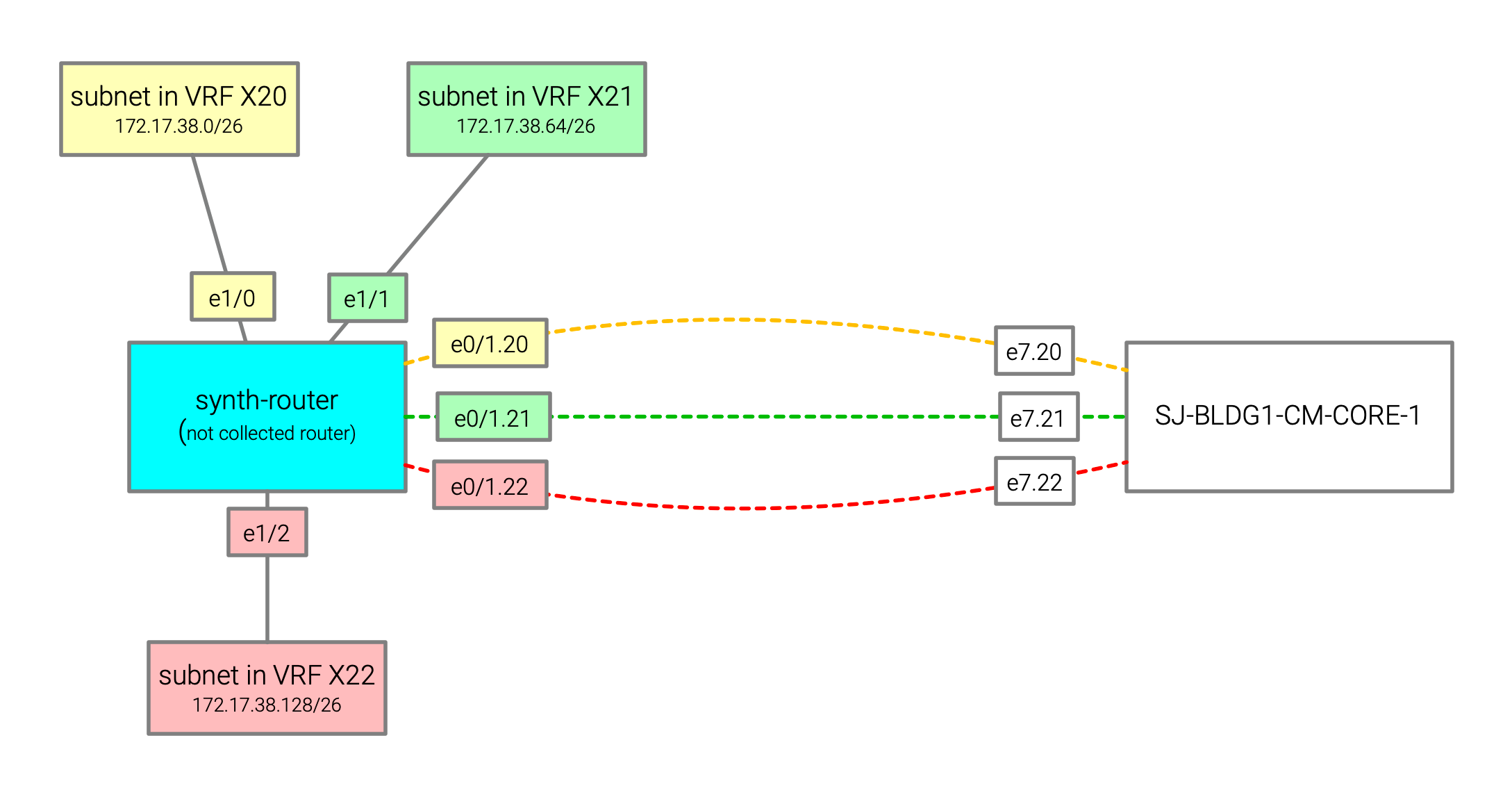
This example lab illustrates precisely when and why Missing Peers appear.
Physical Device: SJ-BLDG1-CM-CORE-1
Interface e7 has three routed subinterfaces (e7.20, e7.21, e7.22), each used by route sending traffic toward the
synthetic node:
- 172.17.38.0/26 → e7.20
- 172.17.38.64/26 → e7.21
- 172.17.38.128/26 → e7.22
synth-router peers with SJ-BLDG1-CM-CORE-1 using three VLAN-tagged subinterfaces:
e0/1.20— VLAN 20e0/1.21— VLAN 21e0/1.22— VLAN 22
Behind synth-router, the following downstream subnets are reachable:
- 172.17.38.0/26
- 172.17.38.64/26
- 172.17.38.128/26
How It Was Modeled in Forward
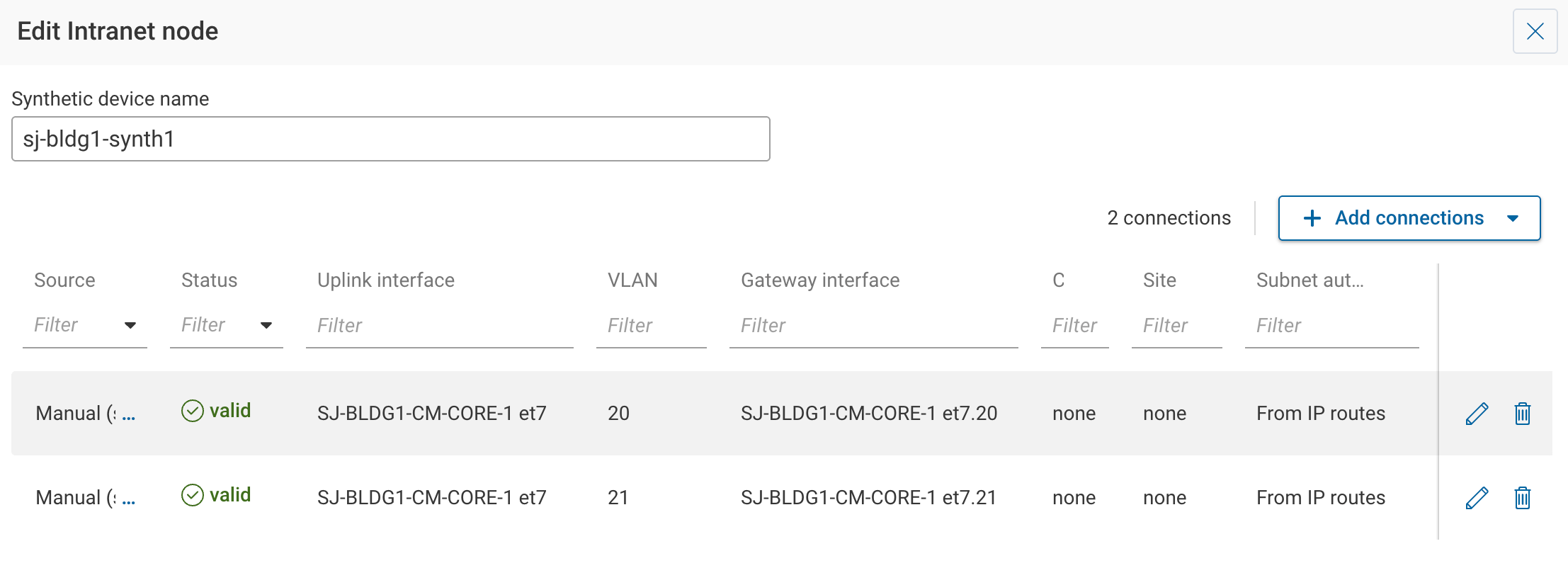
In the Sources → Synthetic, a sj-bldg1-synth1 synthetic node was added to model the behavior of synth-router
from the lab. Only VLAN 20 and VLAN 21 were added as uplink connections. VLAN 22 was not configured.
Resulting Behavior
-
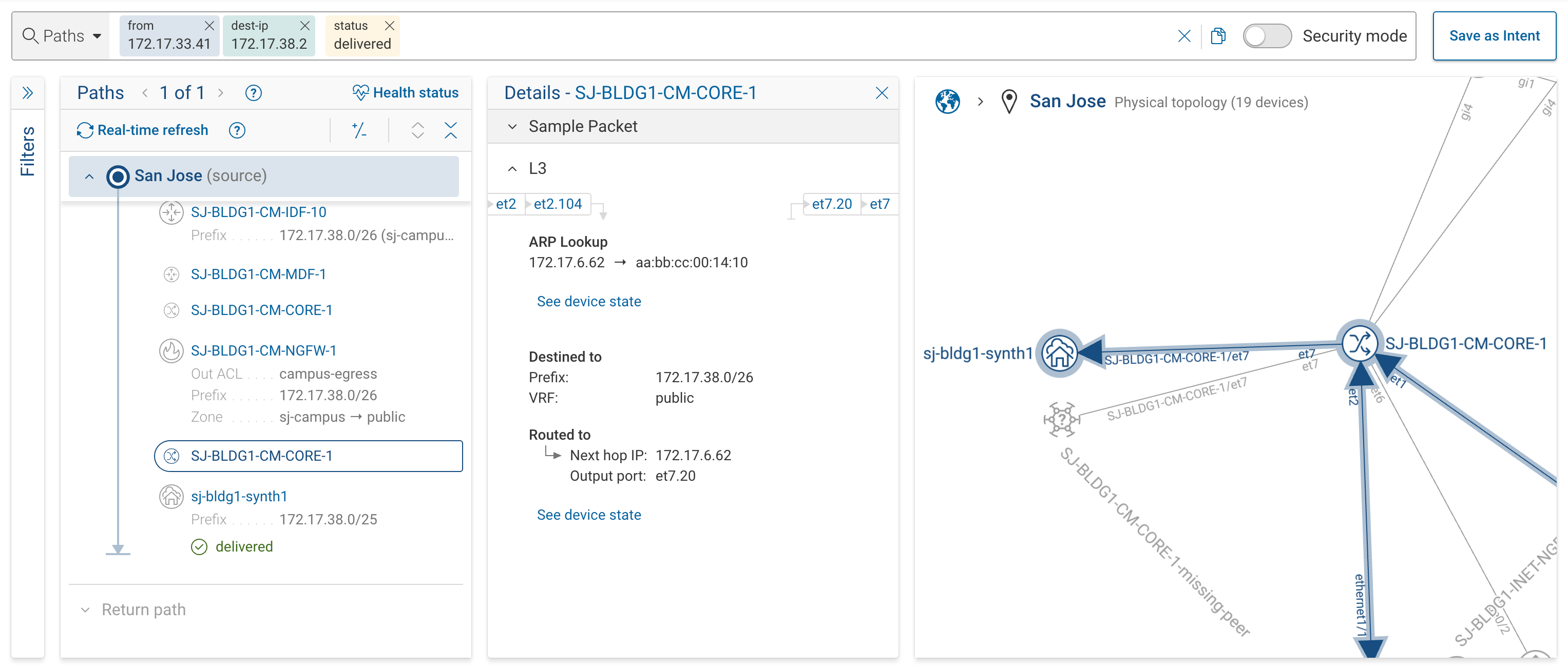
Traffic to 172.17.38.2/26 → VLAN 20 → reaches the sj-bldg1-synth1 synthetic node
-
Traffic to 172.17.38.66/26 → VLAN 21 → reaches the sj-bldg1-synth1 synthetic node (not shown on screenshot)
-
Traffic to 172.17.38.130/26 → VLAN 22 → SJ-BLDG1-CM-CORE-1-missing-peer
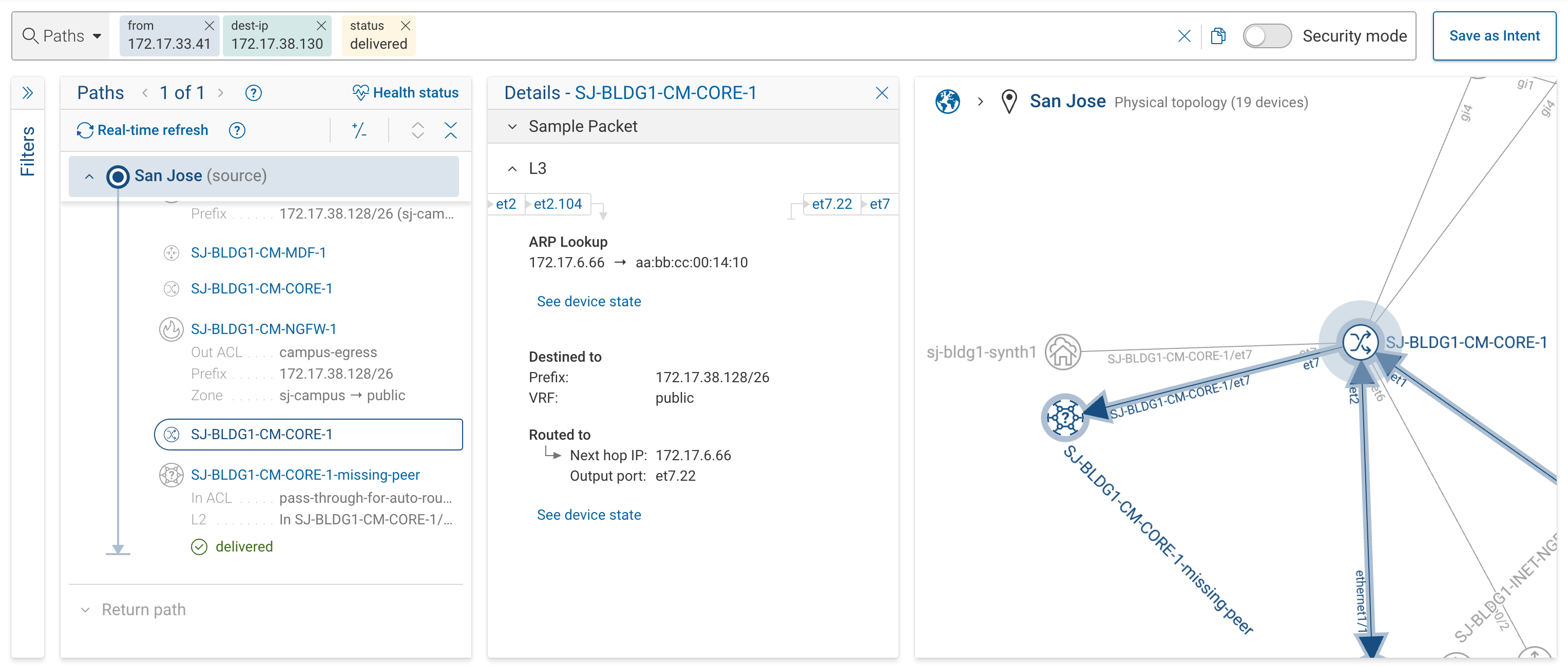
The SJ-BLDG1-CM-CORE-1-missing-peer node captures all egress traffic on VLAN 22, making the unmodeled path explicit.
What To Do When You See a Missing Peer?
-
If the traffic should go to the Intranet synthetic device:
Add an appropriate VLAN as an additional uplink. -
If the traffic represents a different external service:
Create a separate synthetic device and connect that VLAN/subinterface to it. -
If the traffic is out of scope:
You may ignore the Missing Peer. It will remain visible only as an indicator of unmodeled traffic.
-
You cannot manually create a Missing Peer. It appears only when the collected configuration leaves a VLAN or subinterface on a synthetic-device uplink that no connection claims.
-
Removing a Missing Peer requires adjusting the synthetic-device configuration, not editing the Missing Peer itself.
-
Missing Peers help maintain modeling accuracy, ensuring unmodeled traffic is visible rather than silently dropped from analysis.