Inventory
Overview Inventory Exercise
Inventory introduces our custom reporting application. These reports are derived from NQE queries which makes them extensible and customizable.
Estimated Completion Time
10 minutes

You should be familiar with NQE from the previous exercise if not go back and finish that section
Exercise 1: Generating a Custom Report with inventory
Objective: Leverage your understanding of NQE queries to generate a custom report within Inventory. This exercise will demonstrate the flexibility and power of Inventory in creating tailored reports for network analysis.
Task: Create a report that lists all devices within a specific subnet, highlighting devices with specific vulnerabilities.
-
Access inventory Application: Navigate to Inventory -> inventory (NQE) from the main menu.
-
Select Query: In the inventory interface, go to the Search tab. Type
Device Hardwarein the search bar to filter for queries related to device vulnerabilities. -
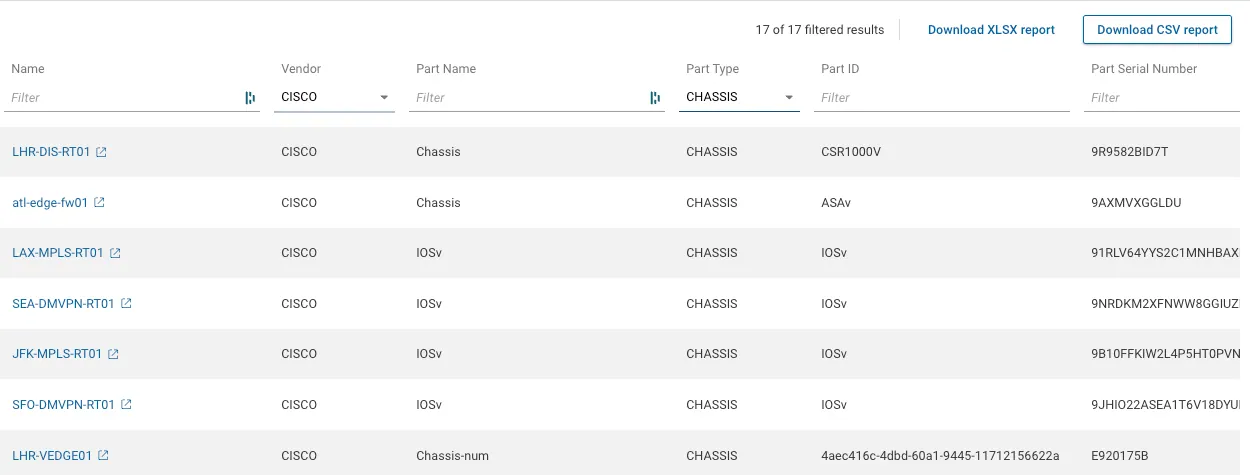
Filter Query: Using the table filters let's find the serial numbers for all
CiscoChassiscomponents
Remember, the power of inventory lies in its ability to customize reports using NQE
Key Insights
- Custom Reporting: inventory enables the creation of highly customized reports, leveraging the power of NQE queries for detailed network analysis.
- Network Insights: Through tailored reports, gain valuable insights into specific aspects of your network, such as device vulnerabilities within certain subnets.
- Flexibility and Extensibility: The ability to modify and extend NQE queries allows for a wide range of reporting possibilities, catering to various network analysis requirements.
- Collaboration and Sharing: Custom reports can be saved and shared among team members, enhancing collaboration and knowledge sharing within the organization.