Configure NTP Servers
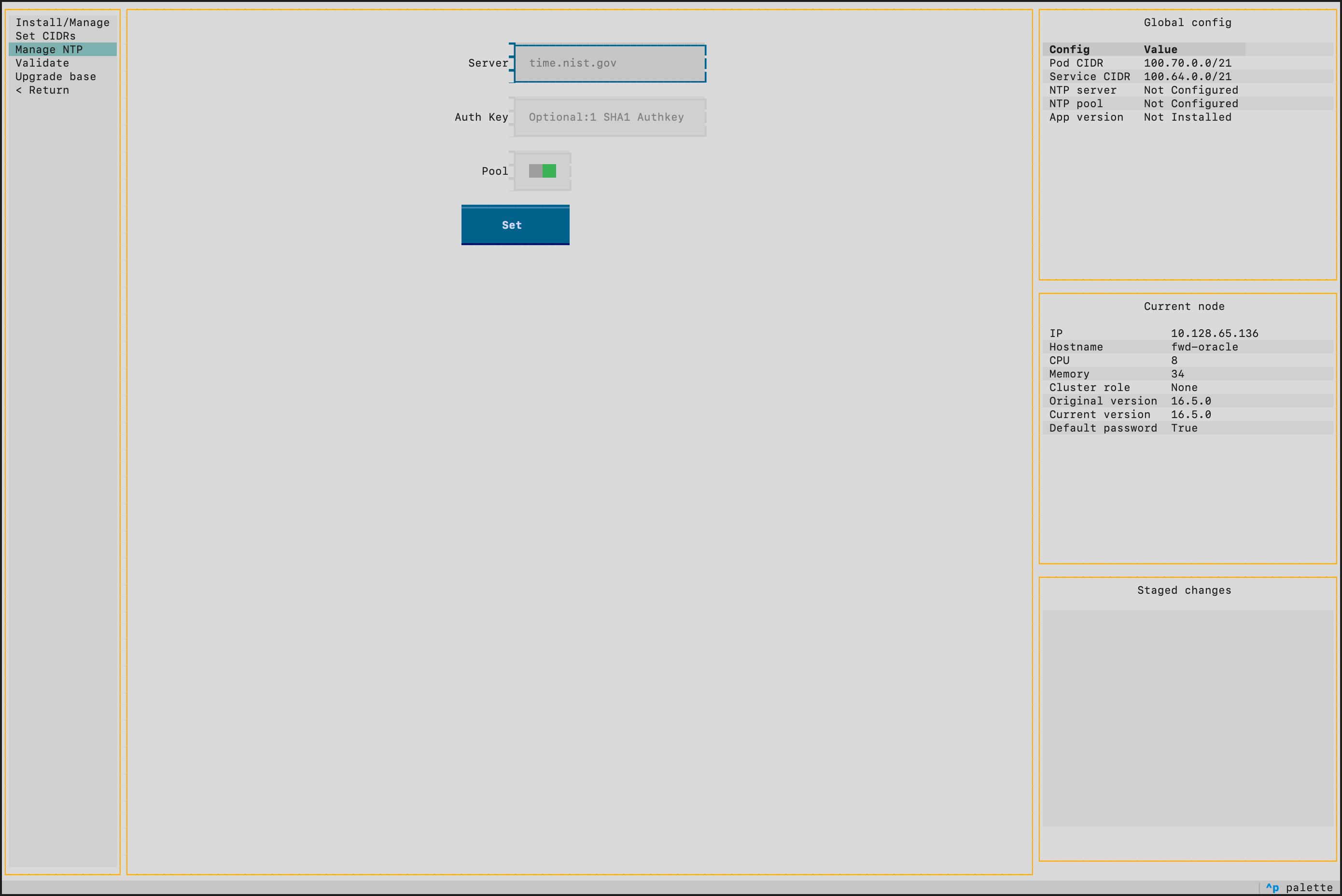
NTP is configured during initial cluster setup via the TUI (Cluster > Manage NTP). This page covers updating the NTP configuration after the cluster is already deployed.
Add an NTP server
- SSH into a primary node.
- Select Cluster > Manage NTP from the TUI.
- In the Server field, enter an NTP server address (e.g.
time.nist.gov). NTP pool addresses (e.g.pool.ntp.org) are also accepted — toggle the Pool switch on for pool entries. - (Optional) Use the Auth Key field to supply a symmetric key in the form
<keyid> <algo> <key>(e.g.1 SHA1 mysecret). Leave blank for unauthenticated servers. - Click Set. The entry appears in the table below and is added to staging.
- Repeat steps 3–5 for each additional server.
- Select Apply to push the new configuration to all nodes.
Remove an NTP server
- From Cluster > Manage NTP, select the server row in the table.
- Click Remove.
- Select Apply to push the change to all nodes.
Verify NTP Configuration
After applying the NTP configuration, verify it from the cluster information panel on the right side of the TUI screen. The configured servers and their synchronization status are displayed there.