26.10.0 - Oct 20
Released: 2026-10-20
We're happy to announce the immediate release of Forward Enterprise version 26.10.0.
What's New 🚀
Forward AI
Forward AI for self-hosted deployments with your own model
Forward AI is now available on self-hosted deployments, using Anthropic Claude models that your organization accesses through its own Amazon Bedrock account. Your network data and prompts go to a model provider you already manage, under your own AWS policies and billing.
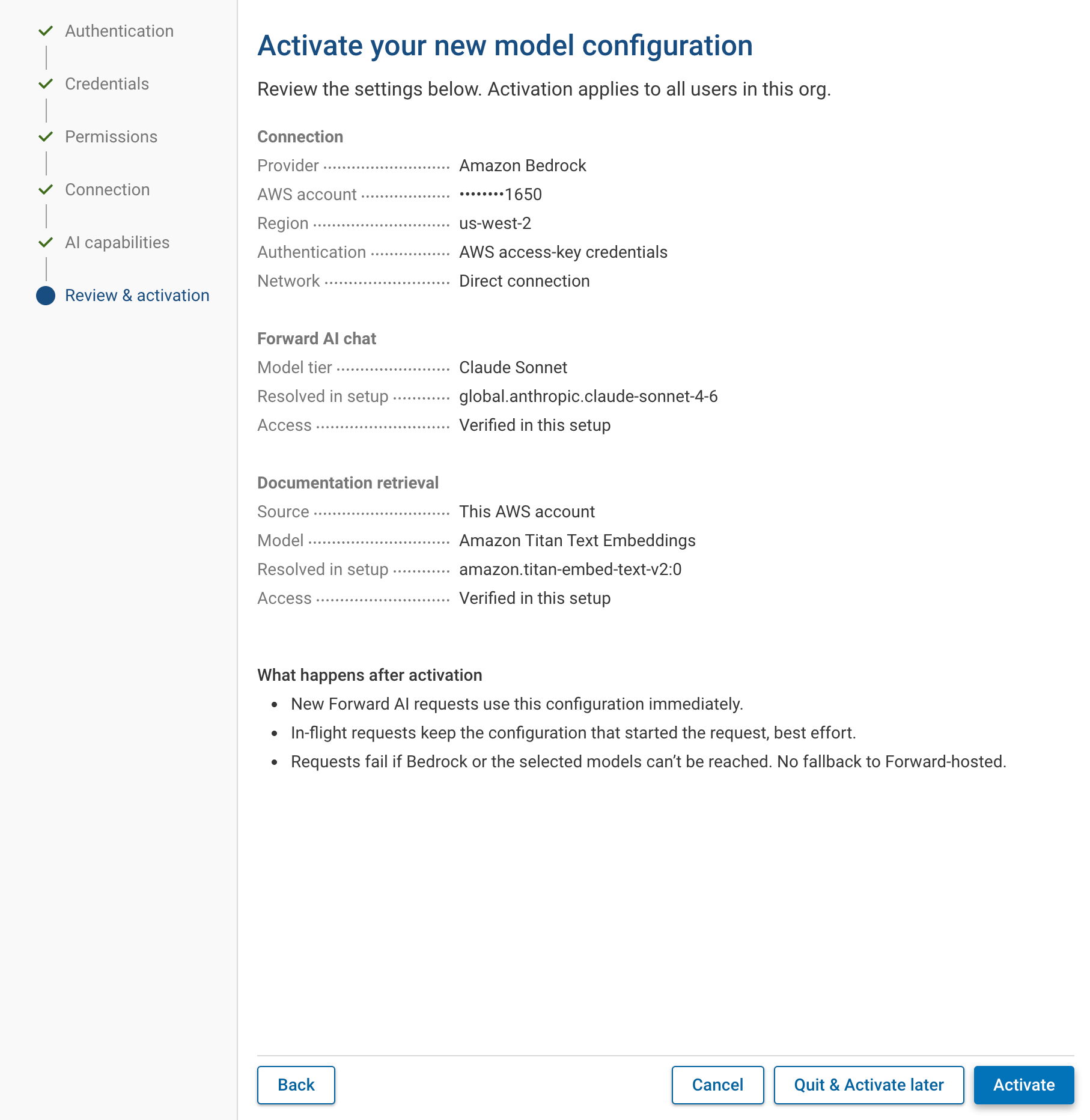
An org admin turns Forward AI on or off for all users in the Forward AI section of Org preferences. Turning it off disables every Forward AI feature in the org. Model access is configured in the new Model providers section of the Integrations page, through a guided Amazon Bedrock setup:
- Authentication: connect with AWS access-key credentials (recommended) or a long-term Bedrock API key. The wizard shows the minimal IAM policy needed to list and invoke models.
- Region and connectivity: choose the AWS region, and optionally set a custom Bedrock endpoint and proxy settings.
- Validation at each step: Forward checks that the credentials can list foundation models, then sends a one-token request to confirm it can invoke the selected model family, and shows the exact inference profile it will use.
- Documentation retrieval: optionally enable an Amazon Titan Text Embeddings model so Forward AI can answer questions from the NQE and product documentation.
After setup you can activate the provider immediately or later. From the Integrations page you can review and edit the configuration, run health checks to confirm the model is still reachable and the credentials have not expired, and disable the provider temporarily without losing its configuration.
To learn more, see Forward AI documentation.
Device configuration history
Forward AI can now answer questions about how a device's configuration has changed over time, such as "what changed in the BGP configuration on this device?" or "which firewall rules were added since this device was first collected, and when?". It lists each point where the configuration changed, most recent first, with the snapshot it came from and the number of lines added and removed. It can narrow the history to one part of the configuration and show the exact before-and-after for any change.
The history covers changes captured by collections, so edits that were made and reverted between two collections do not appear. It ends at the snapshot the conversation is about, so later snapshots are not included. Cosmetic differences, such as lines reordered by an OS upgrade, are not reported as changes. Currently, this functionality is available in Forward AI chat but not through the MCP server.
Predict
Failure analysis
The Insights section of the Predict analysis page, generated by Forward AI, now includes a Failure analysis summary. It describes what the proposed change would break, based on both the regressions and the warnings Predict found, such as a new routing loop, newly exposed vulnerabilities, or a verification check that changes from pass to fail.
Expanded Predict coverage
- OMP on Cisco SD-WAN: Predict now models the Overlay Management Protocol (OMP) used by Cisco SD-WAN edges to exchange routes through the controllers, including the policies that filter which prefixes are advertised between sites.
- VeloCloud BGP: Predict now supports BGP on VeloCloud SD-WAN edges.
Security & Compliance
CIS Benchmarks
Forward Enterprise now assesses device configurations against Center for Internet Security (CIS) Benchmarks, the industry-standard secure configuration guidelines widely used in commercial environments, in the same way it already assesses DISA STIGs. Findings are available for these CIS-certified benchmarks:
- Cisco IOS XE 16.x
- Cisco IOS XE 17.x
- Cisco IOS XR 7.x
- Palo Alto Firewall 11
The quickest way to get started is the built-in CIS Findings NQE verification under Security > CIS. It reports, for every device and every benchmark rule, whether the rule is violated, along with the rule's description and remediation guidance. Failures point to the exact configuration lines involved, as they do for vulnerability and STIG findings.
The same data is available in the NQE data model for custom queries and checks. device.cisFindings holds each device's
findings per benchmark and rule, and network.cisDatabase describes the benchmarks and their rules independently of any
device. The NQE Library includes queries that list the benchmarks and rules. Support for more benchmarks will follow in
future releases.
Vulnerability and End-of-life coverage: Ruckus ICX support
- OS-based CVE analysis for Ruckus (formerly Brocade) ICX switches: vulnerability analysis now covers devices running FastIron, and results appear on the Vulnerability page.
- Hardware end-of-life for Ruckus ICX and FastIron: end-of-life dates for ICX 6430, 6450, 6610, 7150, 7250, 7450, and 7750 switches and FastIron CX, Edge X, and SX chassis now appear in the hardware end-of-life inventory.
Topology
BGP layer in Network Maps
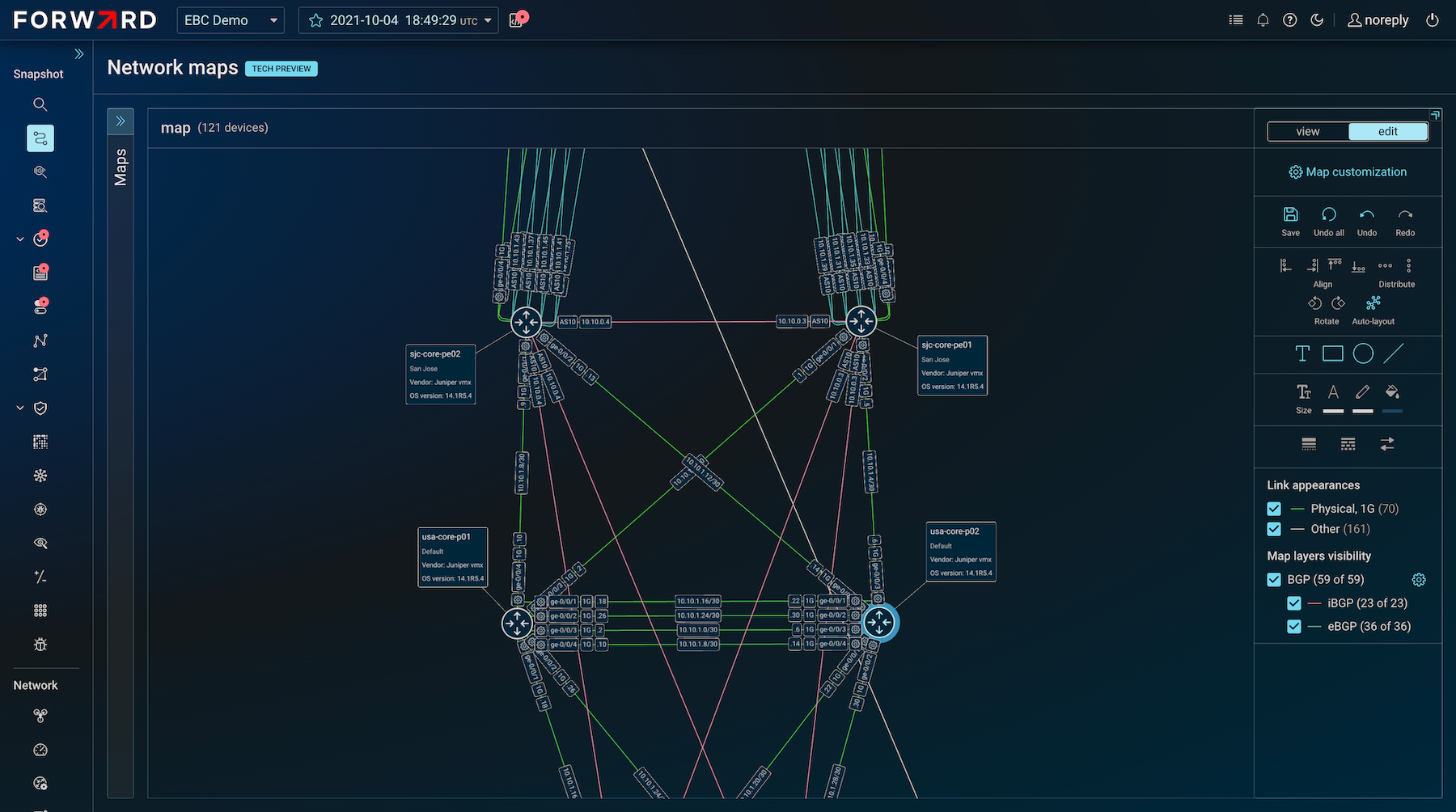
Network Maps can now show BGP peerings alongside physical links. BGP links on the map match the BGP view in Topology. Turn on Show BGP layer in the Map layer attributes tab when you create or customize a map. BGP links display the AS number and router ID by default, and you can turn either label off.
BGP links follow their own appearance rules. Built-in default rules style iBGP and eBGP links to match topology, and you can override them with your own BGP link appearance rules, in the same way you style physical links. The map legend lets you show or hide iBGP and eBGP links and filter BGP links by AS number. Device positions do not change when you toggle the BGP layer; for a BGP-focused layout, create or duplicate a separate map. Image exports include the BGP links that are visible on the map.
To learn more, see Network Maps.
NQE Analysis
- Location coordinates:
network.locationsnow includeslatitudeandlongitude. - BGP local address: BGP neighbors in
network.devices.networkInstances.protocols.bgp.neighborsnow includelocalAddress, the local IP address used for the peering. trimfunction: the newtrimbuilt-in function removes leading and trailing whitespace from a string, which helps when comparing values extracted from configuration or state files.- Built-in function documentation: several built-in NQE functions that had only minimal documentation now have full descriptions and examples.
Integrations
New published APIs
This release publishes several APIs that were previously unpublished, all labeled experimental:
- Device interfaces: list a device's interfaces or get the details of one interface.
- Device diffs: report each device added, removed, or modified between two snapshots, including which properties changed.
- Controller-managed setups: manage an SDN controller cluster, such as a Cisco APIC cluster or an SD-WAN orchestrator, together with the devices it manages.
The latestProcessed snapshot operation is deprecated for removal in 26.12; use List network Snapshots with a limit of
one processed snapshot instead. For details, including how the device interfaces response shape differs from the
unpublished version, see the API release notes.
Modeling
- VTY ACLs: ACLs that control traffic destined to the device itself (receive traffic), such as SSH access, are now modeled on Cisco NX-OS and IOS XR (including management-plane protection) and Arista EOS, in addition to Cisco IOS and IOS XE.
- Azure Route Server and GCP Cloud Router: Azure Route Server and GCP Cloud Router are now modeled and appear in the cloud inventory, joining AWS Route Server. They act as route reflectors in the cloud, which Predict needs to model cloud routing.