26.5.0 - May 20
Released: 2026-05-20
We're happy to announce the immediate release of Forward Enterprise version 26.5.0.
What's New 🚀
Forward AI
Forward AI General Availability
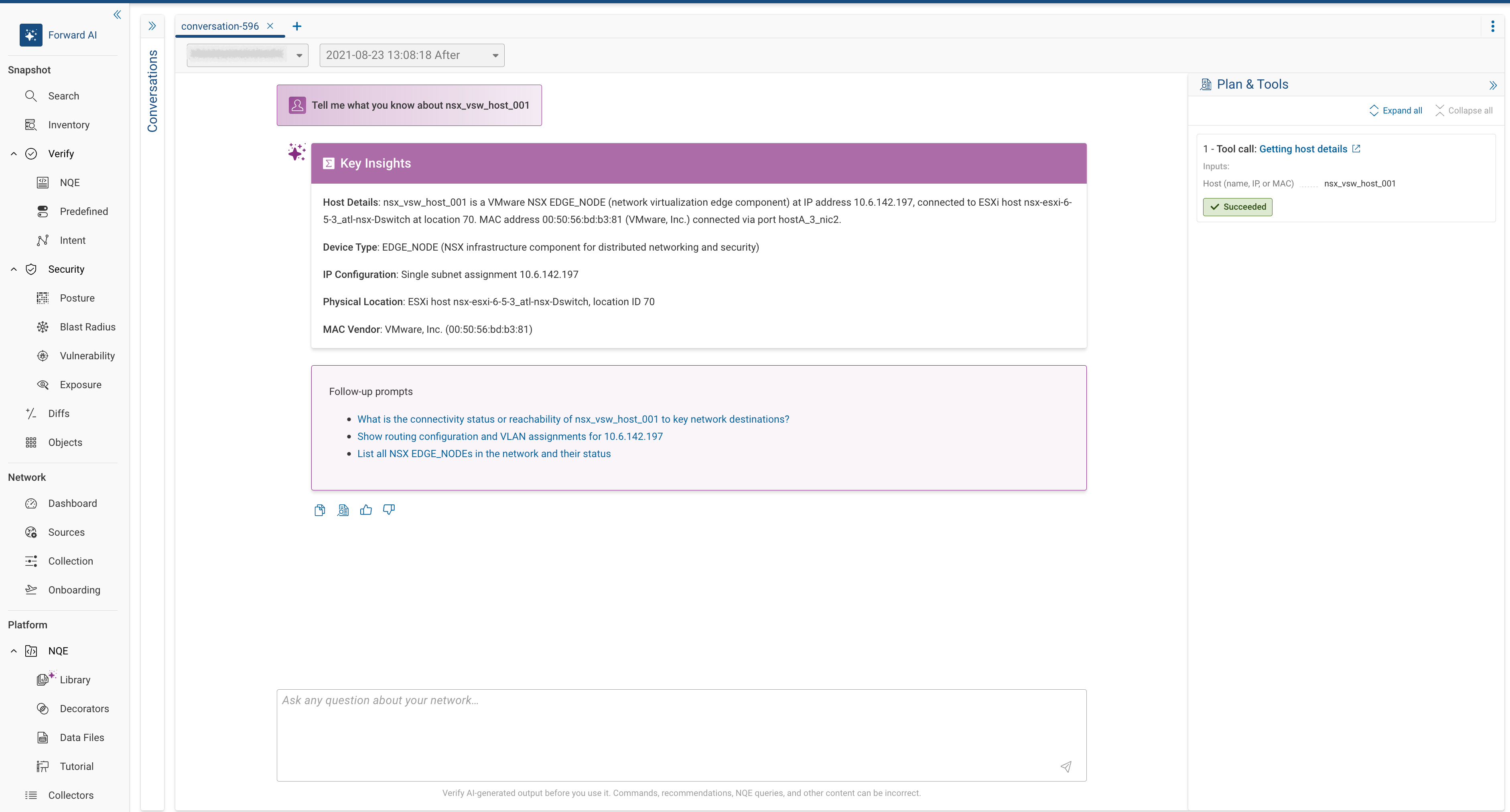
With this release Forward AI becomes generally available for SaaS deployments. Accessible from the top navigation bar, Forward AI is an intelligent, conversational, and agentic assistant built natively into the Forward Enterprise platform. Designed to act as a skill multiplier for network and security teams, it enables users to seamlessly interact with the platform using natural language.
- Read-Only Operation: To ensure network integrity, Forward AI operates strictly as a read-only system. It cannot execute or apply any modifications to the production network.
- Technology Architecture: To interpret user input and deliver accurate outcomes, the platform utilizes Anthropic models hosted within our AWS Bedrock infrastructure.
- Privacy & Security: Forward AI is hosted within our AWS Bedrock deployment and all the privacy and security practices we implement for our customers' data extend here as well. Customer data is handled with stringent privacy and security protocols. Neither customer prompts nor generated responses are ever retained or used to fine-tune the models. Additional data security details are available upon request.
- Control: Forward AI is an optional feature and can be disabled (opted-out) at any time by an Org Admin.
Forward AI capabilities include path search, NQE query generation, device vulnerability and CVE data, plus additional data sources such as device information, interface data, VLAN and VRF details, and subnet locations.
In this release, Forward AI also includes improved handling of out-of-scope questions. The system now clearly communicates when a request falls outside its current capabilities. A built-in feedback mechanism is available for users to report issues or provide input on their experience.
Topology
Network Maps
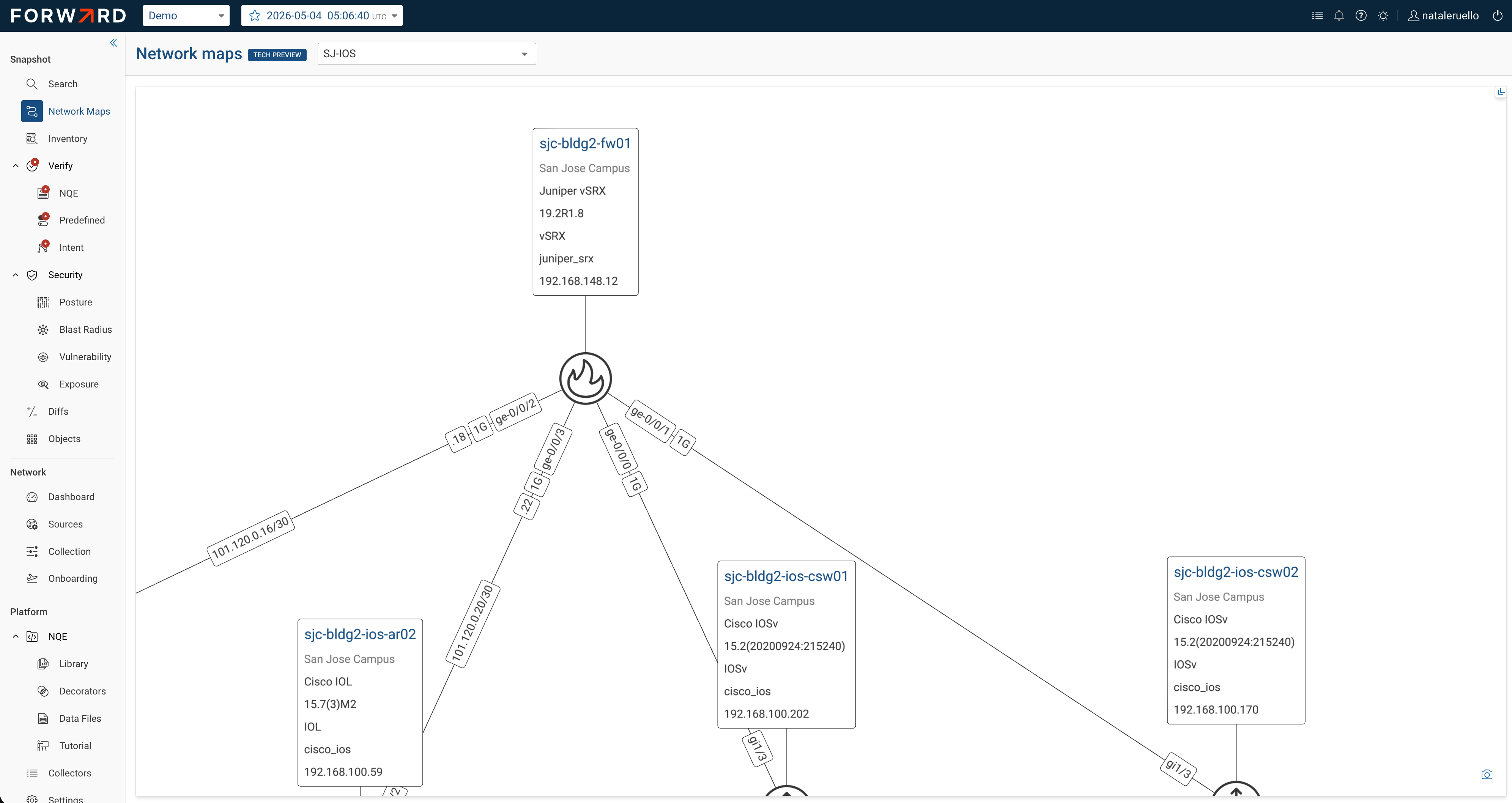
Network Maps is a brand-new feature that lets you create fully customizable topology diagrams spanning devices across any location in your network. Complementing the existing location-based topology views, where you can see devices within a single geographic location, Network Maps let you select any combination of devices across your entire network and arrange them on a single canvas — perfect for documenting services, management domains, or team responsibilities that cross location boundaries.
Creating a map is straightforward: name your map, search or filter for devices, and select the ones you want. The platform automatically discovers and displays all links between the selected devices. Each device card shows configurable attributes — vendor, OS version, collection IP, or any other device property — giving you the context you need at a glance.
Network Maps include the full suite of editing tools familiar from topology diagrams and more:
- Layout editing: Multi-select, drag, align, distribute, and rotate device nodes.
- Annotations: Highlight sections of your map with shapes, boxes, circles, and custom colors.
- Link appearance rules: Define conditional styling rules for links based on type, speed, or other attributes. Rules are prioritized and applied in order, with a legend showing match counts.
- Device management: Add or remove devices as your network evolves, and change displayed attributes at any time.
- Export to image: Export the current view as an image for use outside the platform.
All data shown in Network Maps updates automatically with each snapshot, so your maps always reflect the current state of the network.
Security & Compliance
Custom Vulnerability Analysis — Phase 2
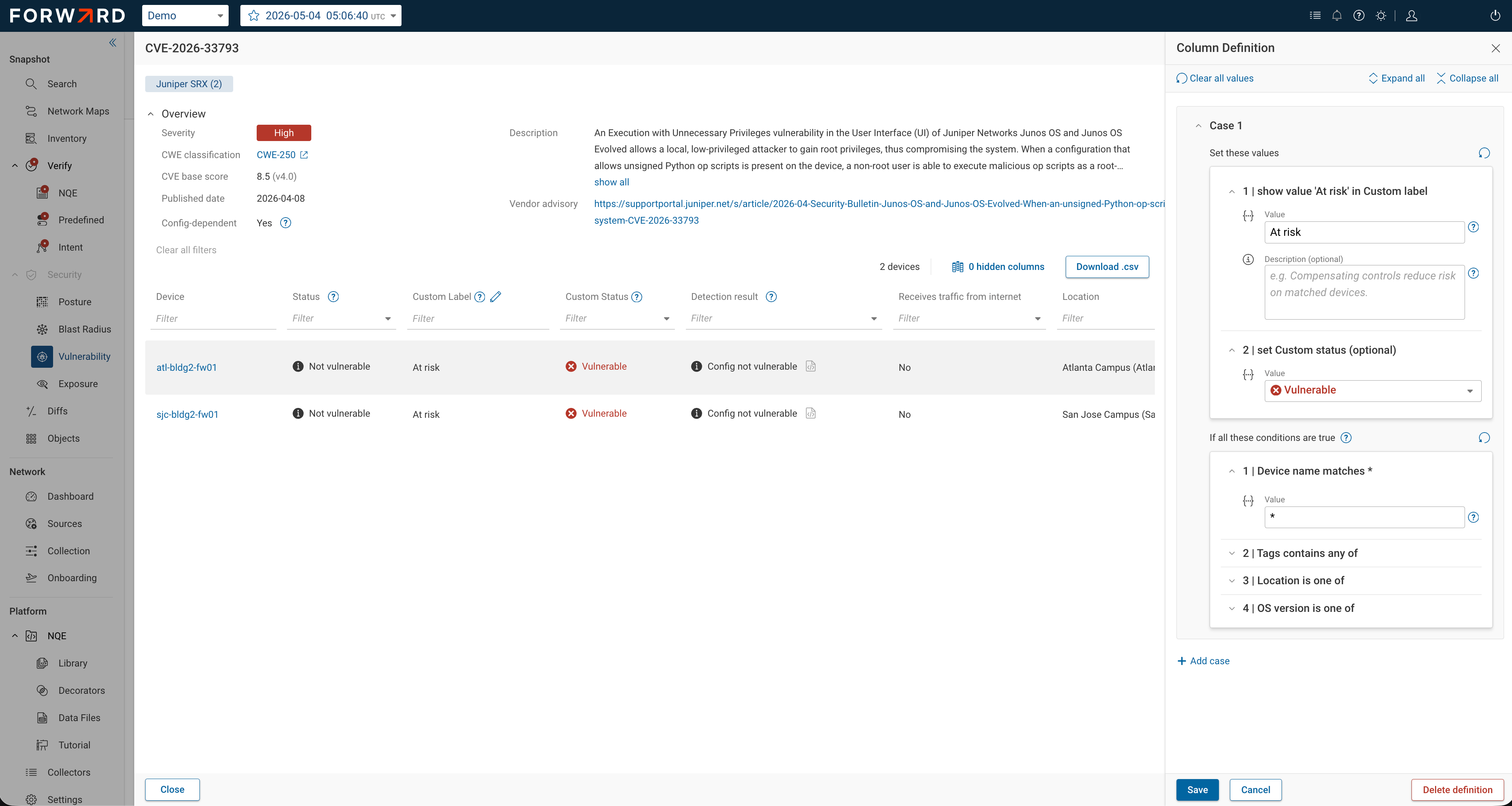
Building on the Phase 1 introduction of custom vulnerability statuses, Phase 2 makes the feature enabled by default and deeply integrates custom status data into vulnerability metrics and dashboards. Security teams can now override system detection results with their own assessment of whether a CVE truly affects their environment, and those overrides are reflected across the entire vulnerability analysis experience.
New in this release:
- Devices tab integration: Two new columns — CVE Count by Custom Labels and CVE Count by Custom Status — appear alongside the existing detection-based counts, giving device-level visibility into custom assessments.
- CVEs tab enhancements: A new Device Count by Status column reflects custom overrides. Dashboard KPI metrics (confirmed vulnerabilities, known exploits) now incorporate custom statuses, so overriding an "unconfirmed" CVE to "vulnerable" immediately updates the KPI totals.
- Updated metric filters: Clicking on KPI values now filters by the status column (which includes custom overrides) rather than the detection result column alone.
- UX improvements: The CVE overview panel is now collapsible for a broader table view, condition groups are renamed to "cases" for clarity, and condition headers dynamically reflect entered values for easier identification.
NQE Analysis
NQE Query Optimizer
NQE now includes a significantly enhanced query optimizer that automatically improves query performance without
requiring users to change their code. Previously, writing efficient NQE queries required careful attention to the
placement of where clauses and let definitions — putting filters in the wrong position could mean the difference
between a query completing in seconds and one that takes much longer.
The optimizer automatically restructures queries behind the scenes:
- Filter and let hoisting:
whereconditions andletdefinitions are moved as early as possible in the query, reducing the amount of data iterated over. - Improved lookup detection: The optimizer identifies more cases where iteration can be replaced with direct lookups, dramatically reducing execution time.
- Cross-function optimization: Optimizations now extend through declarations and function bodies.
- Unused variable removal: Variables that don't contribute to the result are automatically eliminated.
The platform offers a way for the users to inspect the optimizer's work and learn from it, by option-clicking the Execute button in the NQE editor, which renders the rewritten query. This is valuable both for understanding optimizations and for identifying cases where manual adjustments could yield further improvements. The original query is never modified — optimization happens transparently at execution time.
Additional NQE work
- NQE Data Model Updates: New data points include CWE (Common Weakness Enumeration) data in the CVE database, Cisco
SD-WAN
show sdwan omp routesoutput, andshow crypto mapon IOS/IOS-XE. - NQE History for Data Connectors: NQE History now supports queries that reference data connectors and automatically extracted schema data, removing a previous limitation.
- Forward Library 26.5: Updated library queries incorporating the latest data model additions and community contributions.
Dashboard
NOC Display Optimizations
Dashboards have been significantly enhanced for Network Operations Center (NOC) environments where large screens display the dashboards content. These improvements address customer requests for better readability, unattended operation, and presentation on very large wall-mounted displays.
Key enhancements include:
- Full-screen mode: Now available across all major dashboards (previously limited to the Insights dashboard).
- In-app zoom: A zoom control (25% to 200%+, depending on screen size) improves readability on large screens viewed from a distance. Both preset values and custom percentages are supported.
- Auto-scroll: Two viewing modes for unattended operation — page-by-page scrolling (with configurable interval) and smooth continuous scrolling. The page-by-page mode intelligently handles horizontally scrollable panels and ensures no dashboard panel is cut off between page transitions.
- Per-dashboard settings: Scroll behavior and zoom settings are saved independently for each dashboard.
Network Setup
Cisco ACI Device Setup Wizard
A new guided wizard streamlines onboarding of Cisco ACI fabric environments. Previously, adding an ACI fabric required manually creating individual source entries for every leaf, spine, and controller — a process that at times resulted in collection failures when controllers were missing or misconfigured.
A Manage Setup drawer lets you refresh the fabric state at any time — if devices are added or removed from the physical fabric, one click re-discovers and updates the setup. You can also edit device properties, associate or disassociate NDOs, and include or exclude individual devices.
For existing customers, a guided migration path detects ACI devices currently configured as classic sources and walks through converting them to the new setup model. Migration preserves existing device configurations while discovering any new devices that weren't previously configured.
Collection & Platform Updates
Collector Settings at Org Level
Jump server concurrency settings have been moved from the network level to individual jump servers, allowing fine-grained tuning per server. The settings are renamed to Max Startups and Max Sessions to align with standard SSH terminology. Existing settings are transparently migrated from the network to each jump server.
Modeling
- F5OS-C (VELOS) Chassis Support: Extended F5OS hypervisor support to VELOS chassis systems, where redundant controllers manage blades organized into partitions. Each partition runs its own F5OS instance managing Big-IP tenants. Onboarding requires adding each partition as a collection source (not the system controller). Blade inventory is visible in NQE under each partition.
- Domain-Less NAT64 on Cisco IOS-XE: Added support for modeling NAT64 translations on Cisco IOS-XE devices in domain-less configurations, enabling accurate path analysis through NAT64 boundaries.