26.6.0 - Jun 16
Released: 2026-06-16
We're happy to announce the immediate release of Forward Enterprise version 26.6.0.
What's New 🚀
Path Analysis
On-Demand Advanced Reachability Analysis
This release delivers the largest redesign of reachability analysis in the last five years, with a singular goal: dramatically accelerate snapshot processing and time to value. On large networks, reachability analysis has historically accounted for anywhere from 40% to 90% of total snapshot processing time. By deferring the most expensive computation, this redesign eliminates a significant chunk of that time while still supporting every reachability use case customers rely on today.
The key insight is that path analysis queries fall into two classes:
- Grounded path queries — those that contain the traffic ingress point (an interface, device, host, IP location, or security zone). They account for over 90% of all queries issued, whether through the UI, the Published Paths API, or internally issued by Forward Enterprise to support features such as the security apps. These now execute against a new, lightweight search backend that is computed with very little overhead.
- Ungrounded path queries — broad searches such as "from anywhere," through-queries, or plain forwarding-status checks — switch to an on-demand advanced reachability computation that most customers will rarely, if ever, need to trigger.
When a user issues an ungrounded query, the platform now suggests narrowing the source location for a faster evaluation, or offers to run advanced reachability analysis on demand. The computation runs in the background — users retain full access to the snapshot and can continue running grounded queries while it completes. The same on-demand model applies to intent verifications, the Vulnerability app's internet-exposure detection, and the Exposure app.
- No workflow disruption: Grounded searches, path search, and intent checks behave exactly as before and are evaluated immediately.
- Published Paths API unaffected: It was intentionally designed around grounded queries and requires no advanced computation.
- Opt-in proactive mode: An org setting at
Settings > System > Org Preferences > Advanced Reachability Analysiscan run advanced reachability asynchronously at the end of every snapshot, matching prior behavior. It is disabled by default, so deployments will see faster processing out of the box. A published API is available to trigger the computation from automation pipelines.
Network Setup
Guided Onboarding
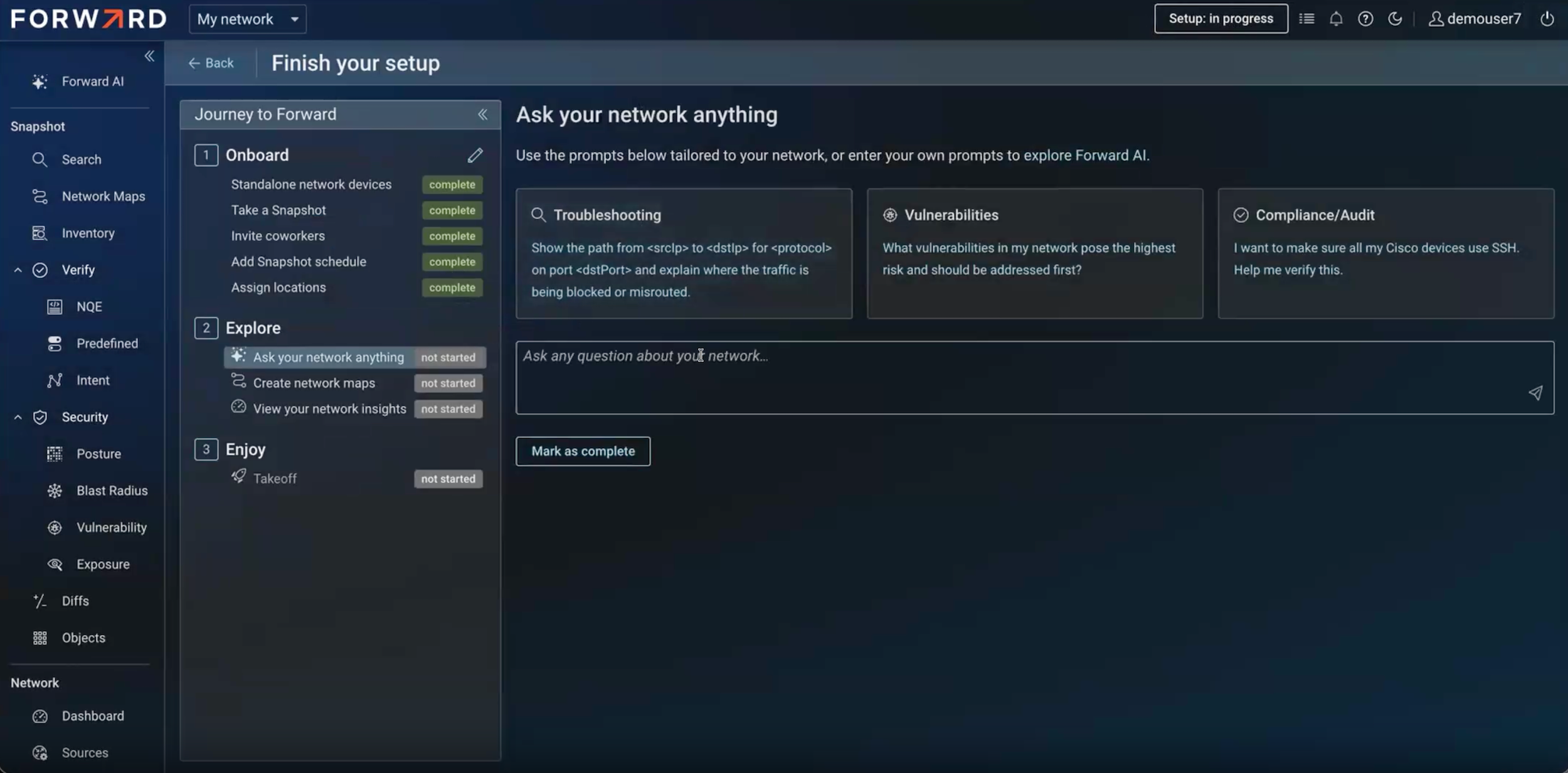
This release introduces a brand-new guided onboarding flow for new deployments. The new onboarding experience guides users through setup step by step. Highlights include:
- Auto-created network and guided collector setup: The first network is created automatically, and a guided widget walks the user through installing a local collector and waiting for it to come online.
- Device onboarding for all source types: A simplified wizard guides the user to onboard the different device types present in the network: Standalone devices, virtualized environments, and cloud infrastructure, using subnet scan, CSV import, or manual entry — with full error handling and clear messaging.
- Resumable and shared: Progress is saved, so users return to exactly where they left off, and onboarding can be shared across all org admins so co-workers can complete remaining steps.
- Explore tasks: After core setup, a second set of guided tasks introduces Forward AI (SaaS only customers), Network Maps, and Network Insights, with a congratulatory completion experience.
- Editable at any time: An edit drawer lets users add or remove device sources, take a snapshot, set a snapshot schedule, invite coworkers, and assign locations directly from the flow.
Topology
Automatic L3 Linking and Missing Connections
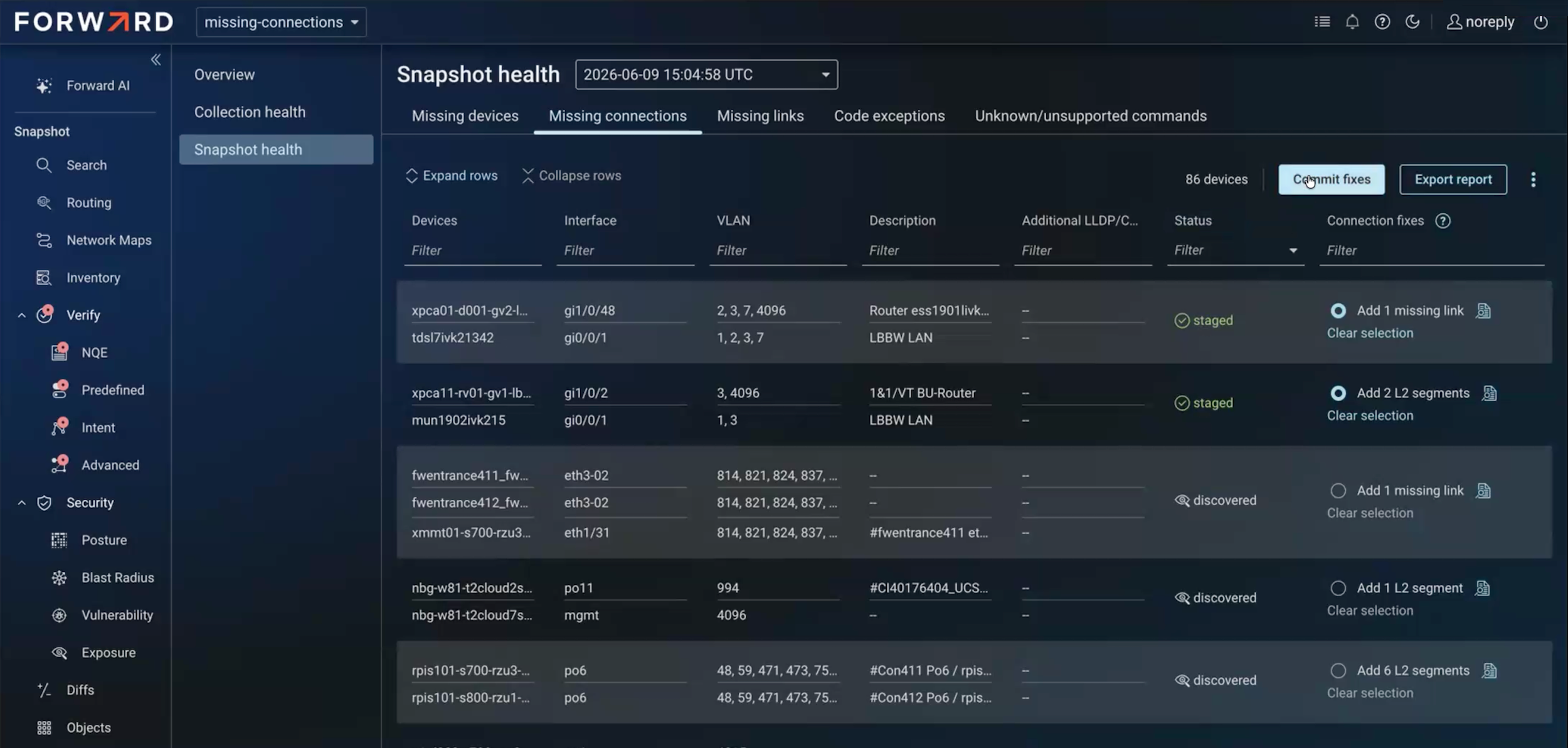
In some networks, L2 devices cannot be collected, leaving gaps in topology that reduce the accuracy of path search and other features. Previously, customers closed these gaps by manually adding links or synthetic devices. Forward Enterprise already infers links and L2 segments from strong MAC and ARP overlap between interfaces — this feature surfaces that information directly in the UI so users can easily explore and apply the recommendations.
A new Missing Connections tab under Snapshot Health proposes up to three kinds of fixes:
- Missing device: Derived from LLDP/CDP neighbor data when a reported neighbor is absent from the snapshot.
- Missing link: An inferred link between two interfaces.
- Missing L2 segment: When no link applies, an inferred L2 segment connecting two L3 interfaces.
Proposed fixes are staged on the client until the user reviews and commits them; committing adds a classic device, a link override, or an L2 segment, which is applied on the next snapshot. Navigating away discards uncommitted changes. Missing devices can also be bulk-added to the sources page, and the list of missing connections is available over the API.
Network Maps Enhancements
Building on the Network Maps feature introduced in 26.5, this release brings performance and editing improvements:
- Performance: Resolved high memory usage for noticeably more efficient and performant maps.
- Area selection: In addition to shift-click multi-select, you can now shift-drag to select an area, capturing both devices and annotations, and reposition the selection together.
- Repositionable device info cards: Drag a device's info card independently of its node; the relative position is preserved as you move the node, producing cleaner, more readable maps.
Security & Compliance
- Vulnerabilities: Added CVE detection for Cisco C91xx Access Points (IOS-XE), covering both OS-level and configuration-dependent vulnerabilities.
- End-of-Life: Extended hardware EoL data to Juniper and Arista devices, so teams can identify aging hardware approaching or past end of life.
- STIG Y26Q2 Update: STIG content is updated to DISA's Q2 release, incorporating roughly 67 rule updates (largely version bumps, all Cisco-related).
- Audit Log Enhancements: Audit logs can now be downloaded for ranges shorter than 30 days (down to a single day), a direct response to customer requests. A new audit log entry is also recorded for full and partial snapshot downloads.
Collection Updates
- Collector Settings at the Org Level: Collection settings previously configured per network — rate limits, trusted certificates, and various advanced settings — now apply across the org and are managed by org admins. The concurrency settings may now be configured per collector. The default collection concurrency which was 32 at the network level is now changed to 128 at the collector level. Sensitive data reduction patterns and the default redaction algorithm are also controlled at the org level, with per-network overrides requiring org-admin authorization. APIs are available to preview migrated settings before and after the change.
- SSH Key-Based Device Authentication: Device connections can now authenticate using SSH keys or SSH certificates instead of a password, extending the key-based authentication previously available for jump servers.
- Privilege-Level Escalation on More Vendors: The privilege level on privilege-mode credentials, introduced for
Checkpoint TACACS escalation, now extends to Arista, Cisco, Dell, and HP devices via the
enable/supercommands. When omitted, the device default (typically the highest level) is used; when specified, it is honored.
NQE Analysis
Asynchronous Query-Execution API
A new set of NQE query-execution endpoints addresses long-running queries that previously failed when client or proxy connection timeouts dropped the TCP connection before results returned. The new API splits execution into three endpoints that each respond immediately:
- Trigger execution (returns an execution key),
- Check status (reports executing/completed, elapsed time, rows produced, and timeout), and
- Fetch results (with
limit/offsetpagination).
Results can be fetched all at once, and for very large result sets the API supports a streaming JSON Lines (newline- delimited JSON) response, letting clients process records line by line without loading everything into memory. The existing synchronous endpoint remains available and is still convenient for quick-running queries.
Modeling
Zscaler Private Access (ZPA) Support
Forward Enterprise now models Zscaler Private Access, our first SaaS-based security service integration. Zscaler's zero-trust model restricts remote users to specific applications rather than granting broad network access, and ZPA is the most relevant component for understanding how corporate applications are reached. Modeling it brings that application-access behavior into the same path analysis experience customers use for the rest of their network.
The Zscaler cloud is modeled as a single device (not tied to a geographic location, since it is a globally distributed set of service edges), and each Zscaler App Connector is modeled as its own device near the private applications it serves. A new SaaS setup type collects ZPA over its API: provide the controller URL and credentials, configure the identity providers in use (such as Okta or Microsoft), and select the App Connectors of interest. App Connectors can be collected over SSH for richer detail, or added manually for basic modeling.
Path search reflects Zscaler's policy evaluation end to end — determining which App Connector can serve a request, applying access policies (including implicit deny), and honoring client-forwarding policies that bypass the Zscaler cloud entirely. Purpose-built network cards walk through each decision step, and a new domain filter aligns path search with Zscaler's domain-based policy rules.
Additional Modeling
- Cisco Nexus Enhanced Policy-Based Routing: Added support for Nexus enhanced PBR, a high-level declarative syntax for steering traffic through a chain of appliances (firewalls, load balancers).
- GCP Network Service Integration (Geneve): Added support for GCP's equivalent of an AWS Gateway Load Balancer, where traffic is redirected to virtual firewalls over a Geneve tunnel via global firewall policies.
Advance Notice
To protect the SaaS deployment from runaway automations and client-side bugs, Forward Enterprise is introducing API rate
limiting on SaaS. Requests are limited per user account; when the limit is exceeded, calls receive a standard
429 Too Many Requests response and the account is throttled for one minute before resuming.
Rate limiting is being rolled out in a phased manner over the coming releases, reaching the target of 2,000 requests per minute per user account by 26.9. This gives customers ample time to review and optimize automations — for example, by batching calls where appropriate. The limit is intended to protect shared SaaS capacity and is not an SLA on throughput. On-premises deployments are unaffected for now.