26.7.0 - Jul 21
Released: 2026-07-21
We're happy to announce the immediate release of Forward Enterprise version 26.7.0.
What's New 🚀
Network Setup
Guided SD-WAN Device Setups
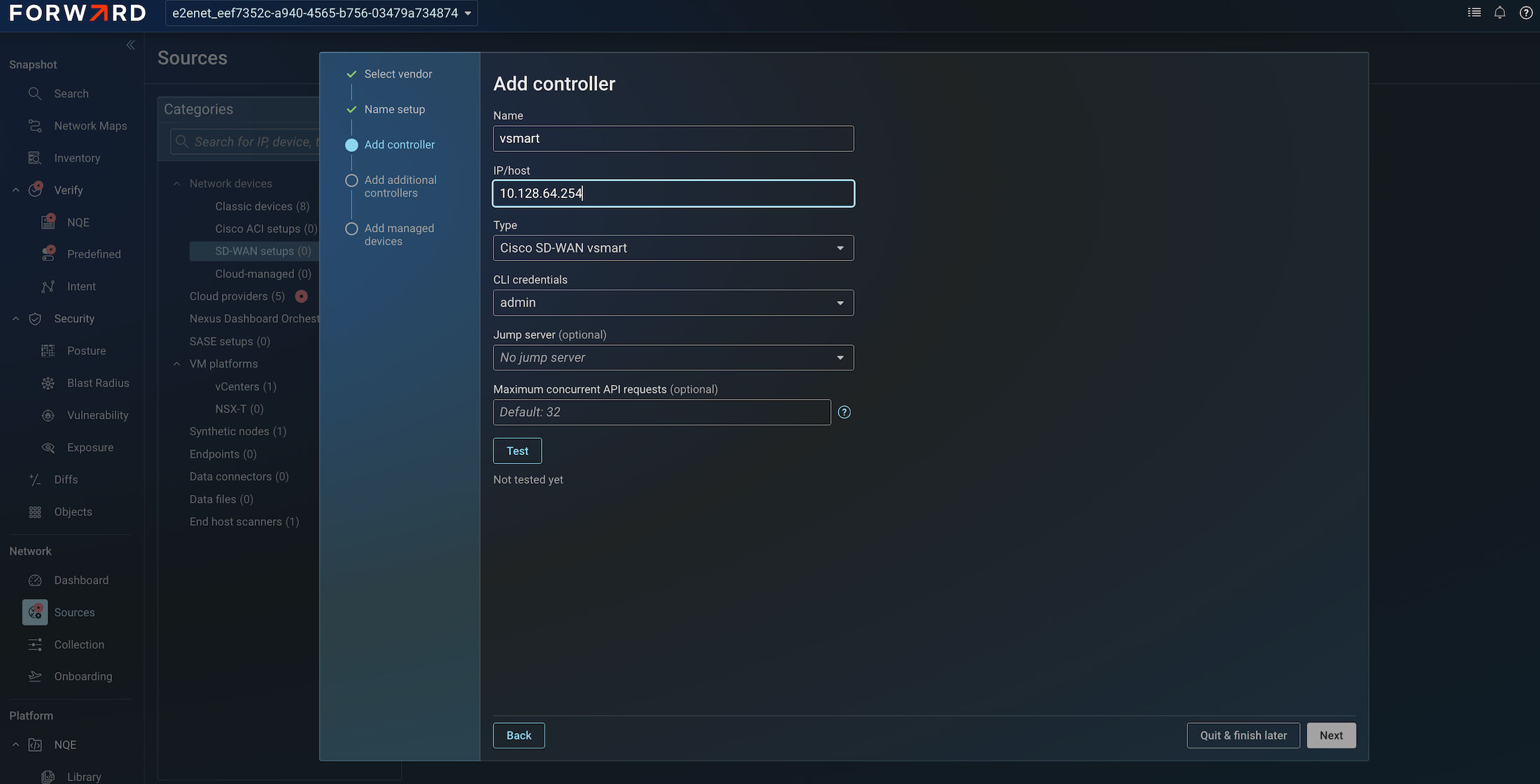
Building on the guided ACI setups introduced in 26.5, this release extends the same controller-driven onboarding experience to SD-WAN fabrics. Previously, SD-WAN devices were onboarded as classic devices, each controller and every edge device had to be added individually. On a large fabric of a few hundred devices, that meant hundreds of separate entries, a suboptimal process with no hierarchy clearly showing which controller manages which devices.
With the new SD-WAN setups wizard, you add only the controller, and Forward Enterprise automatically discovers its edge devices. Select the devices to include with a checkbox and they are all added in a single step, with the controller / managed-device hierarchy clearly reflected in the Sources page. The five-step guided workflow: vendor selection, setup name, controller, connectivity test, and managed-device selection. The new wizard supports Cisco, Versa, Silver Peak, and Palo Alto Prisma SD-WAN.
Existing classic SD-WAN devices can be migrated into the new experience through a guided migration wizard, and a Manage Setup action lets you refresh a setup later to discover and add devices that joined the fabric after initial onboarding.
Topology
Network Maps: Per-Device and Per-Interface Info Cards
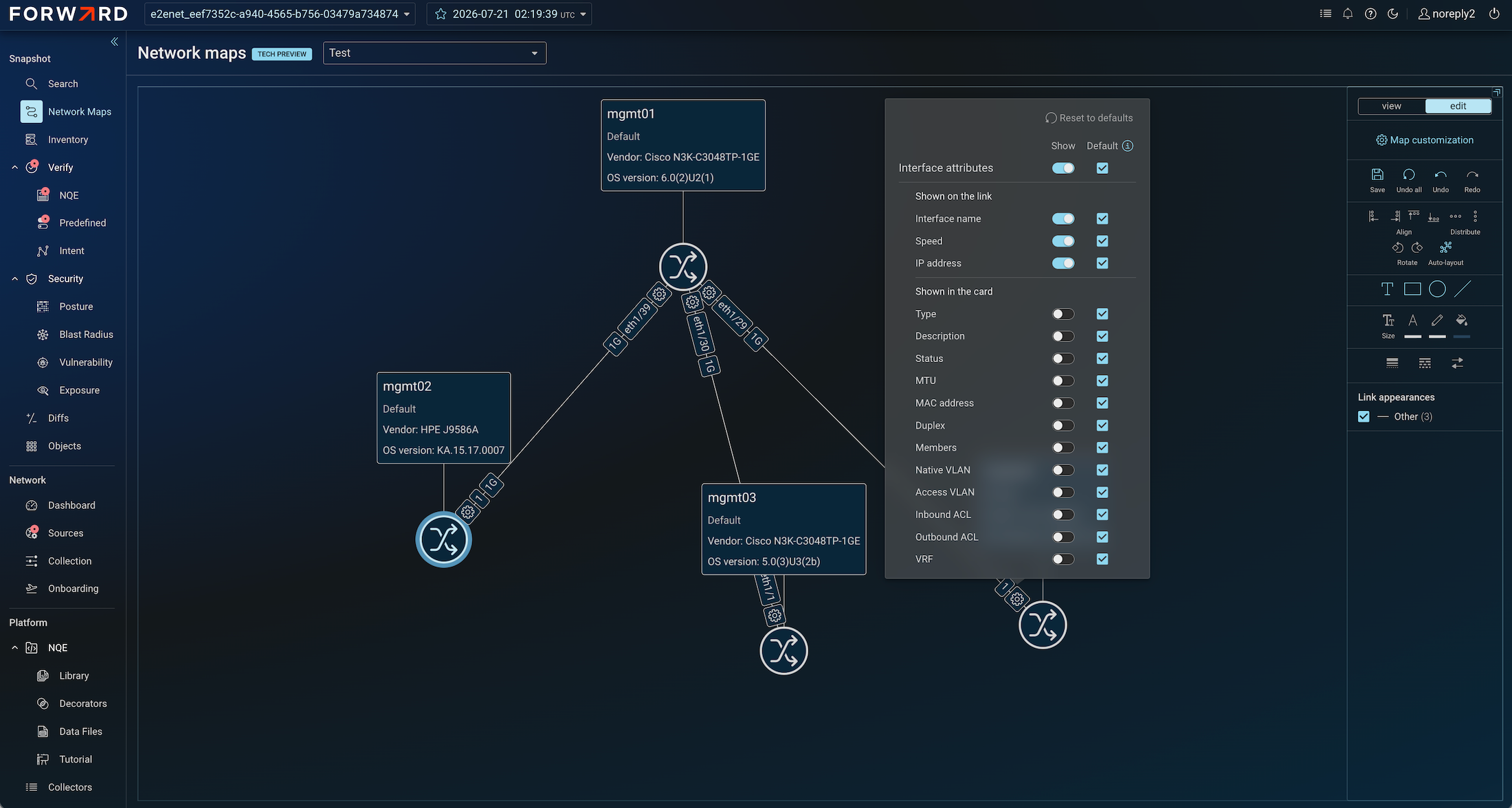
Continuing the quarterly investment in Network Maps, this release adds fine-grained control over the information shown on the map. In addition to the map-level device attribute settings introduced previously, you can now override which attributes appear on a per-device basis, turn individual attributes on or off for a single device, or reset it back to the map default at any time.
The same customization now extends to interfaces. Interface attributes such as name, speed, IP address, type, and status can be shown on the link itself or in an info card anchored to the end of the link, configurable at the map level and overridable per interface. Interface info cards can be repositioned and stay attached to their link as the topology is rearranged.
Integrations
ServiceNow CMDB Preview & Push
The ServiceNow CMDB integration now offers full visibility into the data being synchronized before it is pushed. Previously there was no way to see what data would be sent to ServiceNow. A new Preview & Push experience shows, per network, the exact records that would be pushed to each configured CMDB table based on the most recent snapshot and its mapped queries.
From the same view you can trigger an on-demand push with Push Now, or export the previewed data with Download as CSV — a zip archive containing a CSV per table for each network, matching exactly what is shown in the UI. Networks without a processed snapshot are clearly flagged as having no data available to preview.
Platform
Configurable Privilege Escalation for Workspace Creation
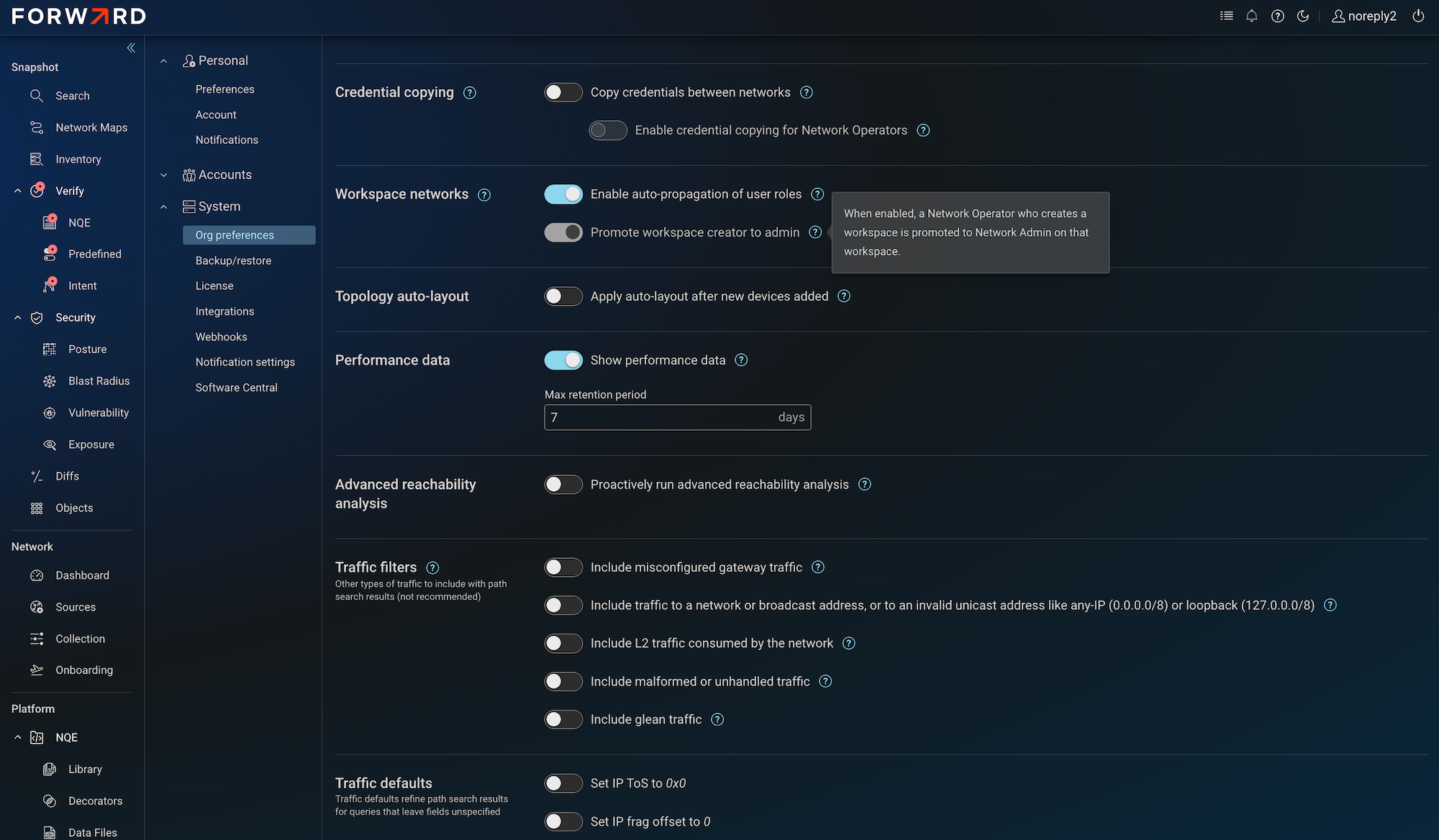
The workspace operator role, introduced in a prior release, elevated a network operator to workspace operator (rather than network admin) when they created a workspace, closing a security gap around delegated administration. Some customers, however, expected workspace creators to retain full network-admin privileges.
A new permanent org property, Promote workspace creators to admin, is now available under Org Preferences to control this behavior explicitly. When enabled, after acknowledging a security warning, workspace creators are elevated to network admin in the workspace. The property is disabled by default for security. A migration preserves existing behavior: orgs that had previously kept the elevation active have the property set to true automatically.
Modeling
- Cisco Nexus 9000 Enhanced PBR (IPv6): ePBR support on the Nexus 9000 series is now complete with IPv6, extending the IPv4 support delivered previously.
- Fortinet Gateway Load Balancer Backend (AWS & GCP): Extending the existing PAN-OS Gateway Load Balancer modeling, Forward Enterprise now models Fortinet as the backend of an AWS Gateway Load Balancer, and the equivalent construct in GCP, where traffic is redirected to virtual firewalls over a Geneve tunnel. PAN-OS and Fortinet are now both supported as GWLB backends on AWS and GCP.
- AWS VPC Route Server: AWS VPC Route Server, a cloud-hosted route reflector that distributes routes between BGP speakers without sitting on the data plane, is now modeled as a cloud object (it never appears on the path). Support for route servers on additional cloud platforms is planned for an upcoming release.
- Device Card Summary: The device card and search now include a summary section at the top surfacing basic device properties such as vendor, model, OS version, and management IPs.
Advance Notice
The API rate limiting announced in 26.6 is now enabled on SaaS. In this release the limit is set to a generous 4,000 requests per minute per user account, with a one-minute throttle window when the limit is exceeded. In line with the previously communicated rollout, the limit will step down to 3,000 and eventually to 2,000 requests per minute in future releases, giving customers time to review and optimize automations. On-premises deployments are unaffected.